AI Email Writer
Let GPT write email for you. Eliminate stress and craft professional email in seconds.
The fastest way to generate email with AI
AI Email Writer by Mailmeteor makes it easy to generate fine-tuned emails, thanks to GPT models. Using a large language model (LLM), it will generate email content based on the context and intent expressed in your instructions.
Other tools
AI Email Response
Reply faster and better to your emails, thanks to our ai email response →
Email Subject Line Generator
Team up with our AI models to generate email subject line for free →
Do more than write emails.
Your inbox, now with an assistant
Get back one hour every day with an inbox that organizes itself,
and writes in your tone. All inside your Gmail.
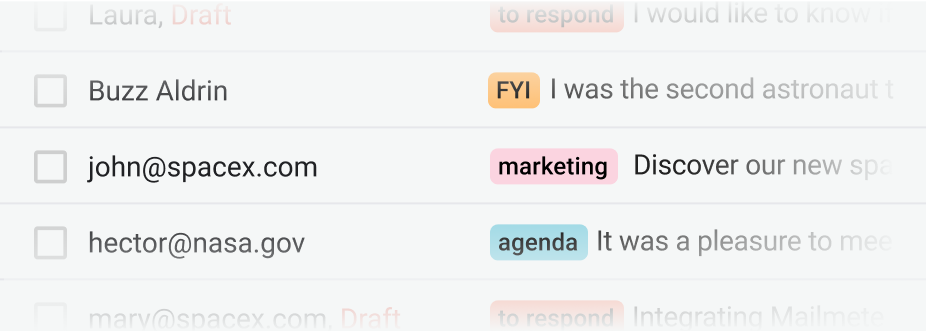
Your emails, smartly organized.
When you open your inbox, every message is already sorted and prioritized. So you can focus only on what truly matters.
Get started →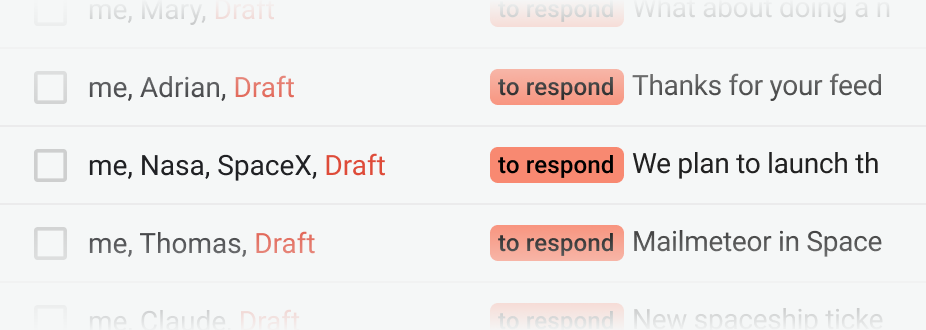
Ready to hit send.
When you check your inbox, every email requiring a response will have a reply pre-drafted in your tone, ready for you to send.
Get started →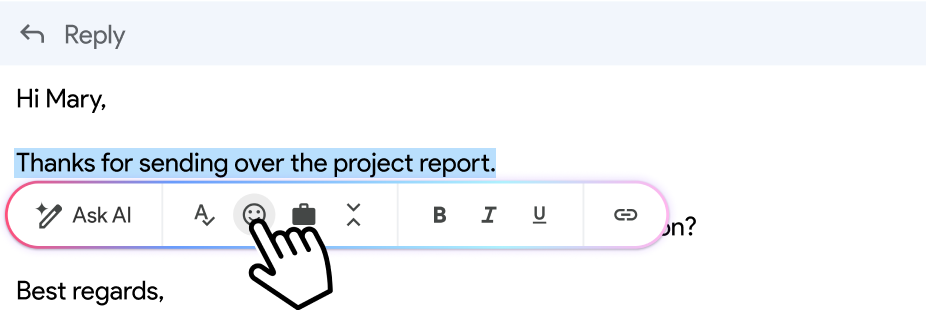
Write smarter. Not longer.
Highlight any text and let AI polish, shorten, or expand it in seconds. Your words, only better.
Get started →Connect your inbox in 1-click.
How it works
Learn how to compose professional emails using AI with our 2-min video tutorial.
Trusted by 6 million professionals
Questions & answers about AI Email Writer
Everything you need to know about generating email with AI.
How does AI Email Writer work?
AI Email Writer uses leading large language models (LLMs) to generate an email from a short prompt. You describe the context, intent, and tone (formal, friendly, concise) and the tool returns a ready-to-send draft you can edit, copy, or paste into Gmail or Outlook.
What kinds of emails can I write with it?
AI Email Writer handles most business and personal use cases, including:
- Cold outreach and sales emails
- Follow-ups and meeting requests
- Customer support replies
- Internal announcements and team updates
- Networking, introductions, and thank-you notes
- Job applications and recruiter outreach
For any of these, you can ask for a specific tone (e.g., “polite but direct”) or length (e.g., “under 80 words”).
Can I set the tone, length, or language?
Yes. Add tone, length, or language directly in your prompt — for example, “Write a 3-sentence friendly follow-up in Spanish” or “Rewrite this reply to sound more professional”. AI Email Writer supports English, Spanish, French, German, and most major languages.
Is AI Email Writer free?
Yes, AI Email Writer is 100% free. No sign-up, credit card, or usage quota. If you send high-volume campaigns, you can also use the AI Email Assistant inside Gmail for drafting, sorting, and replying directly in your inbox.
How is this different from using a general AI chatbot?
General AI chatbots (ChatGPT, Claude, Gemini) are built for open-ended conversation. AI Email Writer is purpose-built for email — it’s pre-tuned for subject lines, greetings, sign-offs, and common business scenarios, so you get a clean, email-ready output without extra prompting.
How accurate is the AI-generated content?
Results are usually ready to send with minor edits, but AI can still miss specific facts, names, or context. Always proofread before sending — especially for figures, dates, or anything the model couldn’t know about your business.
Should I use AI Email Writer for sensitive emails?
No. Avoid using AI for legal, medical, financial, HR, or confidential communications where nuance, legal liability, or privacy matter. Use it as a starting point for drafting tone and structure, not as a substitute for professional judgment.
Does AI Email Writer work on mobile?
Yes. The web tool works in any modern mobile browser (iOS Safari, Chrome on Android). For an inbox-native experience, install the AI Email Assistant to draft and rewrite emails directly inside Gmail.
Will the emails it writes land in spam?
AI-written emails are not flagged by spam filters by default — what matters is your sender reputation, authentication (SPF, DKIM, DMARC), and content. Run your draft through our free Spam Checker to catch trigger words before hitting send.
Can I use AI-written emails for mass outreach?
Yes, but personalize before sending. Paste the generated draft into Mailmeteor to merge it with variables (first name, company, custom fields) so every recipient gets a message that feels written just for them — without reducing deliverability.
Is my data private?
Your data stays yours. Prompts are sent securely to our AI provider to generate the response, are not used to train any model, and are not stored beyond the short abuse-prevention window required by the provider. Mailmeteor does not log or share your drafts.