Most AI tools can write emails for you — but they rarely sound like you. The tone comes out too stiff, too generic, or just slightly uncanny. And no matter how many times you rewrite the prompt, something still feels off.
That’s because AI doesn’t magically know your writing style. You have to teach it. In this guide, you’ll learn how to make AI write in your voice and generate messages that feel natural, consistent, and unmistakably yours.
We’ll show you how to train AI using your own email history, how to define your tone with a custom prompt, and give you 15+ ready-to-use style prompts you can plug into any AI tool to remove that “robotic” feel.
Here’s what we’ll cover:
- Why AI Often Doesn’t Sound Like You
- How to Make AI Write Emails in Your Style
- 15+ Prompts to Make AI Write in Your Style
- How to Create Your Own AI Writing Style Prompt
Sounds good? Then let’s dive in.
Why AI Often Doesn’t Sound Like You
Artificial Intelligence is great at producing text, but it’s not naturally great at sounding like you. That’s because Large Language Models (LLM) default to a neutral, risk-free voice — designed to fit every context. The result? Texts and emails that feel flat, interchangeable, and slightly robotic.
There are 3 main reasons this happens:
-
AI doesn’t know your tone: Unless you tell it, AI has no sense of how warm, concise, direct, or expressive you are. So it uses a “safe” middle-of-the-road voice by default.
-
Prompts are often too vague: Instructions like “make it friendly” or “sound professional” are open to interpretation — and AI tends to choose the blandest possible version.
-
It can’t guess your personal quirks: Your natural writing includes small things like sentence rhythm, preferred phrasing, how much context you give, how direct you are, etc. AI won’t replicate those unless you explicitly teach them.
That’s why even well-written AI emails can feel “off.” Without clear structure and style cues, the output sounds generic — like anyone, but not like you. The good news? Fixing this is simpler than you’d expect.
How to Make AI Write Emails in Your Style
Most people try to “fix” AI tone by rewriting the prompt over and over — but that only changes the output on the surface. To make AI genuinely sound like you, you need to teach it your patterns: the tone you use, how you structure your emails, and the small quirks that make your writing recognizable.
Train AI Using Your Email History
The fastest way to make AI sound like you is to feed it examples of your real writing. Your email history already contains everything the model needs, like your tone, pacing, preferred sentence length, or the way you open and close messages.
You don’t need dozens of samples — 5 to 10 emails are enough for AI to detect consistent patterns. Simply paste them into your AI tool, and ask the model to summarize your writing style.
For even better results, you can ask Mailmeteor’s AI email assistant to analyze your entire email history (privately and securely) and use it as a personalized tone model, so every future email sounds exactly like you.
Here’s how to do it:
- Install the Mailmeteor for Gmail add-on (it’s free!)
- In Gmail, go to Settings > See all settings.
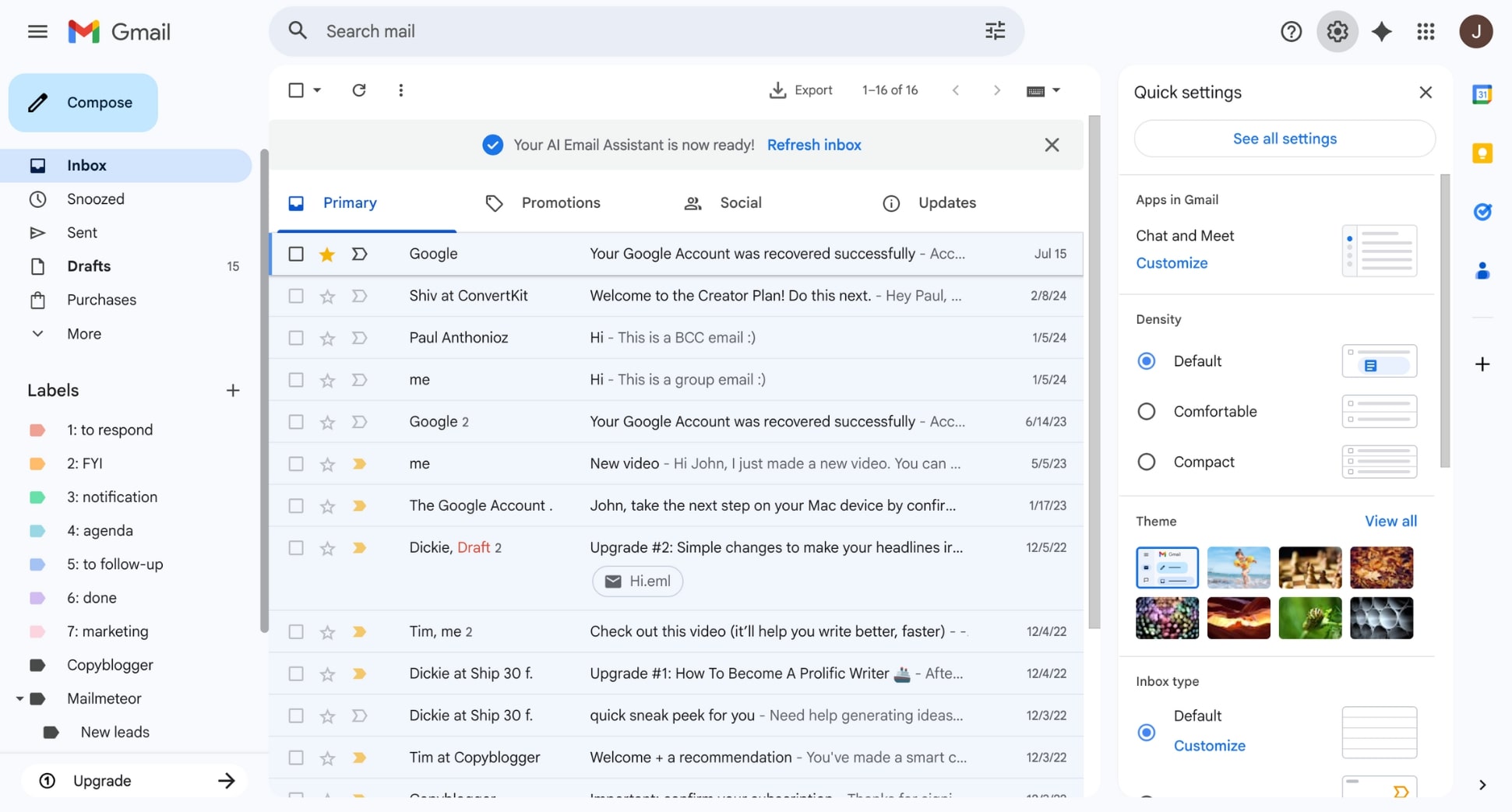
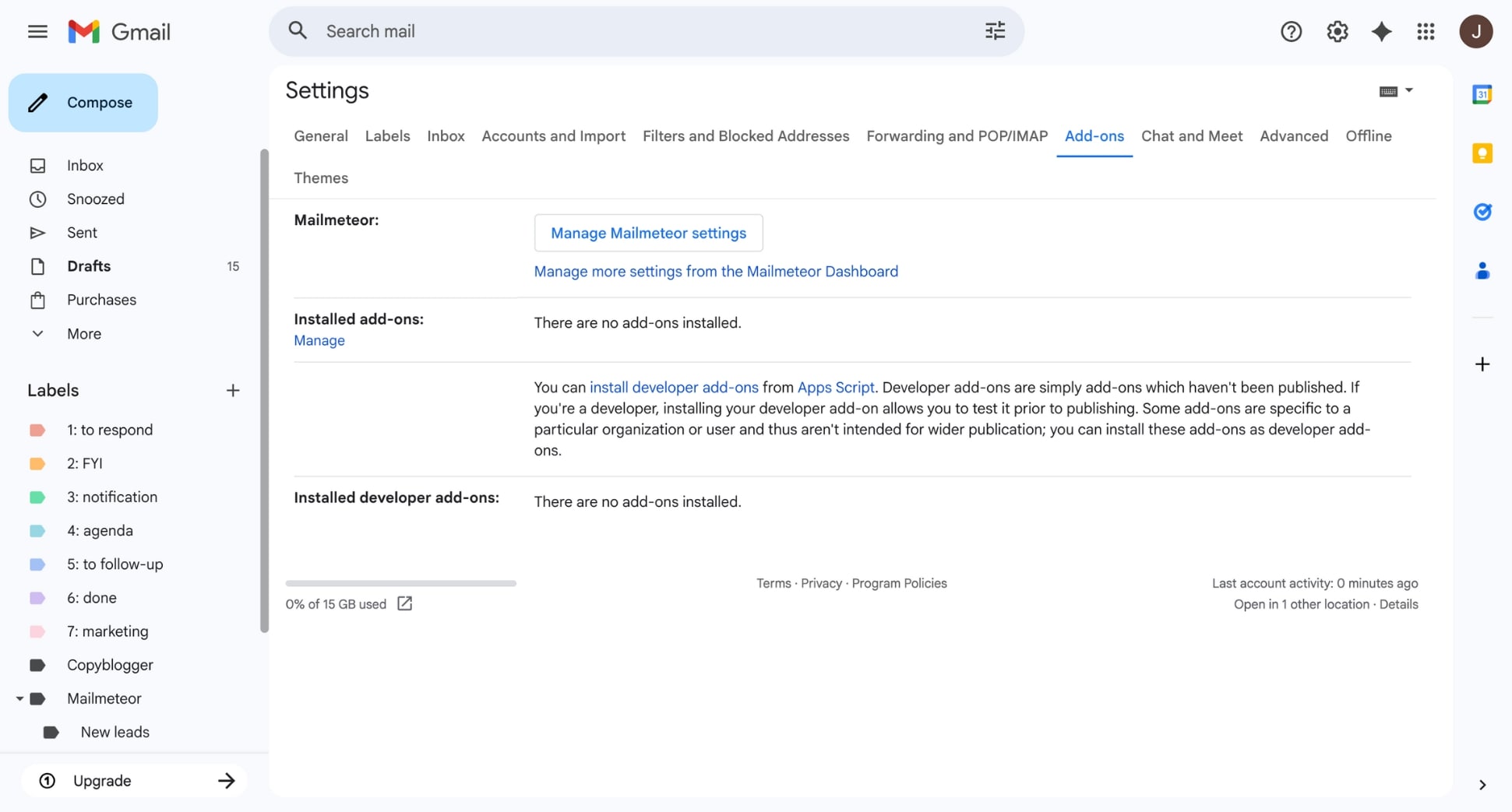
- Navigate to the Add-ons tab and click Manage Mailmeteor settings.
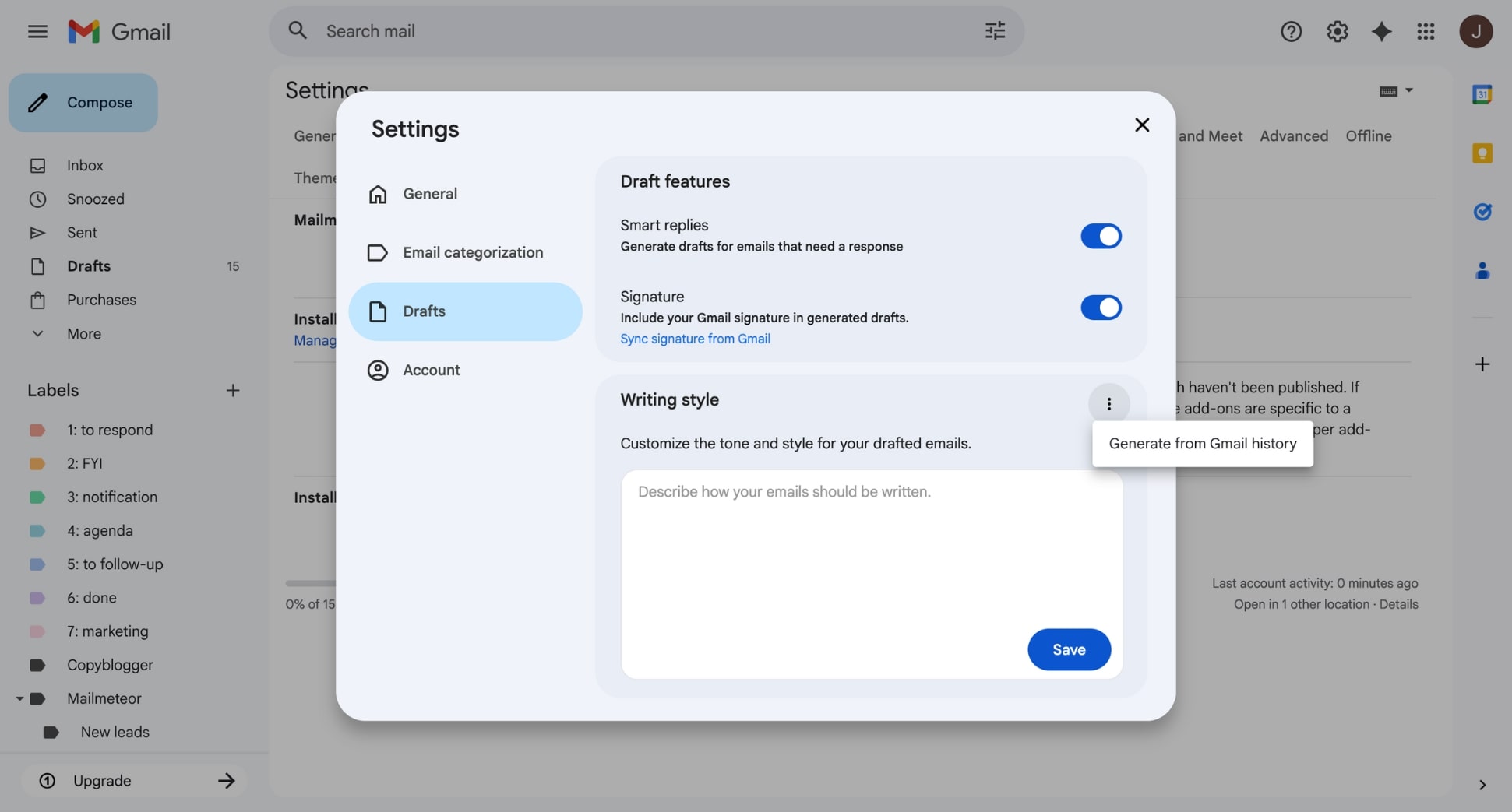
- Open the Drafts menu and, under Writing style, select Generate from Gmail history.
- Click Save.
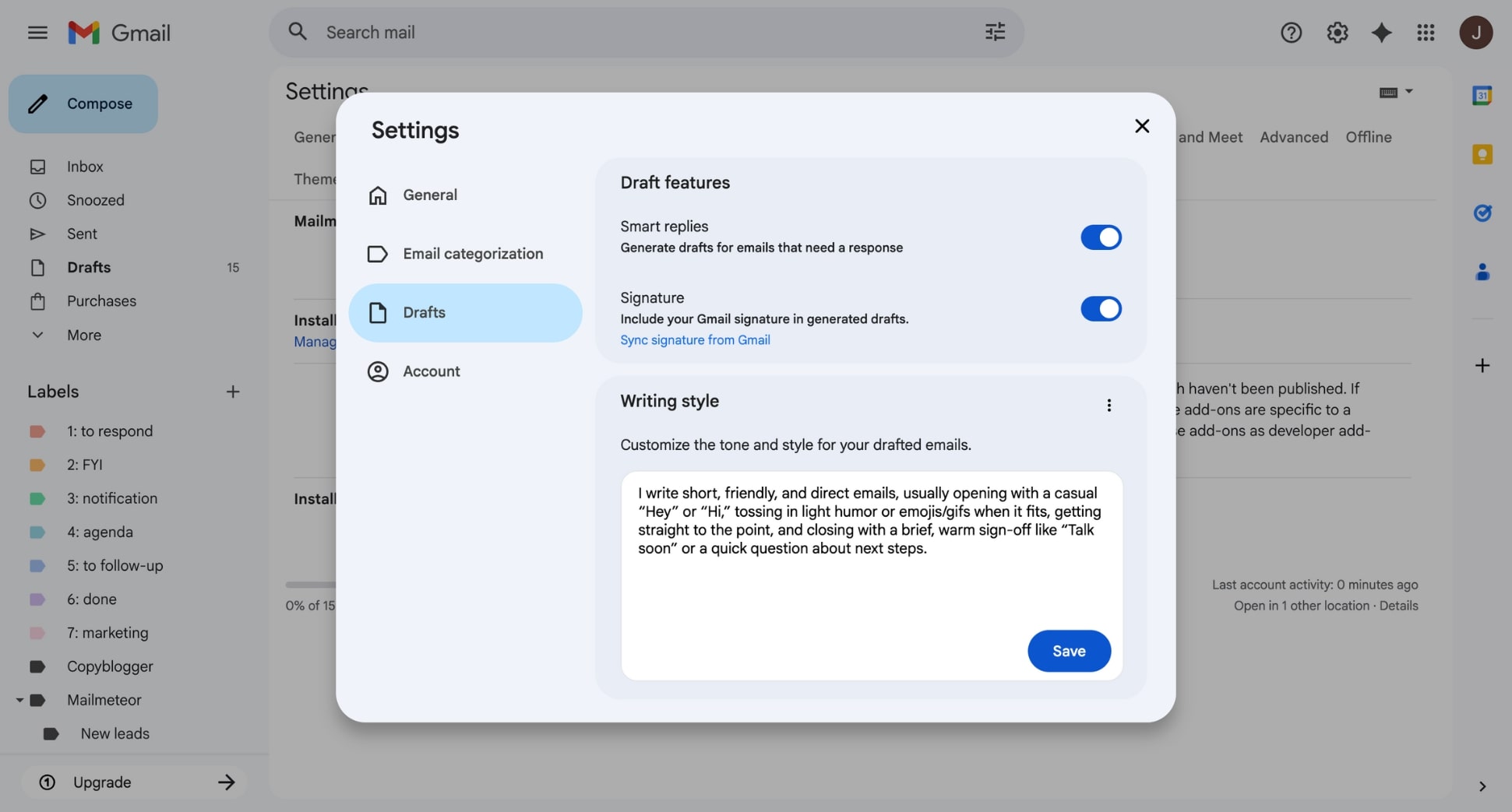
Once that feature is enabled, Mailmeteor analyzes your past emails and generates a personalized writing-style prompt. That prompt is then applied automatically to every draft the AI creates, so your messages consistently sound like you.
Use a Custom Prompt to Define Your Tone
If you don’t want AI to analyze your email history — or you prefer full control over how it writes — you can define your style manually with a custom prompt. Mailmeteor lets you enter your tone and style instructions directly in Gmail.
Here’s how to do it:
- Open Gmail.
- Go to Settings > See all settings.
- Navigate to Add-ons > Manage Mailmeteor settings.
- In the Drafts tab, under Writing style, type your custom writing-style prompt.
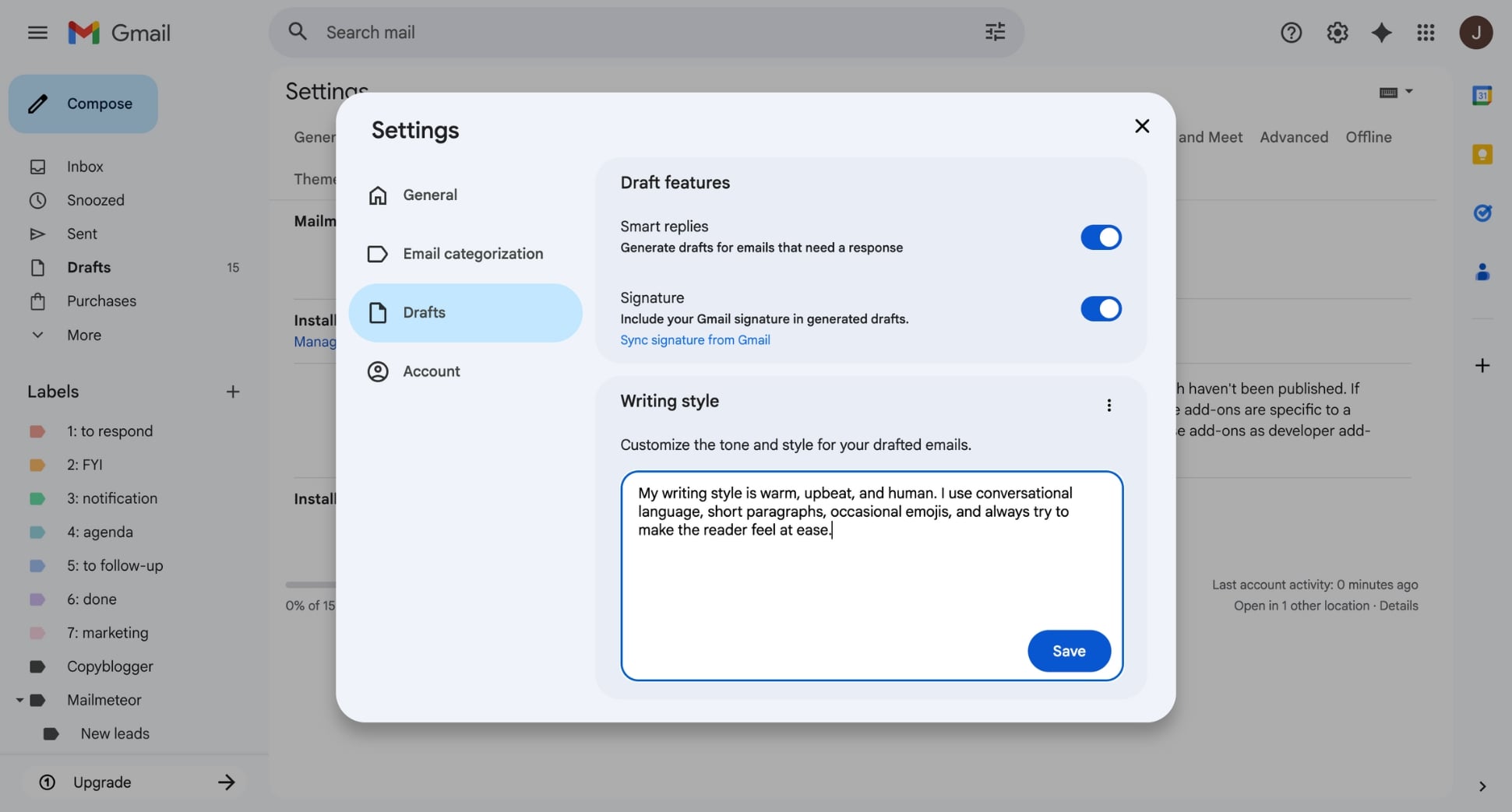
- Click Save.
This feature is perfect if:
- You’re starting from scratch with a new inbox,
- You want a tone that’s different from your natural one
- You simply prefer to spell out exactly how the AI should write
It gives you precise control over your writing style, even without training data. But what exactly should you include in your prompt to make AI sound right? If you need inspiration, this next section is for you.
15+ Prompts to Make AI Write in Your Style
AI becomes dramatically better when you give it a clear tone to follow. Below, you’ll find 15+ plug-and-play prompts inspired by real professional writing styles — founders, salespeople, consultants, recruiters, and more. Use them as-is, or tweak them to match your voice even more closely.
1. The Concise Founder
How it sounds:
Direct, efficient, and confident — gets the point across in minimal words.
The prompt:
Write in a decisive, concise, and no-nonsense tone. Open with the core point immediately, skipping greetings. Use short, declarative sentences and remove anything that doesn’t drive the message forward. Keep paragraphs to a single idea, and keep the overall message brief. Use bullet points only when they make decisions, priorities, or requests faster to scan. Avoid softening language (“I think,” “maybe,” “just”) and avoid vague or emotional phrasing. Prefer action verbs and direct statements over explanations or storytelling. Avoid emojis, exclamation marks, and overly warm phrasing. Maintain a leadership-oriented voice that signals clarity, direction, and momentum. End with a clear next step or a one-line conclusion only when appropriate for the context.
When to use it:
Great for founders, executives, or anyone who needs crisp, high-authority emails.
2. The Friendly Salesperson
How it sounds:
Warm, upbeat, and persuasive — builds rapport while driving action.
The prompt:
Write in a warm, upbeat, and people-centric tone. Begin with a personable, human opener when it helps build rapport (“Hope you’re doing well,” “Great to connect,” etc.). Use clear, conversational sentences — avoid corporate jargon or long blocks of text. Frame benefits in terms of the reader’s goals or challenges, not your product’s features. Use bullet points when it helps the reader quickly compare options or understand value. Use subtle, gentle persuasion with softeners like “happy to,” “quick question,” “you might find this helpful,” when appropriate. Keep paragraphs short and include natural pauses that make the email easy to read. Avoid overly formal phrasing, exclamation marks, and emojis unless they fit the relationship. Ask a simple, low-friction question or suggest a next step only when it naturally fits the conversation. Always close with a friendly, approachable line that keeps the door open for future replies.
When to use it:
Ideal when you want to build rapport, warm up leads, or write persuasive outreach without sounding pushy.
3. The Clear Consultant
How it sounds:
Structured, analytical, and logical — explains ideas with clarity and authority.
The prompt:
Write in a structured, analytical, and expert tone. Begin with a brief TL;DR when the message is long and contains multiple points, trade-offs, or recommendations. Organize information using clear frameworks (e.g., bullet points, steps, categories). Prioritize clarity over persuasion—explain the reasoning behind ideas, not just the ideas themselves. Use precise, neutral language, avoiding emotional phrasing, speculation, or exaggeration. Break down complex concepts into simple components, adding a brief example or definition only when it improves comprehension. Highlight implications, risks, constraints, and next steps when relevant, ensuring they’re easy to scan. Use short paragraphs and remove any content that doesn’t serve clarity. Avoid jargon unless it is standard for the reader—and define it briefly when used. End with a concise, optional recommendation (“A practical next step could be…”) only when appropriate.
When to use it:
Perfect for explaining complex topics, making recommendations, or sending structured, high-clarity messages.
4. The Polite Recruiter
How it sounds:
Courteous, tactful, and approachable — perfect for candidate interactions.
The prompt:
Write in a polite, tactful, and approachable tone. Start with a brief context line when it helps set expectations (e.g., role update, scheduling, next steps). Use short paragraphs and simple sentences that reduce friction for busy candidates. Communicate in a neutral and inclusive way—avoid assumptions about availability, interest level, or circumstances. Use bullet points to present role details, timelines, steps in the hiring process, or required actions, making them easy to scan. Clarify logistics when relevant (dates, links, duration, documents to prepare), but keep explanations concise. Use low-pressure, courteous language (“If that works for you…”, “Feel free to share…”, “Whenever you’re ready…”). Avoid emojis, slang, exclamation marks, or anything overly casual. Acknowledge delays or constraints with professionalism and warmth (“Thanks for your patience”). End with a polite closing (“Best regards”, “Kind regards”) unless a more personal relationship justifies otherwise.
When to use it:
Best for communicating with candidates, coordinating job interviews, or delivering HR updates with tact and professionalism.
5. The Empathetic Support Agent
How it sounds:
Reassuring, patient, and solution-oriented — ideal for handling customer issues.
The prompt:
Write in a calm, empathetic, and reassuring tone. Acknowledge the user’s concern or frustration in one sincere, concise sentence when appropriate. Use simple, friendly language and short paragraphs to reduce cognitive load. Break down solutions step-by-step, using bullet points when instructions become easier to follow. Avoid technical jargon unless absolutely necessary—and briefly define it when used. Stay patient and nonjudgmental; never imply user error (“You might try…” instead of “You didn’t…”). Use supportive expressions such as “No worries—happy to help,” “Let’s fix this together,” or “I understand how that can be frustrating” when they fit naturally. Offer alternative solutions or next steps calmly, without creating urgency or pressure. Invite the user to reach out again if needed, but avoid overlong closings. Close with a warm, professional line (“Happy to help if anything else comes up”).
When to use it:
Use this tone when guiding users through problems, offering solutions, or softening potentially frustrating experiences.
6. The Persuasive Entrepreneur
How it sounds:
Energetic, inspiring, and bold — motivates readers and encourages decisions.
The prompt:
Write in an energetic, confident, and opportunity-focused tone. Open with a strong, directional statement when it helps set momentum or urgency. Keep sentences short and dynamic, prioritizing clarity and forward movement. Use action verbs and momentum-driven language (“Here’s what we can build,” “Here’s the opportunity”). Highlight benefits, possibilities, and wins, using bullet points when they make ideas more compelling or scannable. Frame challenges as solvable and decisions as steps toward progress. Avoid softening phrases (“maybe,” “just,” “might be worth considering”) and keep the message focused on impact. Use a brief TL;DR only when summarizing multiple opportunities or decisions. Add a motivating call to action or a short P.S. only when it reinforces the direction or opportunity presented. Close with a confident, future-facing line that inspires movement (“Let’s move this forward,” “Excited for what’s next”).
When to use it:
Great for pitches, partnership outreach, or any message where you want to inspire momentum and drive decisions.
7. The Structured Teacher
How it sounds:
Clear, patient, and educational — simplifies complex ideas for any audience.
The prompt:
Write in a clear, patient, and instructional tone. Start with a short context sentence when it helps orient the reader. Break concepts into simple steps or sections, using bullet points or numbered lists to guide understanding. Introduce ideas gradually, moving from basic to more advanced only when necessary. Avoid jargon—or briefly define it the first time it appears. Use short, approachable sentences that support comprehension rather than persuasion. Ask occasional guiding questions (“What this really means is…”, “Why does this matter?”) when appropriate to reinforce learning. Include a brief example or analogy only when it helps demystify a concept. Add a quick recap or key takeaway at the end if it strengthens retention. Close with a supportive, educational line (“Hope this helps clarify things,” “Happy to explain further”).
When to use it:
Ideal for explaining concepts, onboarding someone, or breaking down a process step-by-step.
8. The Strategic PR Manager
How it sounds:
Polished, persuasive, and media-savvy — communicates with clarity and a strong narrative.
The prompt:
Write in a polished, credible, and narrative-driven tone. Open with a TL;DR when announcing news, sharing sensitive information, or clarifying key messaging. Frame the communication using context → significance → supporting points to establish a clear narrative. Use short, structured paragraphs to maintain readability for journalists or executives. Highlight the “why it matters,” using contrast, stakes, or impact when appropriate to elevate the message. Use bullet points for facts, data, quotes, milestones, or media assets that need to stand out. Maintain neutral, professional language—avoid slang, filler words, or anything that may weaken credibility. Avoid hype, exaggeration, or overly enthusiastic claims. Acknowledge constraints or risks carefully and factually when relevant. Close with a confident, media-ready call to action or next step only when contextually appropriate (e.g., “Here’s the full announcement,” “Let me know if you need additional context”).
When to use it:
Perfect for announcements, sensitive messaging, or communications that need polish, clarity, and narrative control.
9. The Confident Real Estate Agent
How it sounds:
Assured, proactive, and knowledgeable — communicates options with calm and authority.
The prompt:
Write in a confident, proactive, and knowledgeable tone. Start with a brief context line when it helps situate the property, request, or update. Present information clearly, using bullet points for property features, logistics, viewing options, or next steps to make scanning effortless. Use simple, concrete language to describe details—avoid technical terms unless they’re standard, and define them briefly when needed. Maintain a steady, reassuring voice that helps the reader feel informed and supported, not rushed. Highlight key benefits calmly and objectively (“This layout offers privacy,” “The location provides easy access”). Use phrases such as “Here’s what I recommend” or “A good next step could be…” when appropriate, to guide decisions without pressure. Keep paragraphs short and focused, limiting each to a single idea. Offer alternatives or options when relevant (“If that time doesn’t work, here are two others…”). Close with a confident, reassuring line that encourages easy next steps (“Happy to arrange a viewing whenever it suits you”).
When to use it:
Best for presenting options, summarizing details, or helping someone make a decision without added pressure.
10. The Precise Legal Advisor
How it sounds:
Formal, accurate, and measured — communicates complex information clearly and professionally.
The prompt:
Write in a formal, accurate, and measured tone. Begin with a clear statement of purpose when it helps establish context or scope. Use structured paragraphs and precise, unambiguous language. Avoid conversational expressions, contractions, or figurative language. Introduce definitions or clarifications only when they are necessary for legal accuracy, keeping them concise and neutral. Use bullet points when listing obligations, conditions, requirements, timelines, or procedural steps, ensuring each item is self-contained and logically ordered. Avoid emotional phrasing, assumptions, or speculative statements. Flag constraints, risks, or dependencies factually and without exaggeration. Maintain neutrality; do not express personal opinions. Provide recommendations or next steps only when appropriate and justified by the facts presented, and phrase them cautiously (“It may be advisable to…,” “A possible next step could be…”). Close with a formal, compliant sign-off that reflects professionalism and clarity.
When to use it:
Use this when accuracy is key — policies, contracts, formal updates, or anything requiring measured, unambiguous language.
11. The Enthusiastic Event Organizer
How it sounds:
Energetic, upbeat, and clear — perfect for announcements, logistics, and invites.
The prompt:
Write in an energetic, upbeat, and welcoming tone. Open with a positive, engaging line when it helps build excitement. Keep paragraphs short and easy to scan, using bullet points for dates, locations, schedules, required items, or key logistics. Highlight what attendees can expect, focusing on clarity and anticipation. Use simple, friendly language; avoid jargon or overly formal phrasing. If details are numerous, include a brief TL;DR to help readers grasp essentials quickly. Offer options or alternatives when relevant (e.g., timing, format, RSVP). Use enthusiastic but controlled phrasing—stay warm and inviting without adding unnecessary pressure. Add a call to action or RSVP request only when appropriate, keeping it clear and low-friction. Close with a warm, encouraging line that reinforces enthusiasm (“Looking forward to seeing you there!”).
When to use it:
Great for invitations, announcements, or logistics emails that need clarity and a touch of excitement.
- The Reliable Freelancer
How it sounds:
Dependable, reassuring, and communicative — perfect for building long-term trust.
The prompt:
Write in a dependable, transparent, and professional tone. Start with a brief update or context line when it helps orient the client (e.g., project status, upcoming timeline, recent progress). Use bullet points for deliverables, deadlines, outstanding questions, or next steps, keeping each item concise and easy to understand. Keep the message clear and free of unnecessary embellishment—prioritize practicality and reliability. Acknowledge dependencies, constraints, or risks calmly and factually, offering alternatives when relevant. Use approachable, straightforward language—professional but not overly formal. Maintain a tone that communicates partnership (“Here’s what I’m handling next,” “Let me know what works best”). Avoid jargon, emotional phrasing, or overly casual expressions. Request feedback or clarification only when it’s needed to move forward, phrasing it gently. Close with a steady, reassuring line that reinforces trust (“Happy to adjust as needed,” “Let me know if you’d like anything refined”).
When to use it:
Ideal for client communication, project updates, and messages where trust, clarity, and dependability matter.
13. The Analytical Marketer
How it sounds:
Data-informed, persuasive, and structured — blends clarity with conversion-focused messaging.
The prompt:
Write in a data-informed, structured, and strategically persuasive tone. Start with a TL;DR when sharing insights, results, or performance summaries. Present key metrics, comparisons, or findings using bullet points to make patterns easy to scan. Support every claim with specifics—avoid vague statements or general enthusiasm. Organize the message using a clear logic flow (e.g., Insight → Implication → Recommended next step). Use precise, neutral vocabulary; avoid hype or exaggeration. Highlight customer benefit, framing insights in terms of impact and outcomes. Keep paragraphs short and focused on a single idea. Avoid jargon unless it’s standard for the audience—and define it briefly when helpful. Add a recommended action only when it strengthens the insight, keeping it simple and practical. Close with a concise, results-oriented line (“Let me know if you’d like deeper analysis,” “Here’s what we can explore next”).
When to use it:
Perfect for reports, performance insights, and data-driven messaging that needs to be both clear and persuasive.
14. The Organized Operations Manager
How it sounds:
Structured, practical, and efficient — communicates next steps and logistics with clarity.
The prompt:
Write in a structured, practical, and efficiency-focused tone. Start with a short summary of what needs to happen when it helps establish direction quickly. Use numbered steps or bullet points to assign tasks, outline processes, clarify logistics, or list dependencies, keeping each item concise and actionable. Keep sentences short and directive, but not abrupt—focus on clarity and operational precision. Avoid unnecessary detail or narrative. Flag risks, constraints, or blockers factually when they might affect timing or deliverables. Use simple, neutral vocabulary that eliminates ambiguity. Encourage alignment with phrases like “Let me know if anything needs clarification” or “Please confirm if this timeline works.” Avoid emotional phrasing, filler words, or overly formal language. Close with a concise line reinforcing coordination (“Once confirmed, I’ll proceed with the next steps,” “Thanks for the update—this helps keep things moving”).
When to use it:
Best for coordinating teams, assigning tasks, or sending process-oriented emails that must be easy to follow.
15. The Supportive Coach
How it sounds:
Encouraging, positive, and action-focused — motivates readers while offering clear guidance with a touch of humour.
The prompt:
Write in an encouraging, positive, and supportive tone. Open with a short uplifting line when it helps set a constructive mindset. Break guidance into clear, actionable steps, using bullet points or numbered lists to make each action easy to follow. Use light, warm humor sparingly and only when appropriate—avoid sarcasm or anything that might diminish confidence. Reframe challenges from a growth perspective (“Here’s what this opens up,” “This is a solid starting point”). Use empowering language that reinforces capability (“You’ve got this,” “Here’s a simple way forward”). Keep paragraphs short to reduce overwhelm and maintain forward momentum. Avoid jargon, overly technical explanations, or high-pressure phrasing. Add a motivational takeaway or a short P.S. only when it strengthens clarity or confidence. Close with a supportive, future-oriented line that leaves the reader feeling capable (“Let me know how it goes—I’m here if you need support”).
When to use it:
Use this for motivating messages, feedback, or guidance that should feel positive, empowering, and actionable.
How to Create Your Own AI Writing Style Prompt
Didn’t find a tone that feels 100% like you? Or want something that goes beyond templates — a style that sounds unmistakably yours? The good news is that you don’t need a brand voice handbook, a giant data set, or dozens of writing samples to get there.
In fact, a single prompt can teach AI your writing style with surprising accuracy — as long as you know how to structure it. Here’s a simple 4-step formula to help you build your own custom writing-style prompt from scratch, and make AI sound like you.
1. Define the tone
Start by describing how the message should feel. This is the foundation of your writing style — the part that gives the AI its “voice.” Be specific and intentional. Think in terms of qualities rather than vague adjectives.
Examples you can include:
- Write in a calm, confident, and approachable tone.
- Sound warm, friendly, and conversational — but keep things concise.
- Maintain a professional, neutral tone with zero embellishment.
2. Set the format
Once the tone is defined, tell the AI how the message should be structured. Format instructions help control clarity, length, and readability — and they’re one of the biggest levers for making AI output feel intentional instead of generic.
Examples you can include:
- Keep paragraphs short (1–2 sentences each).
- Start with a brief TL;DR before expanding on details.
- Use bullet points to highlight key actions or decisions.
- Avoid long introductions — get to the point quickly.
- End with a clear next step or closing line.
3. Assign a role
Telling the AI who it is when writing sharpens the output. Roles shape perspective, confidence level, vocabulary, and how the message should be delivered. Without this step, AI often defaults to a generic “assistant” voice.
Examples you can include:
- Write as a founder communicating with investors.
- Write as a helpful colleague offering clear, practical guidance.
- Write as a consultant explaining trade-offs and recommendations.
4. Add your personal preferences
This final layer is where your writing style becomes unmistakably yours. Personal preferences tell the AI what you always do — and what you never do. These micro-rules help the AI replicate your signature habits.
Examples you can include:
- Use parentheses to add small clarifications
- Avoid intensifiers like “very”, “really”, or “extremely”
- Avoid filler words like “just,” “maybe,” or “I think”
- Use contractions (“I’m”, “don’t”, “we’ll”)
- Don’t use exclamation marks
- Avoid rhetorical questions
- Add emojis (sparingly)
- Start with “Hi,”
Conclusion
AI can be an incredible writing partner — especially once you teach it to speak in your voice. With the techniques in this guide, you can turn generic AI output into messages that feel natural and unmistakably yours. But you don’t have to do the heavy lifting manually.
Mailmeteor’s AI Email Assistant brings everything together inside Gmail — personalized tone, smart drafting, follow-ups, mail merge, and tracking — so you can focus on what actually matters.
No new platform. No extra tabs. Just Gmail — upgraded. Mailmeteor is trusted by more than 7 million users and teams at Spotify, Uber, Shopify, and Pinterest. Most features are free, and upgrading unlocks even more power.
👉 Send better emails with Mailmeteor
FAQs
What is an AI writing style?
An AI writing style is the tone, structure, and personality you instruct an AI tool to follow when generating text. It defines how the message sounds — formal or casual, concise or detailed, warm or neutral, etc. By giving AI a clear style prompt, you can make its output feel more aligned with how you actually communicate.
Can AI copy my writing style?
Yes — modern AI tools can mimic your writing style, as long as you give them enough information. You can do this by providing writing samples or using a detailed prompt that describes your tone, pacing, structure, and favorite phrasing. Without this guidance, AI defaults to generic, neutral writing.
What’s the best AI writing style prompt?
The most effective AI writing prompts define:
- Your tone (e.g., warm, concise, analytical)
- How you structure messages
- Words or phrases you prefer or avoid
- How formal or casual you are
If you want a shortcut, use one of the 15+ ready-made style prompts in this guide. They work across ChatGPT, Gemini, Claude, Mailmeteor, and any AI writing tool.
Does providing writing samples help?
Yes — massively. Most AI tools improve a lot when you give them real examples of your writing. Samples help the AI learn your tone, rhythm, sentence length, vocabulary, and email habits. If you use Mailmeteor, you don’t even need to paste samples. The AI can analyze your Gmail history (securely and privately) to learn your natural tone automatically.
Can AI write emails in my tone automatically?
Yes. Some tools — including Mailmeteor’s AI email writer — can adapt their tone automatically using your email history, your saved writing preferences, or a custom style you define. Once trained, the AI generates emails that feel like you wrote them, without needing to re-explain your tone every time.
How do I keep my AI writing consistent?
To maintain a consistent tone across all your messages, use the same custom style prompt for every email, or rely on a tool like Mailmeteor, which stores your writing style and applies it automatically. Consistency becomes effortless once your AI has a well-defined style to follow.


