If you’re trying to find an email address for a lead or prospect, or you’re deep in a search for a long-lost friend, this one’s for you. Finding someone’s email is essential when you’re networking with industry experts, building business relationships, or trying to reach key people at an organization. It can feel like a challenging endeavor, but several reliable techniques and tools can get you there without going down a rabbit hole.
Here’s what we’ll cover:
- Use a verified Email Finder
- Use an email permutator
- Scan social media platforms
- Find an email address on a company website
- Guess an email address using common formats
- Use Google like a pro
- Search alternative search engines
- Subscribe to a newsletter
- Always verify the email before you send
Sounds good? Then let’s dive in.
1. Use a Verified Email Finder
The fastest and most reliable way to find someone’s email is a dedicated Email Finder — a tool that takes a name and a company and returns a verified result, instead of a list of guesses you have to check yourself.
Mailmeteor’s Email Finder is free and doesn’t require an account. Give it a first name, last name, and company domain (or just the company name), and it searches for the most likely professional email address and verifies it before showing you the result.
Here’s how it works:
- Open the Email Finder tool.
- Enter the first name, last name, and company domain (e.g.,
company.com) — or just the company name. - Click Find email.
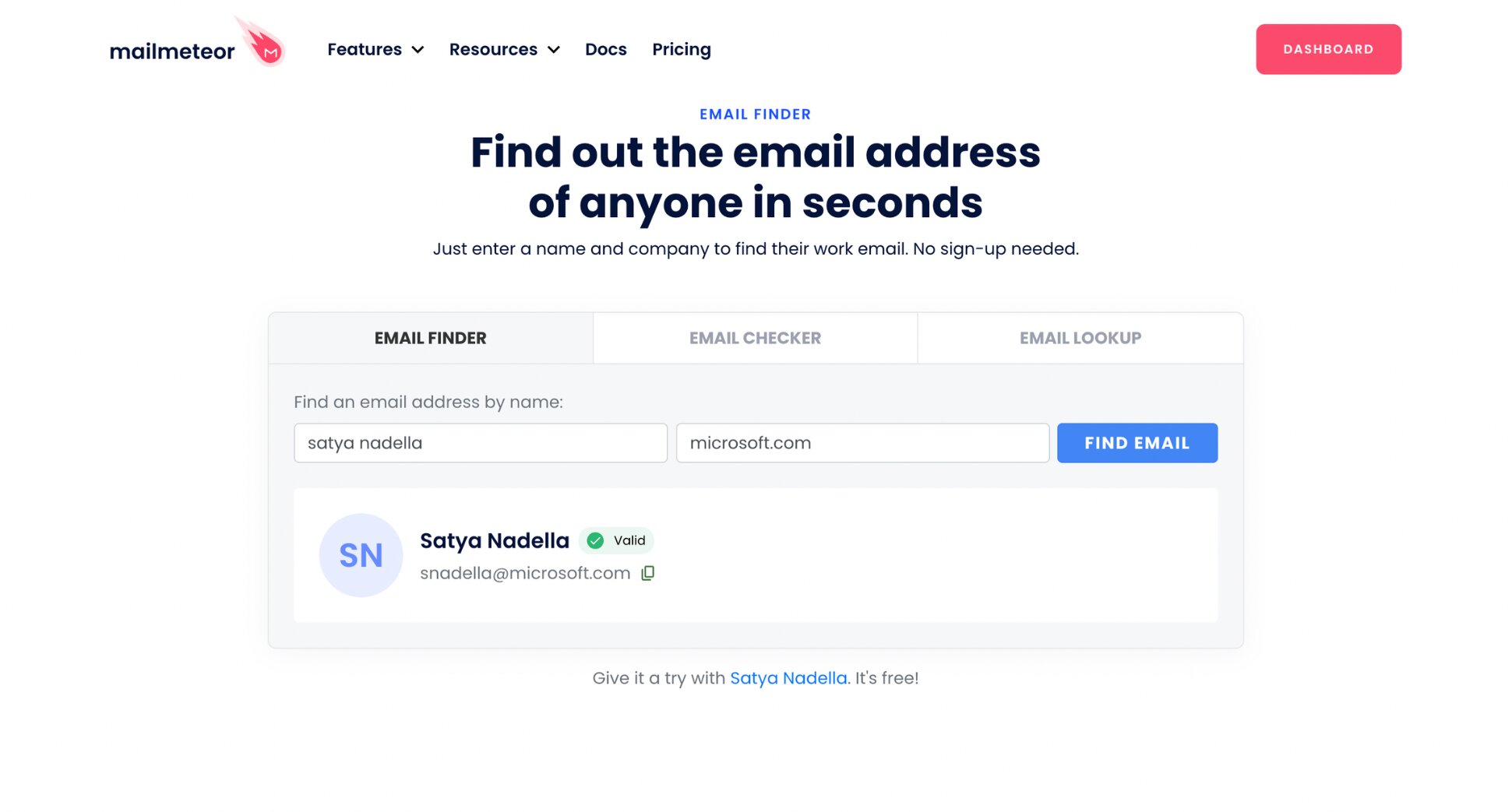
You’ll get a single verified email address, along with a status showing whether it’s valid.
2. Use an Email Permutator
If a dedicated finder doesn’t return a result, an email permutator is the next best thing. Instead of one verified guess, it generates every likely combination of someone’s email address at once.
Mailmeteor’s email permutator does this completely for free. Add a first name, last name, and domain, and you’ll get dozens of permutations generated in a second.
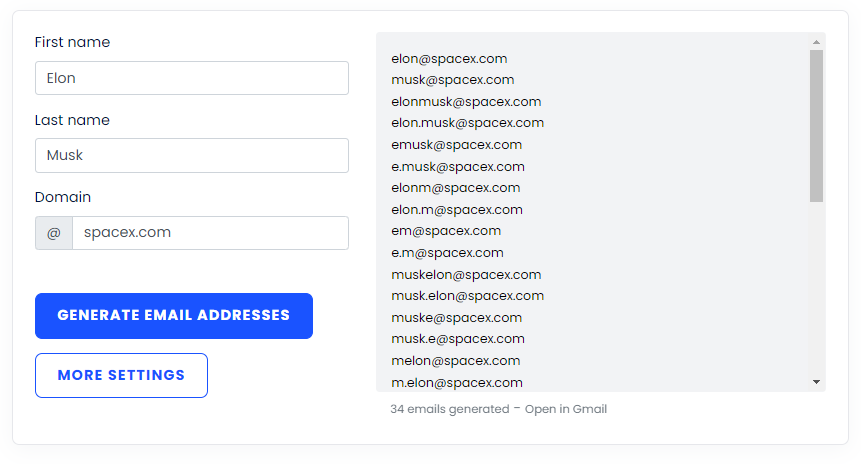
Since a permutator gives you candidates rather than a single verified result, always run what you find through the verification step at the end of this guide before you send anything.
3. Scan Social Media Platforms
It’s not common to see someone posting their email address on Facebook — anyone in their right mind will tell you not to share contact details publicly. It’s worth a glance at “About” sections regardless. But there’s one platform where people do share their email more often: LinkedIn.
If you’re reaching out to someone in sales, outreach, growth, or a similar partnership-facing role, you might find that email right on their LinkedIn profile.
Go to their profile and click Contact info.

If the profile doesn’t list one, Mailmeteor’s LinkedIn Email Finder can take it from there — paste in the profile URL, and it searches for the most likely professional email using public data.
Here’s how it works (steps):
- Open the LinkedIn Email Finder tool.
- Paste the full profile URL (it looks like
linkedin.com/in/their-name). - Click Find email.
You can try the same approach on Instagram. With many professionals actively creating content for their audience, they sometimes list their email in their bio.
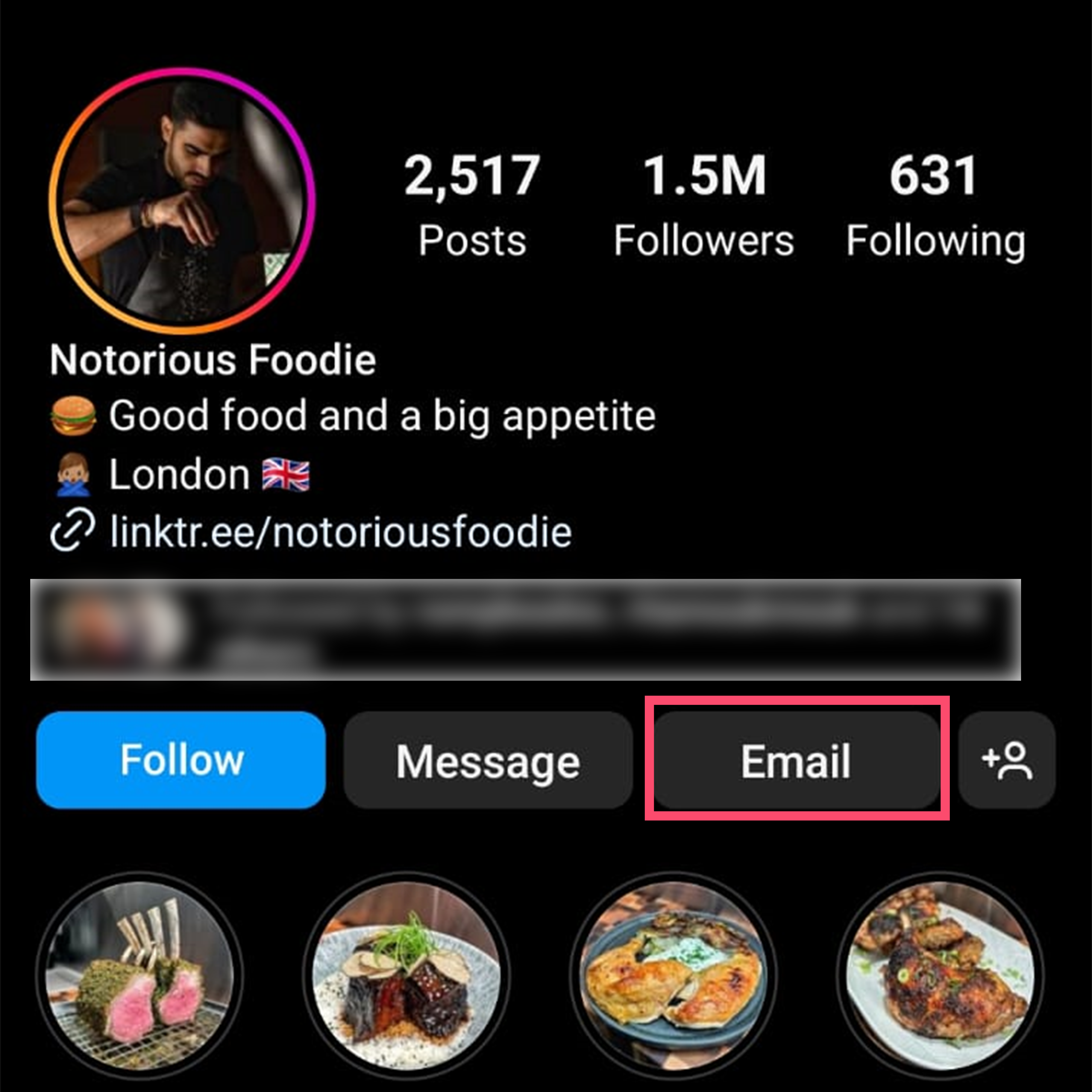
X (Twitter)
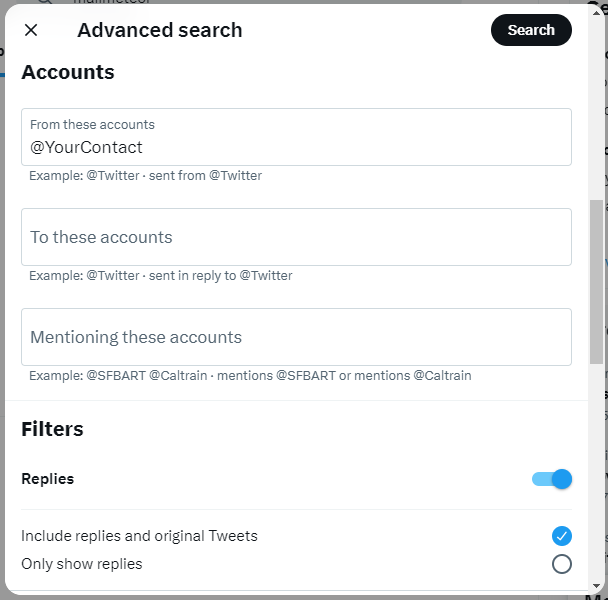
While you’re at it, X’s (formerly Twitter’s) advanced search is worth a shot. All you need is the username. Search the username along with keywords like “email me,” “contact me,” or “my email” to surface a bio or pinned post where they’ve shared it.
4. Find an Email Address on a Company Website
You have your target company or your contact’s place of business — how do you use their website to find an email address? Start with the easiest option ⤵️
- Check their Contact page. Not every company lists individual contacts, but most big companies make it easy to reach out. You’ll often find a contact form or a generic address like [email protected], managed by a support team or assistant. Send a straightforward message politely asking to be connected with the person you’re trying to reach — it works more often than you’d think.
- Check for a “People” or “Team” page. If the site has one, look for your contact there — they may have a card with direct contact details.
- Check the Careers page. Job descriptions sometimes include the email of the hiring manager or department lead.
Even if the emails you find aren’t the one you need, they’re still useful: now you know the company’s email structure and syntax, which you can use to build the address you’re actually looking for.
5. Guess an Email Address Using Common Formats
Once you know the structure a company uses, you can apply that pattern to guess your contact’s email. [email protected] and [email protected] are the two most common formats used by businesses.
Try a few combinations using the person’s name or initials, paired with the company domain. It won’t always work, but it’s worth trying once you’ve exhausted other options — or better yet, run the pattern through the Email Finder above so you get a verified answer instead of a guess.
We’ve also written a complete guide to how to find a Gmail account by name.
6. Use Google Like a Pro
Google has a few tricks that sharpen your search considerably.
One method: search a root source — a company website — combined with a contact’s name and a keyword like “email” or “contact.”
For example: site:mailmeteor.com "Guy" email
A few variations worth trying:
site:company.com "First Last" contactsite:company.com "First Last" "email address"site:company.com "First Last"(drop the keyword entirely and scan what comes up)
7. Search Alternative Search Engines
You can also uncover email addresses by leveraging a search engine other than Google. Run an exact-match search on DuckDuckGo using the query "@domainname.com", and you’ll surface any publicly indexed email addresses tied to that domain.
To target a specific person, add their name to the search. Or keep it broad if you’re open to any contact at that company.
8. Subscribe to a Newsletter
Say you’re targeting someone who runs a blog or newsletter. Here’s a low-effort trick: join their mailing list through the opt-in form on their site.
Newsletters often land in your inbox from the sender’s personal or direct email address — it’s effectively a direct line to them on request.
Don’t let a generic reply-to address discourage you. Reply to one of their newsletters with a genuine question or comment. You might just get a personal response back.
Always Verify the Email Before You Send
Finding a candidate email is only half the job — sending to an address that bounces hurts your sender reputation and wastes the outreach. Before you use anything you’ve found through guessing, permutation, or a search operator, run it through a verification check.
Mailmeteor’s Email Checker verifies a single address for free, with no account needed:
Here’s how it works:
- Open the Email Checker tool.
- Enter the email address you want to check.
- Click Check email.
You’ll see whether the address is valid and can actually receive mail — without sending anything to it.
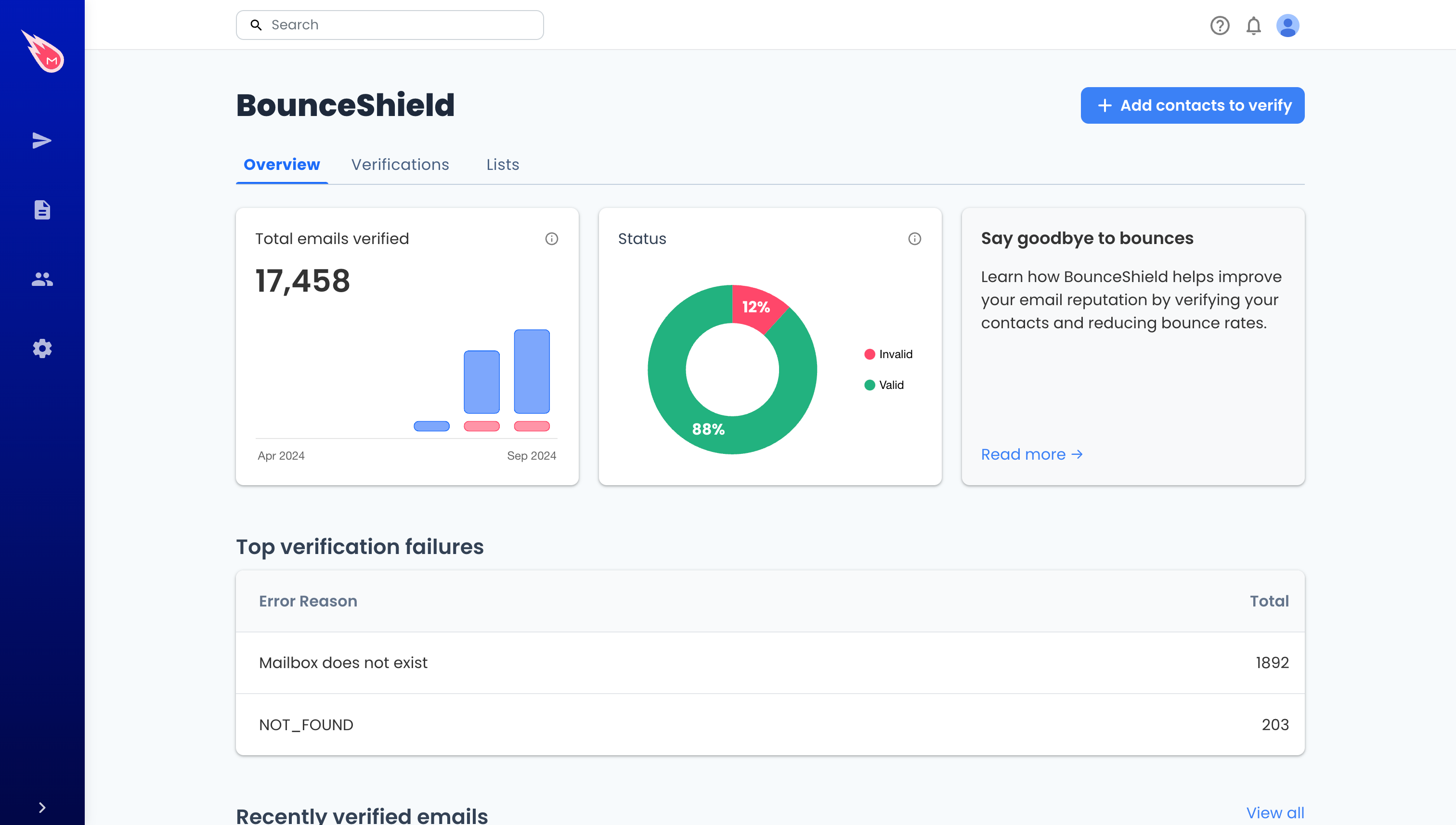
If you’ve built a whole list of contacts to verify at once — say, from a spreadsheet of leads — BounceShield handles bulk verification from the Mailmeteor Dashboard, at $0.01 per email checked. Other bulk verification tools worth knowing about include Bouncer, Clearout, Emailable, NeverBounce, and ZeroBounce.
Ready to Turn That Email Into a Reply?
Finding the address is step one. Turning it into a real conversation is where the outreach actually happens.
📧 Find verified emails by name or LinkedIn URL with Mailmeteor’s free Email Finder
✅ Verify any address before you send, one at a time or in bulk with BounceShield
✍️ Draft your outreach with AI so you’re editing a message instead of starting from a blank page
📬 Send personalized campaigns at scale with mail merge, straight from Gmail
🔁 Set automatic follow-ups so a no-reply doesn’t mean a dead lead
Try Mailmeteor today (it’s free!)
FAQs
How do I find a person’s email address?
Start with a verified Email Finder — enter their name and company to get a checked result in seconds. If that comes up empty, check their LinkedIn profile, try the company’s Contact or Team page, or use a Google search operator like site:company.com "First Last" email.
How do I find my own forgotten email address?
To recover your own account, use Google’s account recovery flow at accounts.google.com and enter a phone number or recovery email associated with the account. Check this guide to learn how to find an old email account.
How do I find an email address with just a name?
A name alone usually isn’t enough — you’ll get much better results if you also know the company or domain. Feed both into an Email Finder, or use a Google search operator combining the name with a likely company website.
Can I find my friend’s email address for free?
Yes — for a personal contact, checking their social media bios (Instagram, X) is often the quickest route, followed by a mutual friend or their own blog or newsletter if they have one. The professional tools in this guide are built for work-related lookups and expect a company name, so they won’t always help for personal contacts.
Is it legal to look up someone’s email address?
Yes, when the information is already publicly available. Tools like a Reverse Email Lookup or Email Finder retrieve publicly indexed data rather than private records, and comply with privacy laws when used responsibly. That said, always respect people’s privacy and avoid using found addresses to spam.
What’s the difference between an Email Finder and a Reverse Email Lookup?
An Email Finder starts with a name (or LinkedIn URL) and gives you an email address. A Reverse Email Lookup works the other way — you start with an email address and it surfaces publicly available details like the person’s name, company, and role. Use it when you’ve received an email from someone you don’t recognize and want context before replying.
How do I find an email address that’s already in my Gmail contacts?
Open Gmail’s Contacts page (contacts.google.com) and search by name — any address that’s ever emailed you or that you’ve emailed is typically saved there automatically, even if you never added it manually.
Are these email finder tools free?
Yes. Mailmeteor’s Email Finder, LinkedIn Email Finder, Reverse Email Lookup, and Email Checker are all free to use with no account required, protected by fair-use limits and CAPTCHA. Bulk verification through BounceShield is the one paid exception, priced per email checked.