What is APOP?
APOP, or Authenticated Post Office Protocol, is an email protocol that enables a user to get their email from a POP3 server while also adding an extra layer of authentication and protection to keep both server and user secure. With POP, a user’s username and password use normal letters and numbers, while APOP uses authentication to encrypt credentials.
What is APOP?
APOP (Authenticated Post Office Protocol) is an email security feature that enhances Post Office Protocol version 3 (POP3) by making authentication more secure.
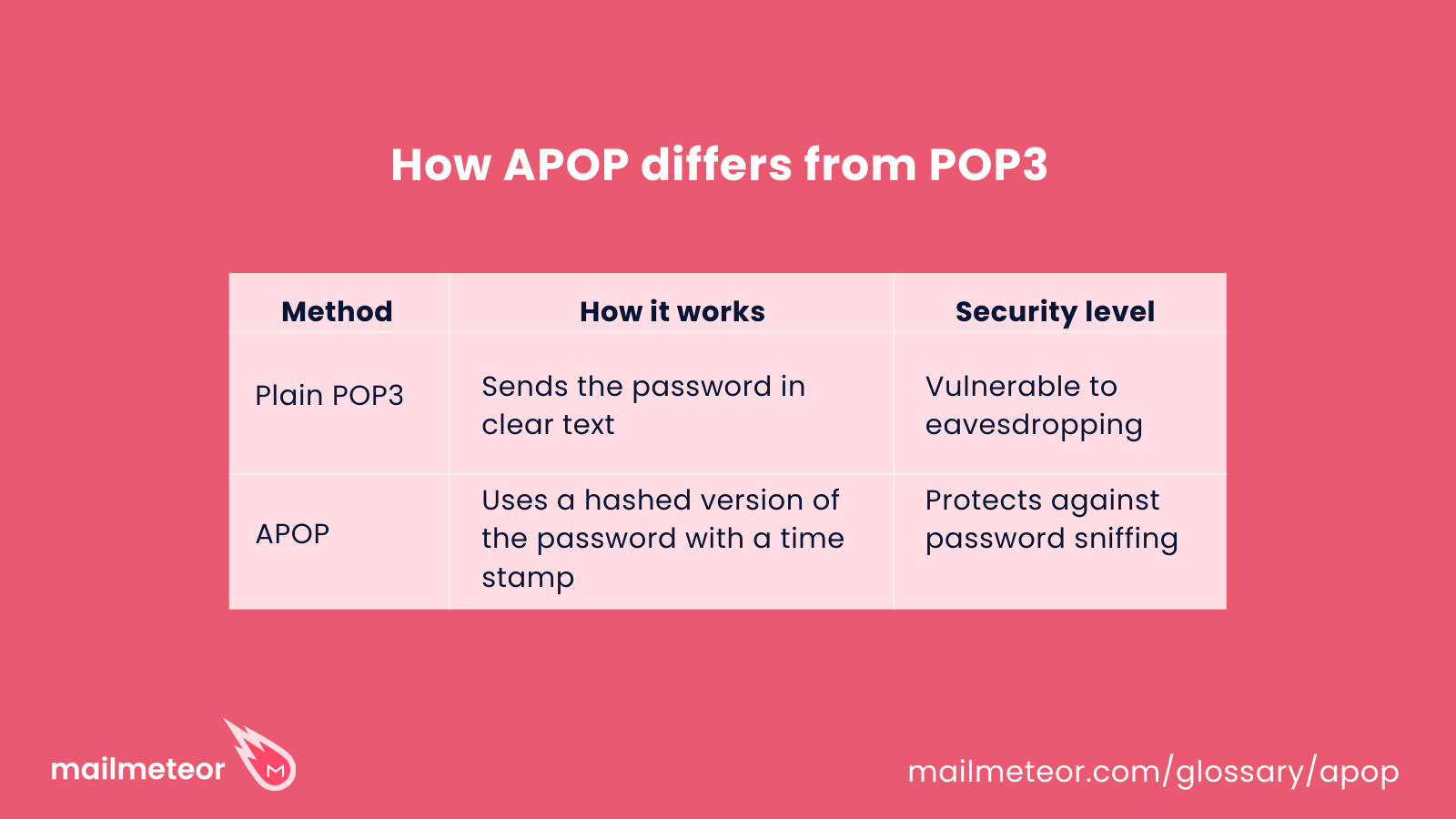
With standard POP3, when you check your email, your username and password are sent over the internet as plain text, making them vulnerable to hackers using network sniffing tools. APOP fixes this by encrypting your credentials before they are transmitted, preventing unauthorized access.
While APOP was a useful security measure in the past, it has since been replaced by stronger encryption methods such as SSL/TLS and OAuth-based authentication (the only method now offered by Gmail).
How does APOP work?
To understand APOP, think of checking your email as unlocking a post office box.
With standard POP3, you simply enter your key (password) to retrieve your messages.
The problem? If someone is “listening in” on the communication (e.g., through network sniffing), they can steal your credentials since they’re transmitted in plaintext.
APOP solves this by never sending the actual password over the network.
Sound confusing?
Let’s explore how it works…
Step-by-step breakdown of APOP authentication
I want you to imagine checking your email on Gmail, Outlook, or Apple Mail on your phone or computer.
When you click “Check Mail,” here’s what happens:
- Your email app goes to your email server (e.g., your company’s email provider, Gmail server, GoDaddy) and says: “Hey, I want to check for new emails.”
- The server comes back with a unique timestamp or nonce (a one-time number).
- The email app combines this number with the user’s password and applies an MD5 hashing function to this combination, which is then sent back to the server.
- Since the server already has access to the password and the timestamp it generated, it performs the same MD5 hashing function.
- If the hash functions match, authentication is successful.
Why is this stronger than POP3?
Instead of sending your password over the internet each time you want to check for emails, you are sharing a hash result.
This adds an additional layer of security because the hash result cannot be used twice—even if a hacker intercepts it—since it’s based on the unique timestamp provided by the server, which becomes invalid after authentication is complete.
Is APOP still the standard in 2026?
APOP was introduced as a security enhancement for POP3, one of the earliest email retrieval protocols. Before APOP, checking your email using POP3 was risky because passwords were sent across networks in plaintext, making them vulnerable to interception.
By introducing MD5 hashing, APOP offered a lightweight, yet effective way to protect login credentials. However, over time, MD5 became vulnerable to hash collision attacks, reducing APOP’s security effectiveness.
While APOP is largely deprecated in mainstream email services like Gmail, some legacy systems and self-hosted mail servers may still support it. However, most providers now require stronger authentication methods like OAuth and SSL/TLS.
Today, modern email security relies on:
- SSL/TLS encryption – Encrypts the entire email session, not just login credentials.
- OAuth authentication – Used by services like Gmail to eliminate passwords altogether.
- End-to-end encryption (E2EE) – Ensures emails remain private throughout transmission.
That said, APOP may still exist in specific legacy setups, particularly in self-managed mail servers or corporate environments where upgrading authentication protocols takes time.
Pros and cons of APOP as a security measure
Pros
- More secure than standard POP3 – Prevents passwords from being sent in plaintext.
- Prevents replay attacks – Uses unique timestamps, making it harder for hackers to reuse old login attempts.
- Lightweight security – Doesn’t require full encryption, making it efficient for older systems.
Cons
- MD5 encryption is outdated – Weaknesses in MD5 hashing make APOP susceptible to modern cyberattacks, including hash collision attacks where different inputs can produce the same hash.
- Doesn’t encrypt the entire session – Unlike SSL/TLS, APOP only secures login credentials, not email content.
- Is vulnerable to dictionary attacks – Despite APOP offering security with one-time hashing results, these can be spoofed with common password combinations.
Takeaways
- APOP was an important security improvement for POP3, protecting passwords from being sent in plaintext.
- It has since been surpassed by stronger encryption technologies, such as SSL/TLS and OAuth authentication.
- Most modern email services no longer use APOP, but it may still exist in legacy systems with limited upgrade options.
FAQs
I used APOP for my email—why isn’t it working anymore?
Some email providers, including Gmail, no longer support APOP, which has known vulnerabilities. Services have moved to more secure authentication methods like OAuth. You can read about Gmail’s move away from APOP here.
How do I know if my email provider still supports APOP?
Check your email provider’s documentation or support page. Many providers have phased out APOP in favor of stronger security protocols like SSL/TLS or OAuth.
Are there any alternatives to APOP?
Yes, modern authentication methods have replaced APOP. The most common alternatives include:
- SSL/TLS with POP3 or IMAP – Encrypts the entire email session, preventing credentials from being exposed.
- OAuth authentication – Eliminates passwords by using token-based login, which is now standard for services like Gmail.
- End-to-end encryption (E2EE) – Provides the highest level of security by encrypting messages so only the sender and receiver can read them.
Can I still use APOP if my email provider allows it?
Yes, but be aware that it’s not the most secure or modern method available today.
Read more