AI is now built directly into Gmail. Google’s Gemini can draft replies, summarize threads, and answer questions about your inbox. But for many users, that’s just the starting point.
If you want smarter drafts, deeper automation, team collaboration, or real inbox organization, you’ll need more than the default.
We tested and compared the 7 best Gmail AI assistants in 2026 — from Gemini to advanced third-party tools — to help you choose the right one for your workflow.
Here’s how they stack up ⤵️
TL;DR: Which Gmail AI Assistant Should You Choose?
- Want the most complete free Gmail AI assistant for writing, sorting, and follow-ups? → Mailmeteor
- Live in your inbox and care about raw speed? → Superhuman
- Care most about polished, professional email drafts? → Mailmaestro
- Managing a shared inbox or support@ address? → Gmelius
- Trying to reach Inbox Zero and reduce clutter? → Shortwave
- Spend hours in meetings and need automatic summaries + follow-ups? → Fyxer
- Want rules, triggers, and hands-off email workflows? → Jace AI
But before comparing tools, let’s clarify what a Gmail AI assistant actually is.
What Is a Gmail AI Assistant?
A Gmail AI assistant is a tool that uses artificial intelligence to help you write, organize, and manage emails directly inside Gmail. Instead of manually drafting every reply, sorting messages one by one, or scanning long threads for context, an AI assistant does that work for you.
Depending on the tool, a Gmail AI assistant can:
- Draft full email replies based on the conversation
- Rewrite or improve your tone (more formal, more concise, more persuasive)
- Summarize long email threads
- Automatically categorize emails by priority or intent
- Suggest follow-ups or reminders
- Trigger actions like scheduling meetings or updating a CRM
The most basic Gmail AI assistants focus on writing. They help you draft, rewrite, and respond to emails faster. More advanced tools go further. They help with inbox organization and workflow automation — often saving you up to two hours a day and bringing you much closer to inbox zero.
Does Gmail Have a Built-In AI Assistant?
Yes. Gmail now includes a built-in AI assistant powered by Google Gemini. It’s available on desktop and mobile for eligible Google Workspace and Google AI plans. Gemini is built directly into the Gmail interface — no extension required.
But while it’s powerful, it’s primarily designed as an intelligent writing and search assistant, not a full inbox automation system. So what can Gemini actually do? Where is it still lacking? And is it the right fit for you?
What Can Gemini Do in Gmail?
Once enabled, Gemini appears inside Gmail as a side panel and as contextual buttons within email threads. It turns your inbox into a conversational workspace — where you can ask questions, generate drafts, and extract information.
Here’s what you can do with Gemini:
- Summarize email threads: Click Summarize this email to get a clear overview of long conversations. Ideal for catching up on busy group threads without reading every message.
- Draft and rewrite emails: Use Help me write to generate a full email draft from a short prompt. You can also refine tone, improve clarity, make a message more formal, or shorten it in one click.
- Generate contextual replies: Gemini enhances Gmail’s Smart Reply feature by suggesting more personalized, context-aware responses based on the conversation and your email history.
- Search your inbox with natural language: Instead of scrolling or using keywords, you can ask questions like “What’s the confirmation number for my flight?”. Gemini can pull answers directly from your emails — and even from Google Drive files.
- Access and create calendar events: Gemini can check Google Calendar events and create new ones from within Gmail, helping you move from conversation to action quickly.
What Are the Limitations of Gemini in Gmail?
Gemini is powerful — but it’s not a complete inbox management solution. Here’s where it can fall short compared to third-party Gmail AI assistants like Mailmeteor, Superhuman, or Gmelius:
- Limited automation: Gemini doesn’t automatically triage, categorize, or prioritize your inbox at scale.
- No advanced workflow triggers: It won’t create custom automation rules, trigger CRM updates, or manage multi-step email workflows.
- Minimal team features: There’s no shared inbox management, collaboration layer, or advanced team coordination.
- No free plan: Gemini requires an eligible Google Workspace or Google AI plan. There’s no standalone free version available to all Gmail users.
For many users, Gemini is a strong starting point. But if you need deeper inbox organization, smarter automation, or real collaboration features, you’ll need something more powerful.
The 7 Best Gmail AI Assistants in 2026
Not all Gmail AI assistants solve the same problem. Some focus on writing faster. Others help you process your inbox more efficiently. A few go further and automate entire email workflows. Here’s a quick comparison of the best Gmail AI assistants in 2026 before we break each one down.
| Tool | Best For | AI Writing | Automation | Free Plan | Starting Price |
|---|---|---|---|---|---|
| Mailmeteor | Outreach + follow-ups | Strong | Moderate | ✅ Yes | $4.99/month |
| Superhuman | Speed + power users | Strong | Light | ❌ No | $25/month |
| Mailmaestro | Professional drafting | Strong | Light | ❌ No | $12/month |
| Gmelius | Team collaboration | Moderate | Strong | ❌ Trial only | $19/month |
| Shortwave | Inbox Zero workflow | Moderate | Moderate | ✅ Limited | $7/month |
| Fyxer | Meetings + follow-ups | Moderate | Moderate | ❌ Trial only | $22.50/month |
| Jace AI | Workflow automation | Moderate | Strong | ❌ Trial only | $20/month |
1. Mailmeteor — Best Free Gmail AI Assistant
Rating: ⭐️ 4.7 on the Chrome Web Store
Mailmeteor is the most complete free Gmail AI assistant in this list because it adds what Gmail still lacks: mail merge, follow-ups, tracking, and lightweight AI help — directly inside your inbox. While most tools focus on writing, Mailmeteor is built to help you get replies. AI helps you draft faster and stay consistent, but the real value kicks in after you hit send: tracking, follow-ups, and campaign workflow.
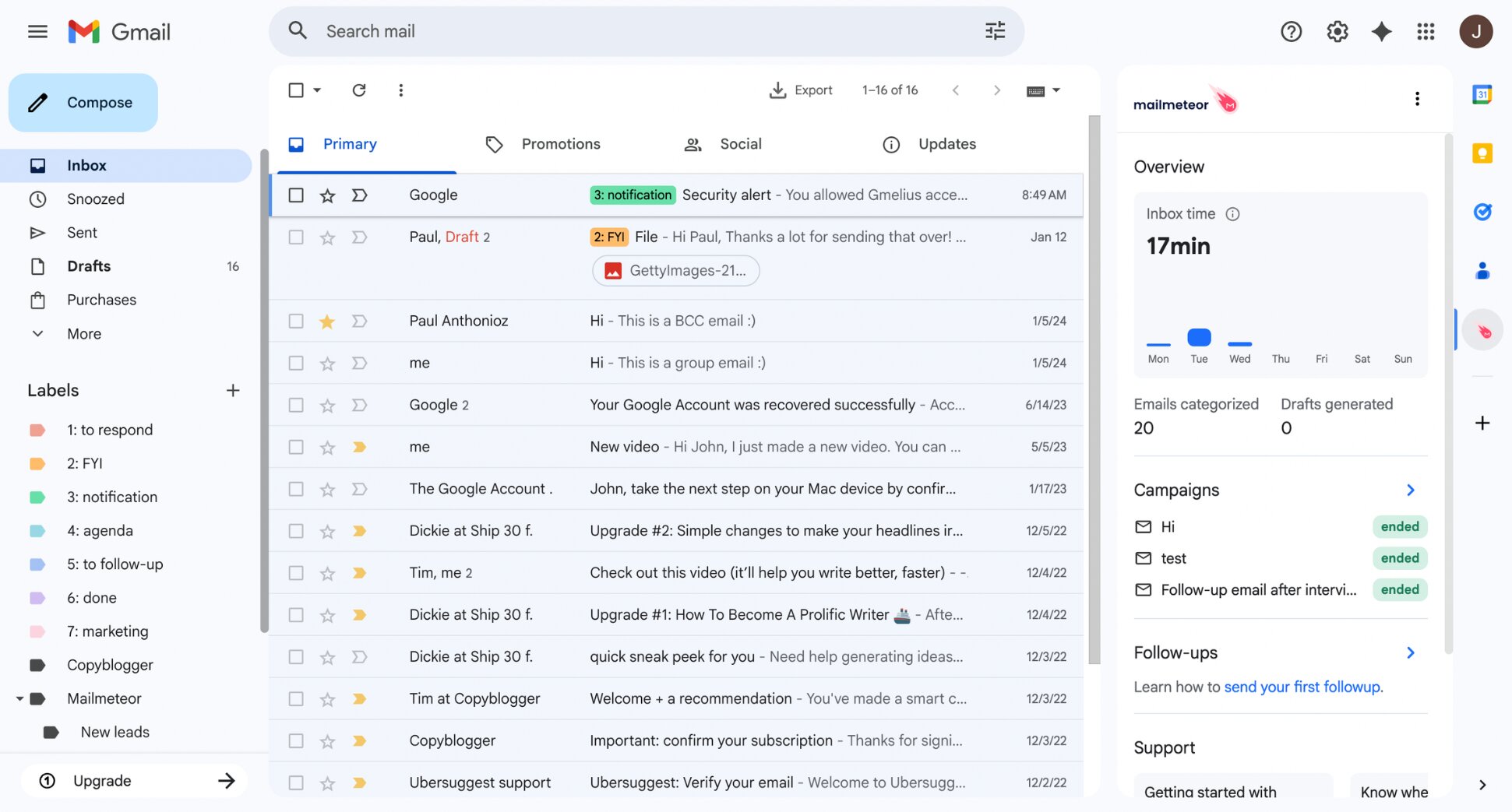
What Mailmeteor does best:
Mailmeteor is strongest at turning Gmail into a practical outreach + follow-up workflow. You can craft personalized messages (with AI help), send them to up to 2,000 recipients per day, track what happens, and automatically follow up if people don’t reply — without jumping between tools or dashboards. It also shines for non-technical users. Setup is fast, the UI is simple, and the tool stays close to Gmail instead of forcing you into a separate platform.
Key Gmail workflow features include:
- AI email writer to draft, rewrite, shorten, or adjust tone inside Gmail
- AI-powered email categorization and smart sorting
- Mail merge campaigns from Gmail, Google Sheets, or Google Docs
- Automatic follow-ups and sequences
- Email tracking (opens, clicks, replies, bounces, and unsubscribes)
- Scheduling + drip sending to protect deliverability
Where Mailmeteor falls short:
Mailmeteor isn’t trying to answer questions about your inbox the way Gemini can, and it’s not a full triage-focused email client like Superhuman. Its AI is practical, but it won’t replace deep inbox search or advanced agent-style automation.
- Not a full inbox AI copilot
- Limited automation outside campaigns and follow-ups
- High-volume senders must respect Gmail limits
- No AI search feature
Pricing:
Mailmeteor has a real free plan, which is rare in this category.
- Free (Hobby) — 500 emails/month, 3 campaigns, 1 sender, limited Email Assistant.
- Starter ($4.99/user/month) — 5,000 emails/month, always-on Email Assistant, expanded writer + tracker.
- Premium ($12.99/user/month) — 15,000 emails/month, 3 senders, automations, follow-ups, reply detection.
- Pro ($29.99/user/month) — 45,000 emails/month, 5 senders, warmup, verification, priority support.
Verdict:
Mailmeteor is the best free Gmail AI assistant if you want something practical: write faster, send personalized campaigns, track engagement, and follow up automatically — all while staying inside Gmail.
If your main need is AI inside Gmail to summarize and answer questions about my inbox, start with Gemini. But if your goal is turning Gmail into an outreach machine with a lightweight AI layer, Mailmeteor is the most balanced option.
2. Superhuman Mail — Best for Power Users
Rating: 4.7 ⭐️ on G2
Superhuman isn’t just a Gmail AI assistant — it’s a performance-focused email client for people who live in their inbox. Rather than adding AI as a sidebar, it rebuilds the entire email experience around speed, shortcuts, and rapid triage. Every interaction is optimized to feel instant, helping heavy email users move through high-volume inboxes dramatically faster.
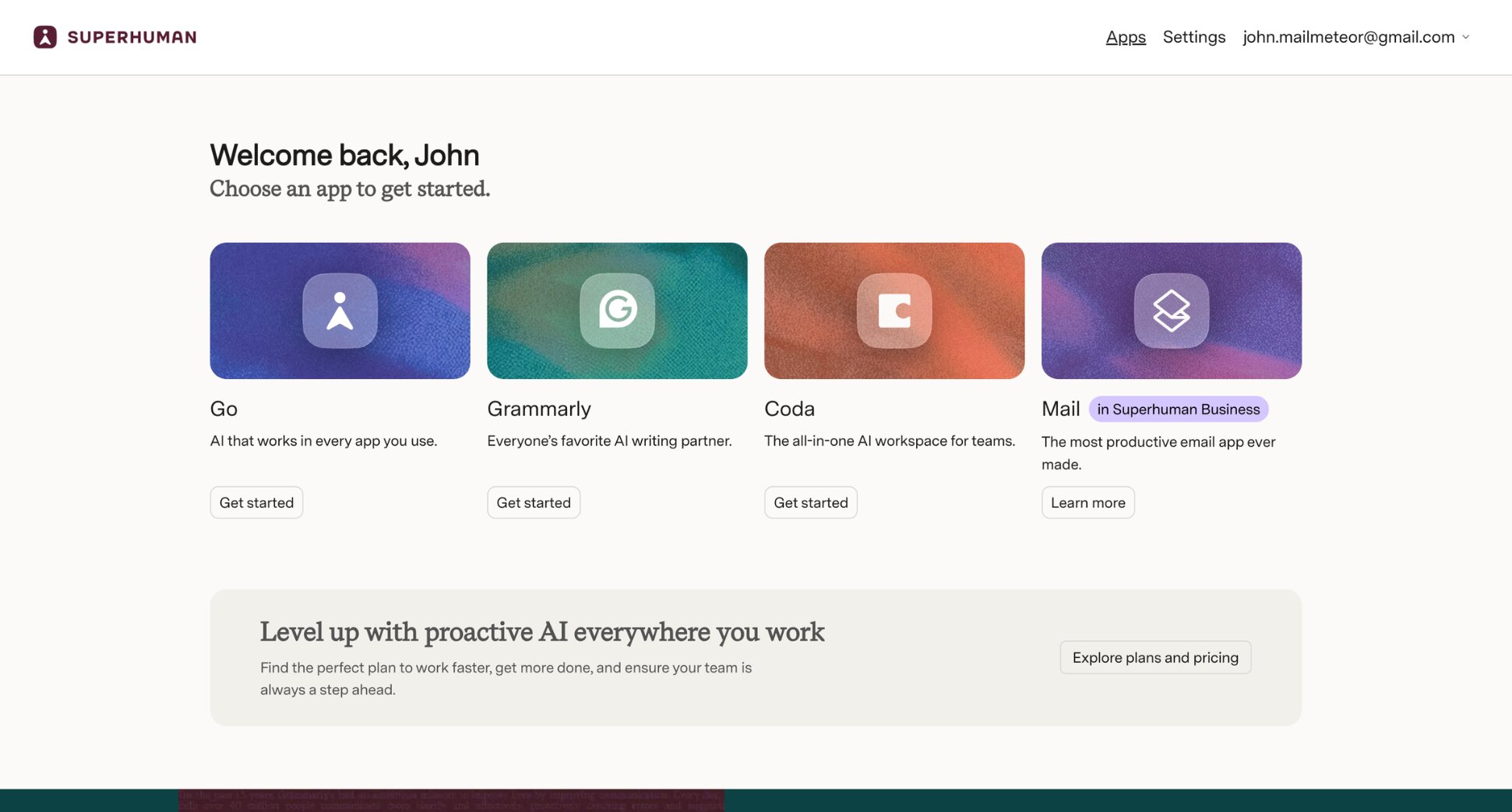
What Superhuman does best:
Speed is the core value. Everything feels instant. Combined with its keyboard shortcuts and split inbox system, Superhuman turns email into a triage workflow instead of an endless scroll. Its AI features are polished but lightweight. You get thread summaries, AI-powered drafts, natural-language search, and tone rewriting — all integrated directly into the compose experience. It’s not trying to automate your entire inbox like Jace or Gmelius. It’s trying to make you faster.
Key AI capabilities include:
- Auto thread summaries
- AI drafting with tone controls
- Ask questions about your inbox in natural language
- Instant replies and auto drafts
- Scheduled follow-ups + reminders
- Read receipts and reply indicators
- Built-in calendar view + availability sharing
- Team comments and shared drafts
Where Superhuman falls short:
Superhuman is powerful — but opinionated and expensive. It’s also not ideal for light email users. If you check your inbox casually a few times a day, the ROI likely won’t justify the price.
- The plans are expensive
- Requires time to learn shortcuts and adapt to its workflow
- Limited deep automation compared to tools like Jace or Gmelius
- AI features are strong, but not radically different from other premium tools
Pricing:
Superhuman offers a free trial, but no free tier.
Annual pricing starts at:
- $25/user/month (Starter) — AI features, split inbox, collaboration, calendar
- $33/user/month (Business) — Auto Drafts, Ask AI, CRM integrations
- Enterprise — Custom pricing with advanced security & support
Verdict:
Superhuman is the best Gmail AI assistant for people who want speed above all else. It doesn’t try to automate everything. It doesn’t try to replace your workflow with rules and triggers. Instead, it gives you a frictionless, keyboard-driven inbox.
If you spend hours a day in Gmail and care about responsiveness, Superhuman is one of the most polished experiences available. If you mainly want AI writing help or automation rules, you’ll find better value in lighter (and cheaper) tools.
→ Looking for a Superhuman alternative? See how Mailmeteor compares to Superhuman.
3. Mailmaestro — Best for Professional Email Drafting
Rating: 4.3 ⭐️ on Capterra
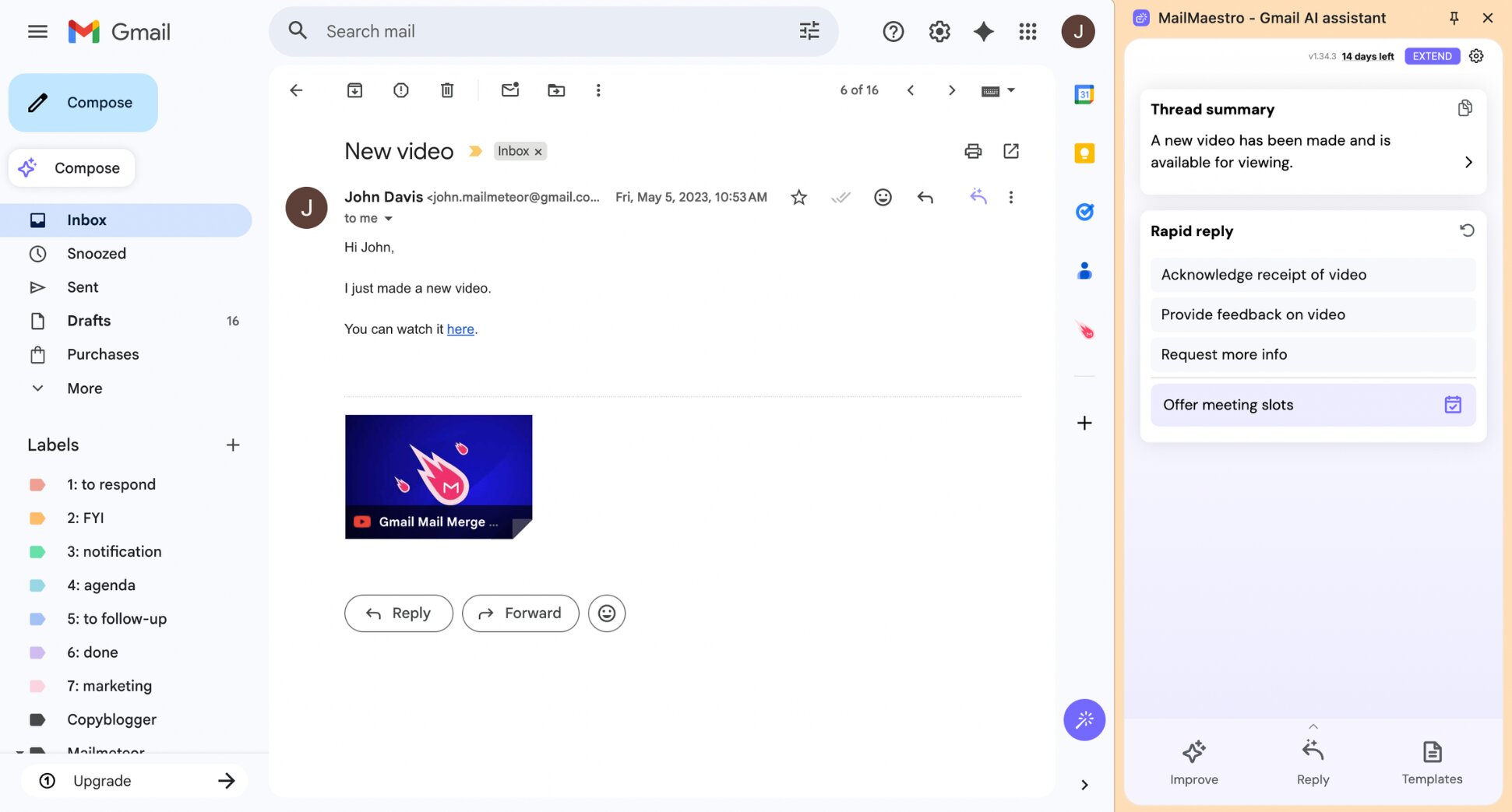
Mailmaestro is built to help professionals write polished emails faster. Unlike workflow-heavy tools that try to automate your entire inbox, Mailmaestro focuses on improving the quality and speed of your communication inside Gmail and Outlook. If your main frustration is staring at a blank reply box — or spending too much time refining tone and structure — this is where Mailmaestro shines.
What Mailmaestro does best:
Mailmaestro is strongest at turning short prompts into professional-grade emails in seconds. You type a simple instruction, and it generates 3 distinct drafts with different tones and structures. During testing, its thread summarization was useful for long back-and-forth conversations. Instead of scrolling through 10+ replies, you get a concise overview plus suggested responses. With its TeamsMaestro add-on, it can also record meetings and generate structured notes.
Key AI capabilities include:
- AI email drafting from short prompts
- One-click contextual replies inside threads
- Full thread + attachment summarization
- Magic templates for repetitive emails
- Smart reminders and follow-up nudges
- AI meeting notes
Where Mailmaestro falls short:
Mailmaestro is excellent for writing — but lighter on automation. If your goal is full inbox automation, it may feel limited. But if your goal is crafting better emails in less time, it delivers.
- No advanced workflow triggers or rule-based automation
- Limited inbox triage compared to tools like Jace or Gmelius
- AI suggestions occasionally require light editing for tone precision
Pricing:
Mailmaestro offers a free trial. But no permanent free plan.
Paid plans start at:
- $12/user/month (MailMaestro) — AI email drafting, thread summaries, tone control
- $17/user/month (TeamsMaestro) — Meeting recording, transcription & summaries
- $25/user/month (MaestroDuo) — Email + meeting assistant bundle
Verdict:
Mailmaestro is one of the best Gmail AI assistants for professionals who care about communication quality. It doesn’t try to reinvent your inbox — it simply helps you write faster, summarize smarter, and reply more confidently.
If your biggest pain point is writing time and tone consistency, Mailmaestro is a strong pick. If you’re looking for deep automation, shared inbox workflows, or rule-based triggers, you may prefer tools like Gmelius or Jace.
4. Gmelius — Best Gmail AI Assistant for Teams
Rating: 4.4 ⭐️ on G2
If your inbox is shared across a team (support@, sales@, billing@), Gmelius goes far beyond a simple AI writing tool. It positions itself as a full Gmail AI assistant for collaborative teams, combining AI drafting, smart routing, and workflow automation directly inside Gmail. At the center of the experience is Meli, Gmelius’ AI assistant that works within Gmail and Google Workspace apps.
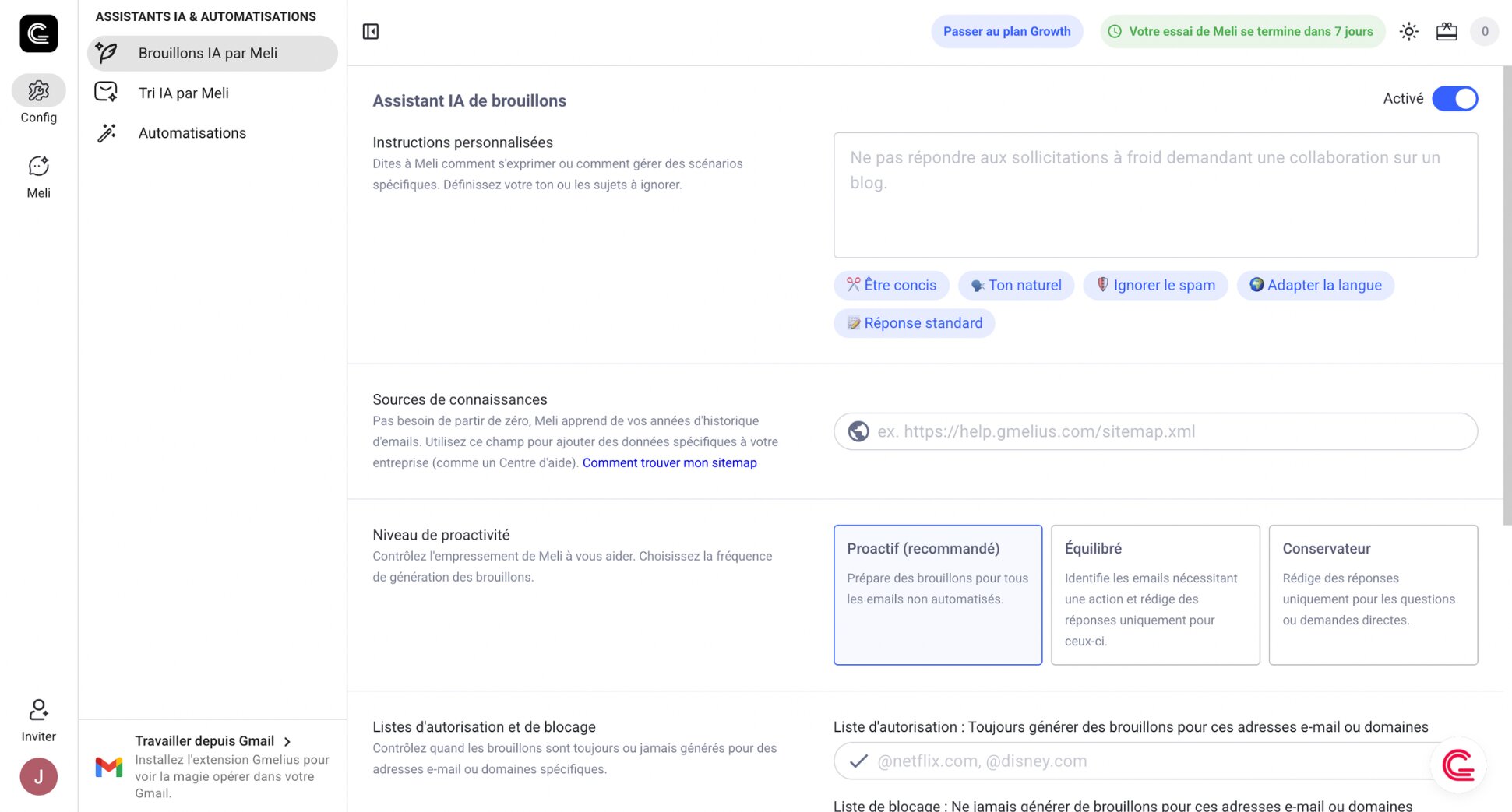
What Gmelius does best:
Gmelius stands out when email becomes a coordination challenge rather than just a writing task. Unlike lighter Gmail AI assistants that focus only on drafting, Gmelius turns Gmail into a lightweight help desk and workflow system. For customer support, sales, and operations teams managing high email volume, that added structure can reduce response times and coordination errors.
Key AI capabilities include:
- AI Draft Assistant that generates replies based on past conversations
- AI Sorting Assistant that automatically categorizes and tags emails
- AI Dispatching Assistant that routes messages to the right teammate
- Shared inboxes directly inside Gmail
- Shared Gmail labels and internal notes with @mentions
- Rule-based automation (If-this-then-that workflows)
- Email analytics and team performance tracking
Where Gmelius falls short:
Gmelius is powerful — but not lightweight. If your primary goal is faster email writing or light inbox cleanup, Gmelius may feel heavier — and more expensive — than necessary. During testing, a few trade-offs stood out:
- Can feel complex for solo users who only need AI drafting
- Adds noticeable interface layers inside Gmail
- Some users report occasional performance slowdowns
- No permanent free plan (7-day trial only)
- Pricing scales quickly for larger teams
Pricing:
Gmelius offers a 7-day free trial. There is no ongoing free tier. For teams managing shared inboxes daily, the pricing can justify itself through automation and coordination gains. For individuals, it may be harder to justify.
Annual pricing starts at:
- $19/user/month (Meli plan) — Core AI assistant features
- $25/user/month (Growth) — Adds shared inboxes and automation
- $40/user/month (Pro) — Advanced AI dispatching and analytics
Verdict:
Gmelius is one of the most advanced Gmail AI assistants for team-based workflows. If you need AI-powered drafting, smart routing, shared inboxes, and structured collaboration inside Gmail, it’s a strong contender.
However, if you’re looking for a lightweight Gmail AI assistant focused primarily on writing quality and personal productivity — without committing to a per-seat collaboration platform — simpler alternatives may offer better value.
5. Shortwave — Best for Reaching Inbox Zero
Rating: ⭐️ 4.4 rating on G2
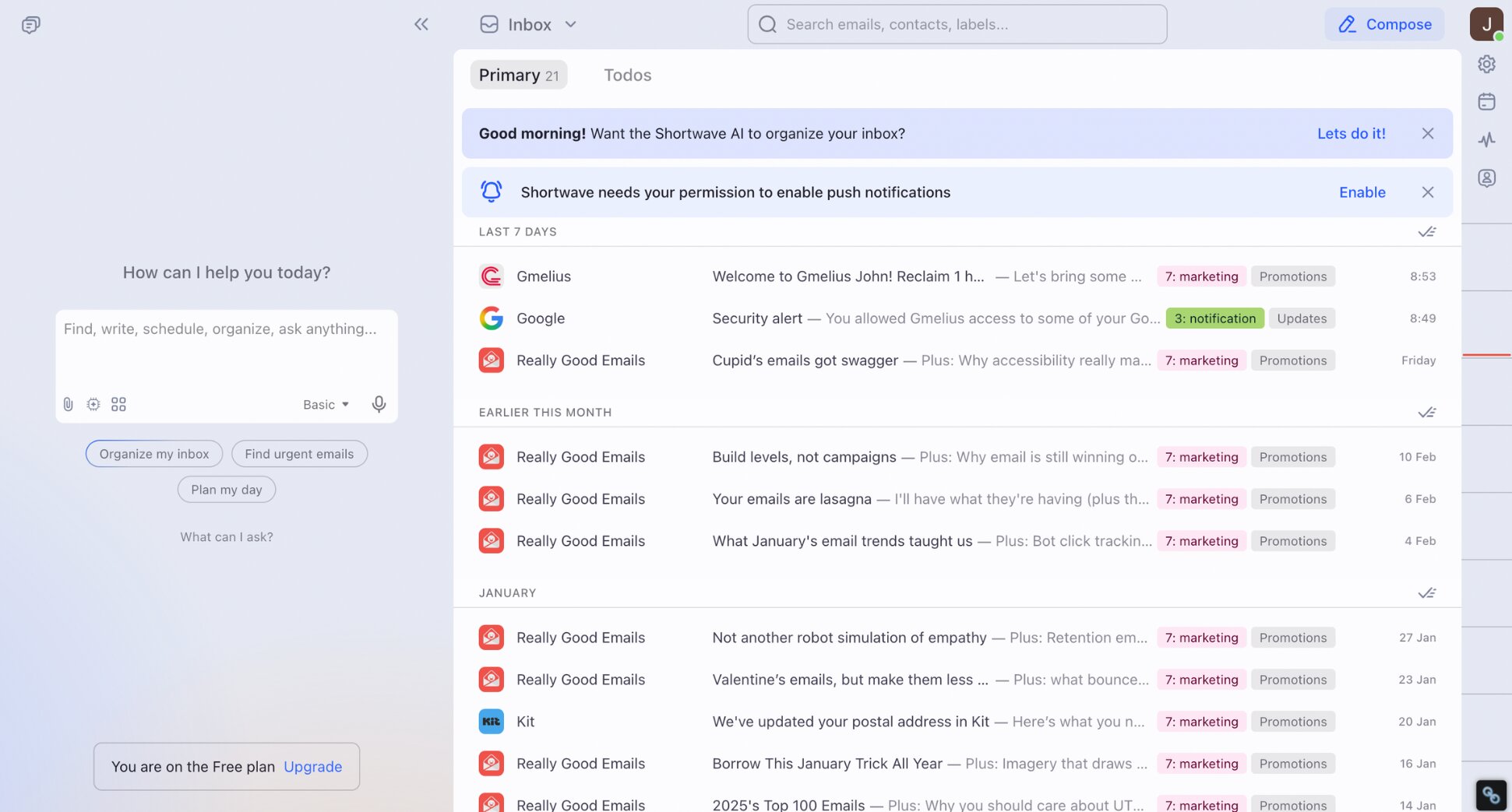
Shortwave is a Gmail-based email client built around the Inbox Zero concept. The idea is that your inbox should function like a task list. Instead of layering AI features on top of Gmail, it redesigns the entire experience to help you quickly process, organize, and clear emails. Every message becomes something you either handle, schedule, or dismiss — no endless scrolling required.
What Shortwave does best:
Shortwave excels at structured inbox triage. Instead of a flat stream of emails, it groups similar messages into Bundles, separates them into focused tabs (Splits), and encourages single-pass processing. The result feels more like a task manager than a message feed — you quickly decide what’s done, what needs follow-up, and what can wait. Emails can be turned into todos, snoozed to return later, or scheduled to arrive at specific times — so low-priority messages don’t interrupt your day.
Key AI capabilities include:
- Natural-language search
- AI assistant that can help schedule meetings
- Instant AI summaries at the top of threads and bundles
- AI drafting + rewriting that learns your voice over time
- AI filters that let you describe a rule in plain English to auto-label messages
Where Shortwave falls short:
Shortwave is powerful — but if you don’t like its triage mentality, you may end up bouncing back to Gmail. And while the AI is impressive on paper, in practice it can feel slower than just doing quick actions manually.
- AI drafting can be hit-or-miss
- Limited bulk unsubscribe vs dedicated cleanup tools
- Cloud-based AI processing may be a no-go for some regulated environments
- The best features are locked behind higher tiers for teams
Pricing:
Shortwave has a free plan, plus paid tiers for individuals and teams.
Annual pricing starts at:
- Free — basic access, limited search history + AI
- $7/user/month (Personal) — removes key free-plan limitations
- $18/user/month (Pro) — more advanced AI + longer history
- $24/user/month (Business) — team features + more AI usage
- $36/user/month (Premier) — advanced intelligence, larger AI context, more filters
- $100/user/month (Max) — highest AI limits + training
Verdict:
Shortwave is one of the best Gmail AI assistants if your main pain is inbox chaos, not just writing. It’s less about generating nicer emails and more about turning email into an organized system: bundles, splits, todos, and AI filters.
If you want the fastest keyboard-first experience, Superhuman still wins. But if you want a more customizable, inbox-zero-first client where AI helps with organization, search, and triage, Shortwave is a top contender.
→ Looking for a Shortwave alternative? See how Mailmeteor compares to Shortwave.
6. Fyxer — Best for AI Meeting Notes
Rating: ⭐️ 4.1 rating on Trustpilot
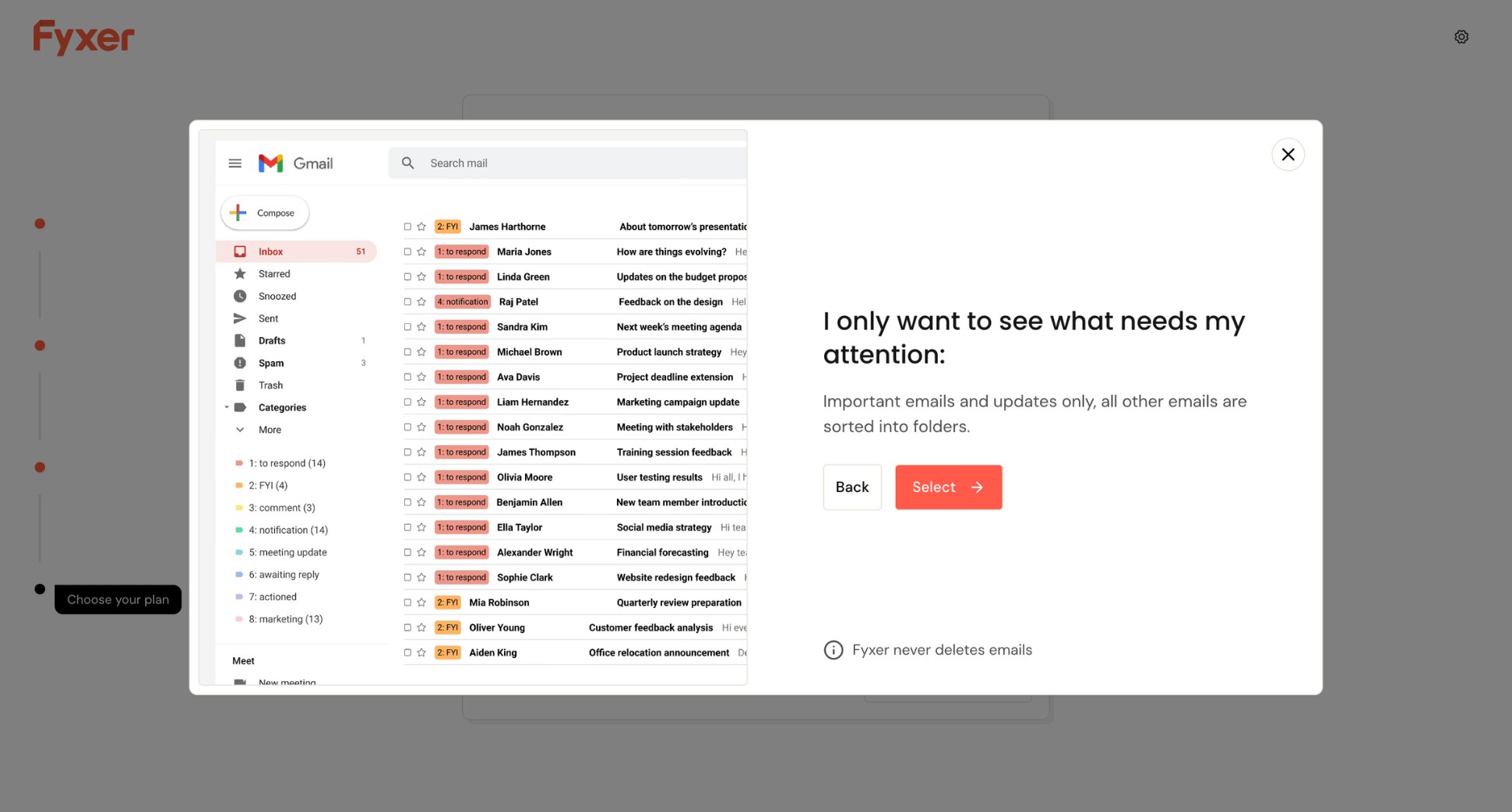
If your workday is packed with meetings, follow-ups, and endless back-and-forth emails, Fyxer positions itself as an AI executive assistant that lives inside Gmail or Outlook. During testing, it felt less like a writing add-on — and more like a behind-the-scenes operations helper. Where Fyxer really stands out is in how it connects email + meetings + follow-ups into one workflow.
What Fyxer does best:
Fyxer shines when your inbox and calendar are tightly connected. In testing, the meeting summary feature was the most impressive part. Notes were clean, structured, and action-oriented — often usable without major edits. For professionals in sales, consulting, recruiting, or operations, that alone can save several hours per week. Unlike lightweight Gmail AI tools, Fyxer feels closer to a digital chief of staff than a drafting assistant.
Key AI Capabilities Include:
- AI inbox categorization
- Pre-written replies that adapt to your tone over time
- Automatic meeting transcription and structured summaries
- AI-generated follow-up drafts after meetings
- Smart scheduling across time zones
- HubSpot integration
- Fyxer Chat to ask questions about your inbox and meetings
Where Fyxer falls short:
Fyxer is powerful — but it’s not frictionless. Trustpilot reviews show strong satisfaction overall, but mixed feedback on reliability and billing friction during cancellation. During testing, a few limitations stood out:
- Important emails sometimes get routed incorrectly
- Pricing can feel steep for solo users
- Draft quality can be inconsistent
- Occasional meeting bot errors
- No mobile app
Pricing:
Fyxer offers a 7-day free trial. But no permanent free plan.
Annual pricing starts at:
- $22.50/user/month (Starter) — 1 inbox + calendar, inbox organization, drafts in your voice, meeting notetaker
- $37.50/user/month (Professional) — Multiple inboxes and calendars, team scheduling, Fyxer Chat, HubSpot integration, file uploads for training
- Custom (Enterprise) — 50+ seats, dedicated account manager, SSO/SCIM, customized onboarding, advanced security controls
Verdict:
Fyxer is best for professionals stuck in back-to-back meetings who then spend another hour handling follow-ups. Its biggest strength is bridging the gap between meetings and email — turning calls into summaries and ready-to-send follow-ups.
If you just want better email writing, it’s likely overkill. But if your real pain is post-meeting admin and a flood of “quick follow-up” threads, Fyxer can reduce that drag. That’s where it earns its price.
→ Looking for a Fyxer alternative? See how Mailmeteor compares to Fyxer.
7. Jace AI — Best for Workflow Automation
Rating: ⭐️ 4.7 rating on Trustpilot
Jace AI positions itself as an autonomous email assistant rather than a Gmail AI writing tool. Instead of waiting for prompts, it proactively organizes your inbox, drafts replies in your voice, and executes repeatable workflows behind the scenes. While many Gmail AI assistants focus on drafting better emails, Jace focuses on reducing the operational load of email itself.
What Jace AI does best:
Jace AI stands out when your inbox runs on repeatable patterns. Instead of manually handling micro-tasks every time, Jace lets you turn them into rules and triggers. For example, you can automatically CC stakeholders based on recipient, apply templates for specific clients, create events from email threads, or label messages by priority and intent. Over time, your inbox starts behaving more like a system than a stream of messages.
Key AI capabilities include:
- Smart inbox labels
- Auto-drafted replies in your voice
- Smart rules + workflow triggers
- AI chat over your inbox
- Follow-up automation
- Multi-inbox support
Where Jace AI falls short:
It’s a powerful layer — but it can feel too proactive if you don’t like automation making assumptions.
- If misconfigured, rules can move emails in ways you didn’t expect
- Improves over time, but the first 1–2 weeks require a lot more editing
- If you receive fewer than ~30 emails/day, the ROI may feel limited
- Navigation feels less polished than premium email clients
- No mobile app
Pricing:
Jace offers a 7-day free trial. But no free plan.
Annual pricing starts at:
- $20/user/month (Plus plan) — Inbox categorization, 2 inboxes, chat with 1 year of email history, 10 auto-drafts/day
- $40/user/month (Pro plan) — Up to 8 inboxes, chat with 3 years of history, 30 auto-drafts/day, advanced/custom integrations
- Custom (Enterprise) — White-glove setup, usage-based pricing, dedicated account manager
Verdict:
Jace is a strong pick if you want an assistant that automates the boring parts of email end-to-end — not just drafting. It’s valuable for busy teams who need prioritization, follow-ups, and cross-tool actions to happen automatically.
If you mainly want faster email writing, you’ll get similar results from lighter tools. But if you want workflows, Jace AI is one of the most hands-off options in this list. This tool doesn’t just generate text — it executes patterns.
→ Looking for a Jace AI alternative? See how Mailmeteor compares to Jace AI.
How We Evaluated These Gmail AI Assistants
To make this comparison practical, we tested each Gmail AI assistant inside active Gmail accounts. Our goal was simple: identify which tools actually save time — and which ones just look good on paper.
Here’s the framework we used ⤵️
1. AI Writing Quality
At its core, a Gmail AI assistant should help you write better emails faster.
We evaluated:
- Context awareness inside email threads
- Tone control (formal, friendly, concise, persuasive)
- Quality of summaries
- Accuracy of suggested replies
- How much editing was required before sending
Some tools produced generic drafts. Others generated responses that felt natural and context-aware.
2. Inbox Organization & Automation
Not all Gmail AI assistants go beyond writing.
We assessed whether each tool could:
- Automatically categorize or prioritize emails
- Generate draft replies proactively
- Suggest or automate follow-ups
- Trigger actions (calendar events, CRM updates, integrations)
This is where major differences appeared between basic AI writing tools and full workflow automation assistants.
3. Ease of Setup & Gmail Integration
An AI tool should reduce friction — not add more complexity.
We looked at:
- Installation time
- Whether it works directly inside Gmail
- Learning curve
- Interface clarity
- Desktop and mobile compatibility
Tools that required switching to external dashboards or complicated configuration scored lower on usability.
4. Pricing & Free Plan Value
Finally, we compared cost versus capability.
We analyzed:
- Whether a free Gmail AI assistant plan is available
- What features are included in entry-level tiers
- Scalability for individuals vs teams
- Whether advanced AI features require premium subscriptions
Some tools offer generous free plans and fair pricing. Others lock key features behind expensive upgrades.
How to Choose the Right Gmail AI Assistant
Choosing the best Gmail AI assistant isn’t about picking the tool with the most features. It’s about identifying your biggest email bottleneck. Start by asking yourself: what actually slows you down?
1. If Writing Takes Too Long
If you spend too much time drafting, rewriting, or adjusting tone, prioritize AI writing quality. Look for tools that offer:
- Context-aware replies inside threads
- Tone controls (formal, concise, persuasive…)
- Strong summarization of long conversations
- The ability to learn from your email history, past replies, and writing patterns
Best fits: Mailmaestro, Superhuman, or Gemini.
2. If Your Inbox Feels Overwhelming
If your problem isn’t writing — it’s volume — look for tools that improve triage and organization with features like:
- Automatic categorization
- Bundling or priority splits
- Natural-language inbox search
- Smart filtering rules
Best fits: Shortwave, Jace AI, or Gmelius.
3. If Follow-Ups Slip Through the Cracks
If your biggest issue is forgetting to follow up or track replies, you need workflow support — not just AI drafting.
Look for:
- Automatic follow-ups
- Email tracking
- Sequences
- Reply detection
Best fit: Mailmeteor.
4. If Meetings Create Email Overload
If most of your inbox chaos comes after meetings, prioritize tools that connect email + calendar:
- Automatic meeting summaries
- Action item extraction
- AI-generated follow-ups
- Smart scheduling
Best fit: Fyxer or Mailmaestro.
5. If You Want Hands-Off Automation
If you’re dealing with repeatable email patterns (routing, labeling, reminders, CC rules), choose a tool with real workflow triggers:
- If-this-then-that rules
- Auto-drafted replies
- Smart routing
- Cross-tool integrations
Best fit: Jace AI or Gmelius.
Conclusion
AI in Gmail is no longer a novelty — it’s quickly becoming the default. The real question isn’t whether to use a Gmail AI assistant, but how much of your email workflow you want to delegate. Some tools act as smarter keyboards. Others redesign the inbox entirely. A few go further and automate follow-ups, routing, and coordination behind the scenes.
If your goal is simple drafting help, Gemini may be enough. But if you want measurable productivity gains — fewer missed follow-ups, better tracking, and emails that actually convert into replies — you need more than just smarter sentences. That’s where Mailmeteor stands out. It keeps Gmail familiar while adding the practical layer most professionals actually need:
- AI-powered drafting and tone adjustments inside Gmail
- Smart email categorization to reduce inbox noise
- Mail merge campaigns without leaving your inbox
- Automatic follow-ups so opportunities don’t slip
- Real-time tracking (opens, clicks, replies)
- Drip sending and scheduling to protect deliverability
Instead of replacing Gmail, it upgrades it — turning your inbox into a lightweight outreach and follow-up system. Try Mailmeteor’s Gmail AI assistant today (it’s free!) and see how much email work you can remove from your day.
FAQs
Is Gemini free to use in Gmail?
No. Gemini in Gmail is available through eligible Google Workspace and AI plans. Most free Gmail accounts don’t have full access. If you want a free Gmail AI assistant, some third-party tools (like Mailmeteor) offer free plans.
Can AI automatically reply to emails in Gmail?
AI can draft replies, but you still need to review and send them manually. Advanced Gmail AI assistants can also suggest follow-ups and automate workflows — but fully automatic sending is rare.
Can AI summarize email threads in Gmail?
Yes. Gemini can summarize long threads directly inside Gmail. Other Gmail AI assistants can also extract key points and action items.
Is it safe to use a Gmail AI extension?
It depends on the tool. Choose apps listed on the Google Workspace Marketplace, check reviews, and verify their privacy policy. Avoid unknown extensions with broad email access.
Can I use multiple Gmail AI assistants at the same time?
Yes — but it’s not recommended. Multiple extensions can slow Gmail down and create overlapping features. One well-integrated tool is usually better.
How do I turn off Gemini in Gmail?
In Gmail, go to Settings > See all settings > Smart features and disable Gemini (if available). Workspace admins can also manage it from the Admin Console.
What’s the best free Gmail AI assistant?
If you’re looking for a free Gmail AI assistant, Mailmeteor offers the most complete entry-level plan. It includes smart drafting, tone adjustments, and email categorization — without requiring a paid Google upgrade.
Is there a ChatGPT for Gmail?
Not officially. But several Gmail AI assistants use GPT-style models to draft, rewrite, and summarize emails inside Gmail. If you’re a ChatGPT Plus user, you can also connect ChatGPT to Gmail using integrations like Zapier or API-based workflows. This allows you to analyze emails, generate replies, or trigger actions — but it’s not built directly into the Gmail interface.


