Before you send out invitations, you need to make sure people are available. That’s the job of a save the date email — a quick heads-up that helps your guests block the day long before the details are finalized.
Everyone’s calendar is packed with meetings, travel, family events, and deadlines. A simple save the date cuts through the noise and tells people, “Hey, keep this day open.” It’s a small gesture that can make a big difference in turnout.
But writing a great save the date isn’t just about sharing the date. It’s about setting the tone, giving just enough information, and making sure your guests know this is something they won’t want to miss.
In this guide, you’ll learn how to write a save the date email, when to send it, and what it should say. You’ll also get 7 polished templates for business and personal events — plus tips on sending save the dates at scale with mail merge.
Here’s what we’ll cover:
- What Is a Save the Date Email?
- When Should You Send a Save the Date Email?
- What to Include in a Save the Date Email
- 7 Save the Date Email Templates to Lock In Your Guests Early
- How to Write a Save the Date Email That Gets People to Show Up
- How to Send Personalized Save the Date Emails at Scale
Sounds good? Then let’s dive in.
What Is a Save the Date Email?
A save the date email is an early heads-up you send before the official invitation. The purpose of this message is simple: tell people the event is happening and make sure they reserve the date.
Unlike a full invitation, a save the date doesn’t need to include all the details. At this stage, you’re only confirming:
- What the event is
- When it will take place
- Where (if known)
- And that more information will follow
Save the date emails are used for business and personal events — from conferences and webinars to weddings, birthdays, or product launches. They help reduce scheduling conflicts and improve attendance by giving people time to plan ahead.
Think of it as a friendly nudge that says: “Mark your calendar — you’ll want to be there.”
When Should You Send a Save the Date Email?
When it comes to save the date emails, timing is everything. Send your message too early, and people may forget about it. Send it too late, and their calendars may already be full.
As a rule of thumb, you should send a save the date as soon as the event date is confirmed — even if the agenda or full details aren’t finalized yet. But the optimal timing depends on the type of event.
For Business Events
For professional events, scheduling conflicts are extremely common. People juggle meetings, travel, conferences, and internal deadlines — so advance notice makes a real difference, especially if you’re targeting busy executives.
Here’s when to send save the dates for business-related events:
- Conferences: 4–6 months in advance
- Corporate events: 2–4 months in advance
- Webinars: 2–4 weeks in advance
- Product launches: 4–8 weeks in advance
- Workshops or training sessions: 4–6 weeks in advance
- Client events: 4–8 weeks in advance
For Personal Events
Personal gatherings often require travel planning, babysitters, and time off — which means earlier is better. If many guests are coming from out of town, always send the save the date early to ensure they can plan ahead.
Here’s when to send save the dates for personal events:
- Weddings: 6–12 months in advance
- Engagement parties: 2–4 months in advance
- Birthday parties: 3–6 weeks in advance
- Baby showers: 6–8 weeks in advance
- Holiday gatherings: 1–3 months in advance
What to Include in a Save the Date Email
A save the date email doesn’t need to be long — but it does need to include a few essentials. Your goal is simple: give people enough information to block the date, without overwhelming them with details you haven’t finalized yet.
Here’s what every save the date should include:
- A clear “Save the Date” message (in the subject line or first sentence)
- The date of the event (and time, if known)
- The name or purpose of the event (conference, wedding, webinar…)
- The location (or a note saying “Location coming soon” / “Hosted online”)
- A short teaser or reason to attend (optional but helpful)
- A note that full details will follow (to reduce questions)
- A gentle CTA such as “Add this to your calendar”
That’s it. No agenda, no instructions, no RSVP requirement — just the essentials people need to block the date. All the details, logistics, and the formal invitation will come later.
7 Save the Date Email Templates to Lock In Your Guests Early
In a rush or not sure how to phrase your save the date email? No worries — we’ve done the work for you. Below are 7 customizable templates tailored for corporate events, webinars, weddings, birthdays, product launches, and more.
1. Save the Date for a Corporate Event
Hi {{ FirstName }},
We’re excited to let you know that {{ Company }} will be hosting {{ EventName }} on {{ Date }}.
More details — including the agenda, venue, and speakers — will follow soon. In the meantime, please save the date so you don’t miss it.
- Event: {{ EventName }}
- Date: {{ Date }}
- Location: {{ Location }}
Looking forward to seeing you there.
Best regards, {{ Signature }}
2. Conference Save the Date
Hi {{ FirstName }},
We’re pleased to announce that {{ ConferenceName }} will take place on {{ Date }}.
Full details — including the program, speakers, and registration information — will be shared soon. For now, please save the date so you can join us.
- Conference: {{ ConferenceName }}
- Date: {{ Date }}
- Location: {{ Location }}
We hope to see you there.
Best, {{ Signature }}
3. Webinar Save the Date
Hi {{ FirstName }},
We’re excited to announce an upcoming webinar on {{ WebinarTitle }}, happening {{ Date }} at {{ Time }} ({{ Timezone }}).
This session will cover the key insights, strategies, and real-world examples you need to {{ Benefit }} — and it’s completely free to join.
Save the date: • Topic: {{ WebinarTitle }} • Date: {{ Date }} • Time: {{ Time }} ({{ Timezone }})
We’ll send the agenda and registration link shortly. For now, make sure to block the date so you don’t miss out.
See you there, {{ Signature }}
4. Wedding Save the Date
Hi {{ FirstName }},
We’re excited to share some happy news — we’re getting married!
It would mean a lot to us if you could save the date:
- Date: {{ Date }}
- Location: {{ City / Venue }}
We’re still working out the details, but we wanted to make sure you had the date saved. We’ll share the full invitation — with the schedule, venue info, and travel details — very soon.
We hope you’ll be there to celebrate this moment with us.
Warm wishes, {{ CoupleNames }}
5. Birthday Save the Date
Hey {{ FirstName }},
Heads up — I’m officially turning {{ Age }} on {{ Date }}, and I’m planning a little something to celebrate.
Can you keep that day free? 🎉
Details are still in the works (I promise there will be cake… or at least something cake-adjacent). I’ll send the official invite soon with the where/when/what.
For now, just save the date — I’d love to have you there :)
More soon! {{ Signature }}
6. Product Launch Save the Date
Hi {{ FirstName }},
We’ve been working on something we’re incredibly excited about — and we can finally share it soon.
On {{ Date }}, we’ll be unveiling a new {{ product }} designed to help {{ audience }} achieve {{ benefit }}.
Details are still under wraps, but here’s what you can expect:
- A first look at our new release
- A live walkthrough of the key features
- Early access opportunities for attendees
A full invitation with the agenda, link, and all the announcements will follow shortly.
Looking forward to sharing what we’ve built, {{ Signature }}
7. Party Save the Date
Hi {{ FirstName }},
A quick heads-up — we’re throwing a party on {{ Date }}, and we’d love for you to be there.
We’re still putting the finishing touches on the plan, but expect good music, good people, and a night worth marking on your calendar :)
- When: {{ Date }}
- Where: {{ Venue }}
- What: {{ Theme }}
A proper invitation with all the details — schedule, vibe, and how to get there — will follow shortly.
Hope you can make it, {{ Signature }}
How to Write a Save the Date Email That Gets People to Show Up
A good save the date doesn’t just share a date — it gets people excited enough to mark their calendars. Even with minimal details, the way you phrase your message can make the difference between “I’ll see if I can make it” and “Count me in.” Here’s how to write a save the date email that stands out.
1. Start with a clear subject line
Your subject line is the only part of your email everyone is guaranteed to read — so make it immediately obvious why you’re writing. Skip clever wordplay or suspense. The goal is clarity, not creativity.
A strong save-the-date subject line should:
- Clearly state that it’s a save the date
- Mention the event (conference, webinar, wedding, party…)
- Include the date if possible
Here are some examples:
- Save the Date: {{ EventName }} — {{ Date }}
- {{ EventName }} — Save the date
- Save the Date — {{ EventName }} is coming!
When people scan their inbox later, a clear subject line makes your email easy to find — and harder to forget.
2. Lead with the key information
People open save the dates for one reason. And that’s to know when and where the event is happening. Don’t bury this information in the middle of the email — put it right at the top so readers can scan it instantly.
A simple format works best:
- When:
- Where:
- What:
If your event doesn’t have a venue yet, just list what you do know. “Location to come” is perfectly fine. The goal is to help people decide whether they can make it — and that starts with the basics.
3. Give a brief reason the event matters
Even though save the dates are short, a single sentence explaining why the event is worth attending can make a big difference. You’re not selling the full experience yet — just giving a hint of what makes this date worth reserving.
A few examples:
- “We’re bringing together 500+ leaders in for a day of insights and networking.”
- “We can’t wait to celebrate this milestone with the people who matter most.”
- “We’re announcing something big — and we want you to be among the first to see it.”
One line is enough. Think of it as a teaser that builds anticipation without giving away the full agenda.
4. Set expectations about what comes next
A save the date isn’t the official invitation, so be clear that more details are coming. This reassures your readers that they don’t have to take action yet — they just need to mark the date.
You can phrase it like this:
- “A full invitation with the schedule and details will follow soon.”
- “We’ll share the agenda, speakers, and logistics as we get closer.”
- “More information — including venue and RSVP instructions — is on the way.”
This keeps your message short and prevents people from replying with questions you’re not ready to answer.
5. Make it easy to add the event to their calendar
Want more people to actually show up? Help them add the date to their calendar with one click. Most people won’t do it unless you make it effortless. Once it’s locked in their schedule, the chances of conflict — or forgetting — drop dramatically.
You have two easy choices:
- Attach a calendar file (.ics): An .ics file works everywhere — Google Calendar, Outlook, Apple Calendar, mobile apps. Just attach it to your email and mention it clearly (“You can add the event to your calendar using the attached .ics file.”)
- Add an “Add to Google Calendar” link: Ideal if most guests use Gmail or Google Calendar. It lets them add the event instantly — one click, no downloads, no attachments.
How to Send Personalized Save the Date Emails at Scale
If you’re inviting more than a handful of people, sending save the dates manually becomes slow — and easy to mess up. Names get misspelled, details get copied incorrectly, and reminders fall through the cracks.
The good news? With the right workflow, you can draft your message in seconds, personalize it for every guest, schedule automated follow-ups, and even track who opened or clicked the email. Here’s how it works.
1. Use AI to Draft Your Save the Date Email
Before you start personalizing, you need a solid message. Instead of writing it from scratch, you can use Mailmeteor’s AI Email Writer to generate a clear, polished save the date in just a few seconds.
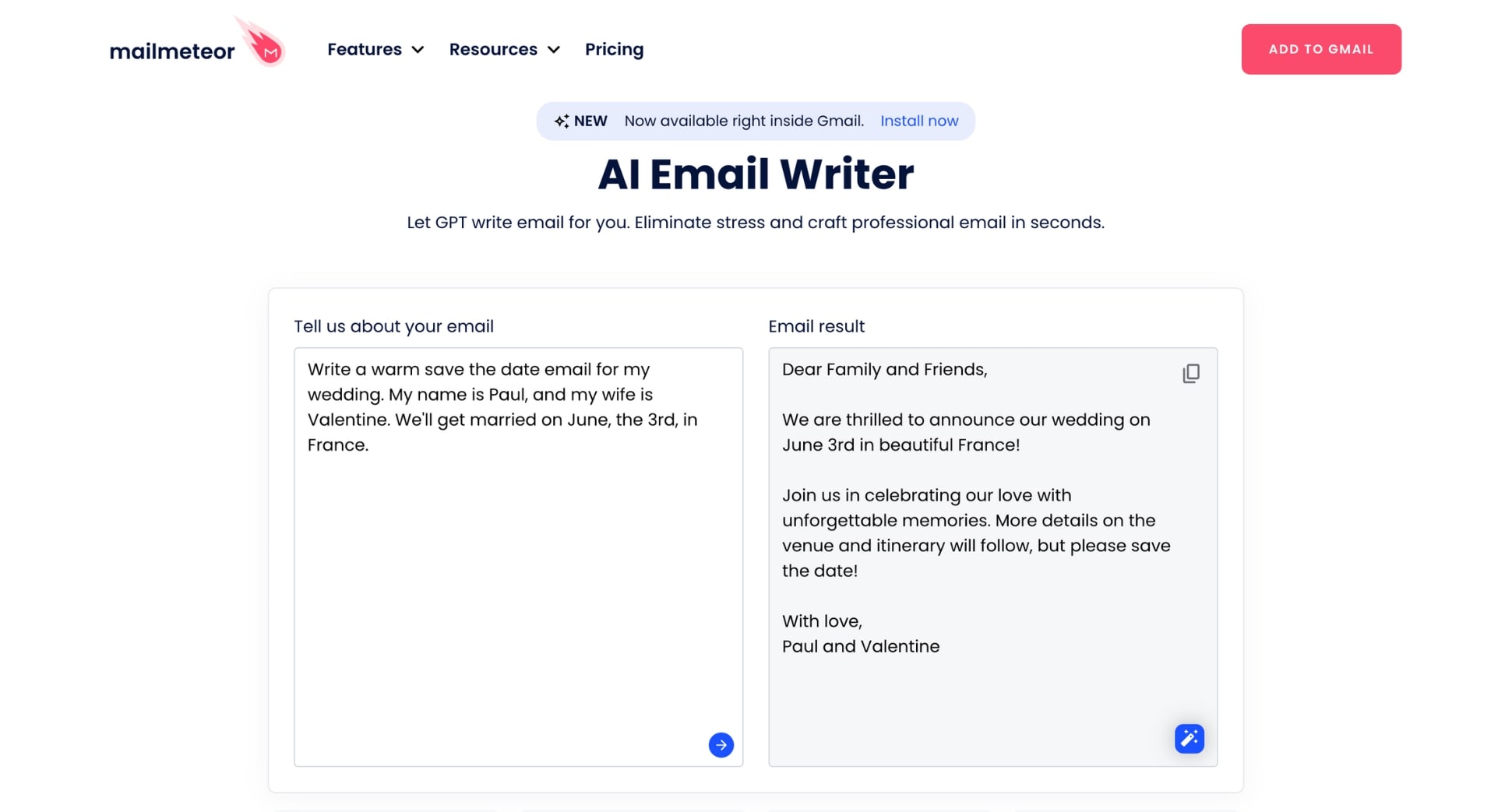
All you have to do is describe the event (date, purpose, audience), and the AI will produce a concise, professional save the date you can use as your starting point. You can regenerate, refine, or expand it until it matches the tone you want.
2. Personalize Each Email Automatically with Mail Merge
Once your save the date message is ready, the next step is making it feel personal — even if you’re sending it to 20, 200, or 2,000 people. That’s where mail merge comes in.
With Mailmeteor, you can pull guest information (names, companies, roles, RSVP links, etc.) directly from a Google Sheet and automatically insert it into each email using variables like {{ FirstName }} or {{ EventName }}.
Here’s how it works:
- Install Mailmeteor’s Google Sheets add-on.
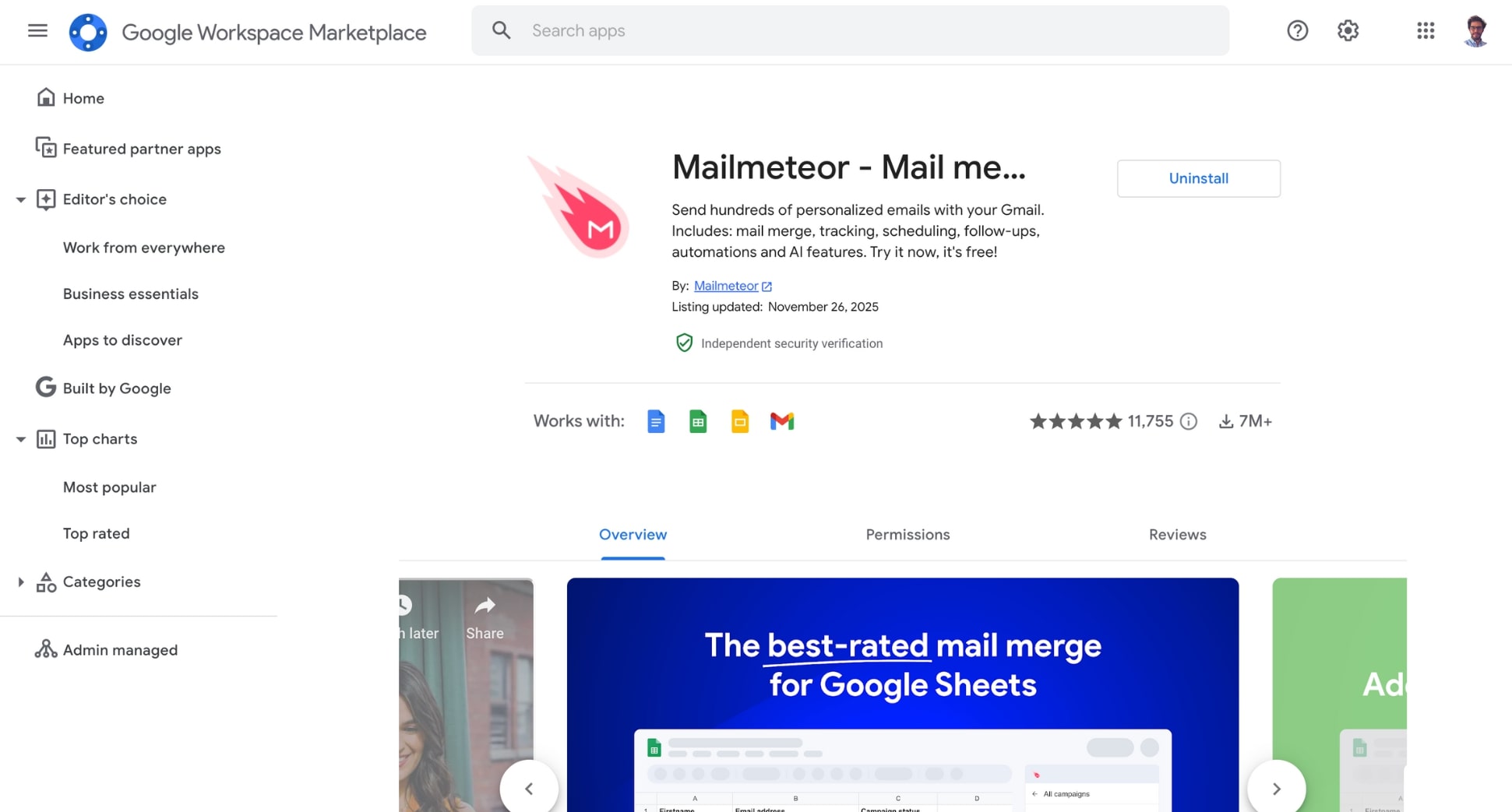
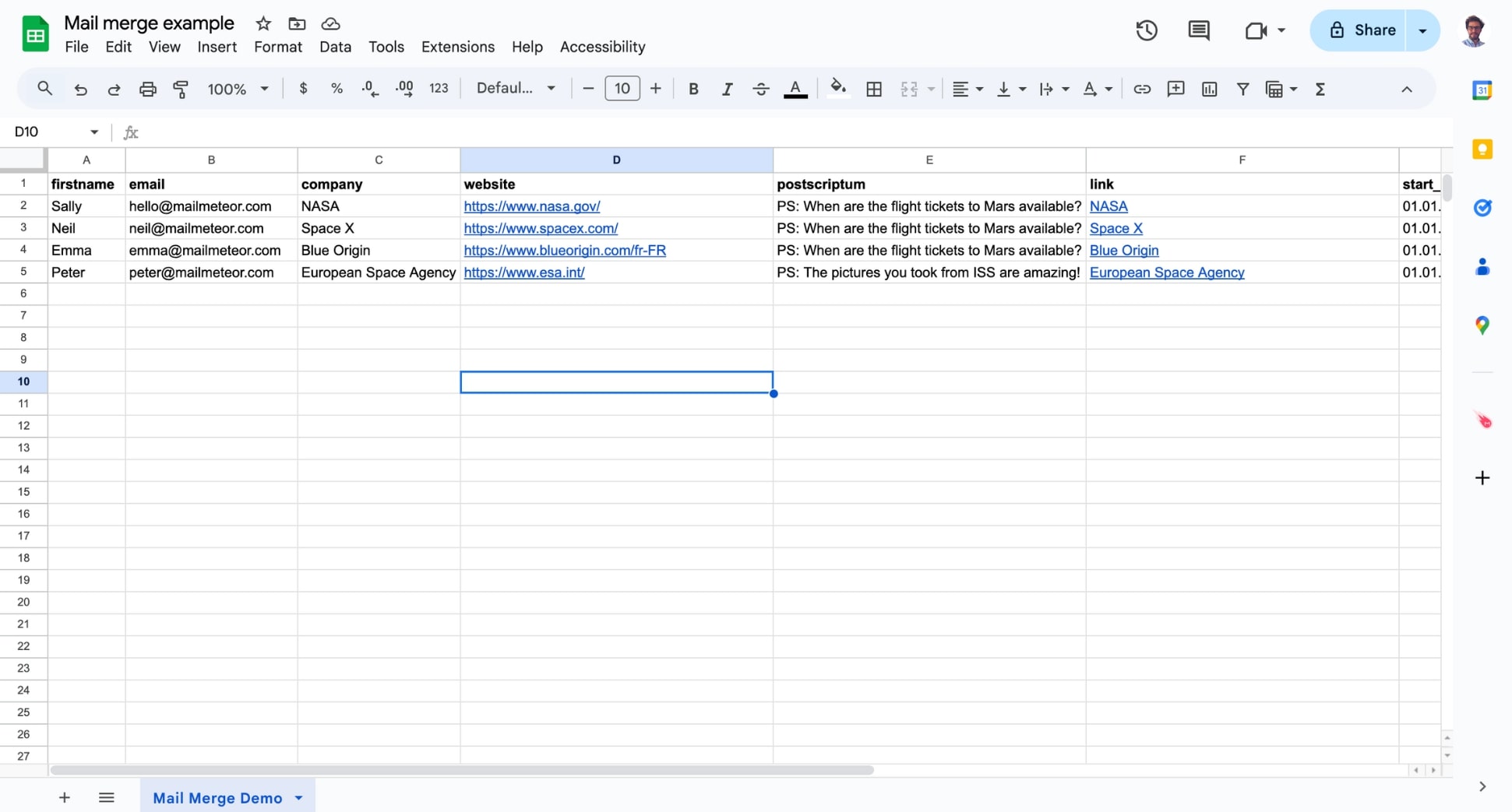
- Create a Google Sheet with your guest list. Add columns for any details you want to personalize (name, address, role, etc.).
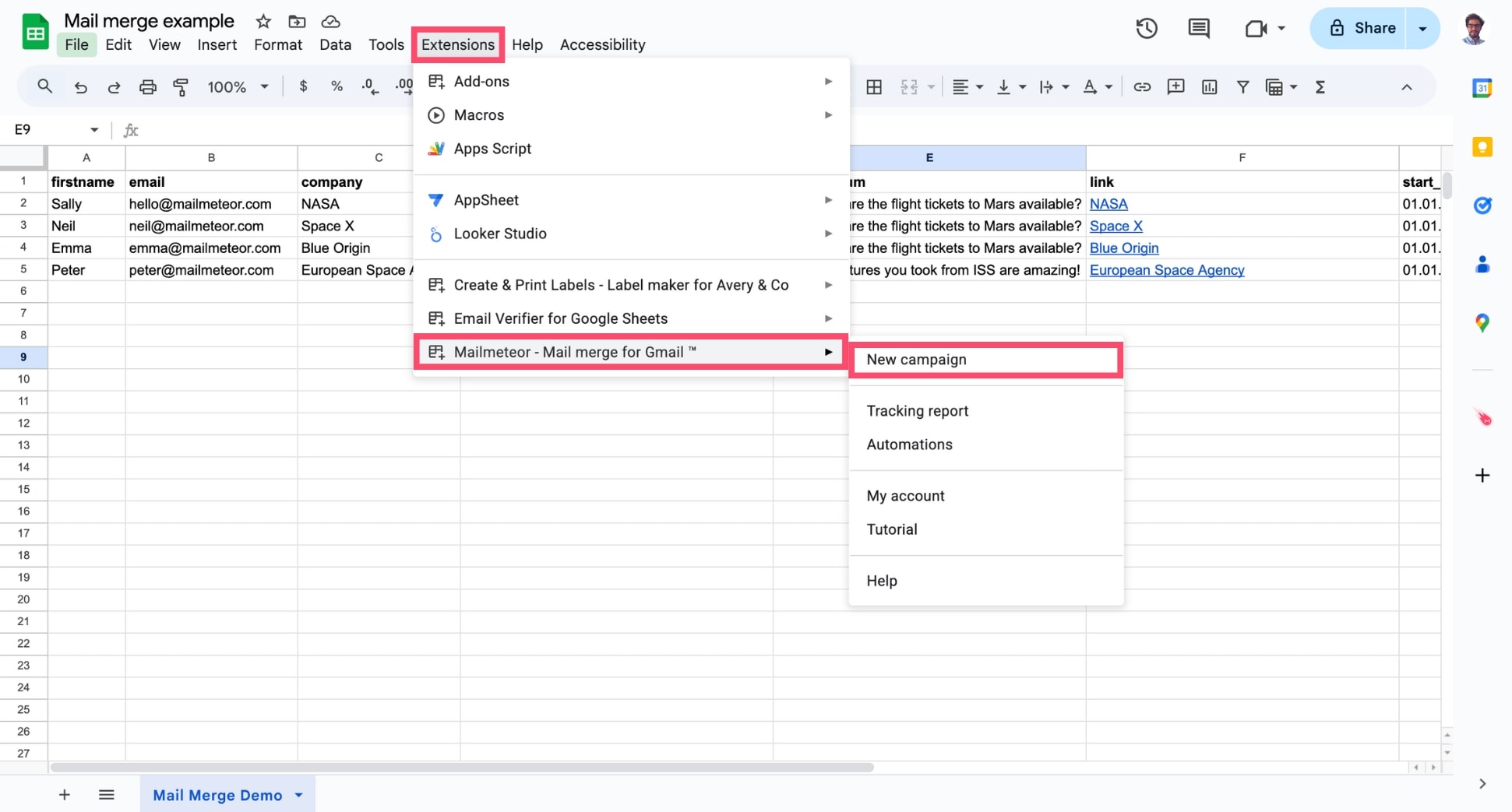
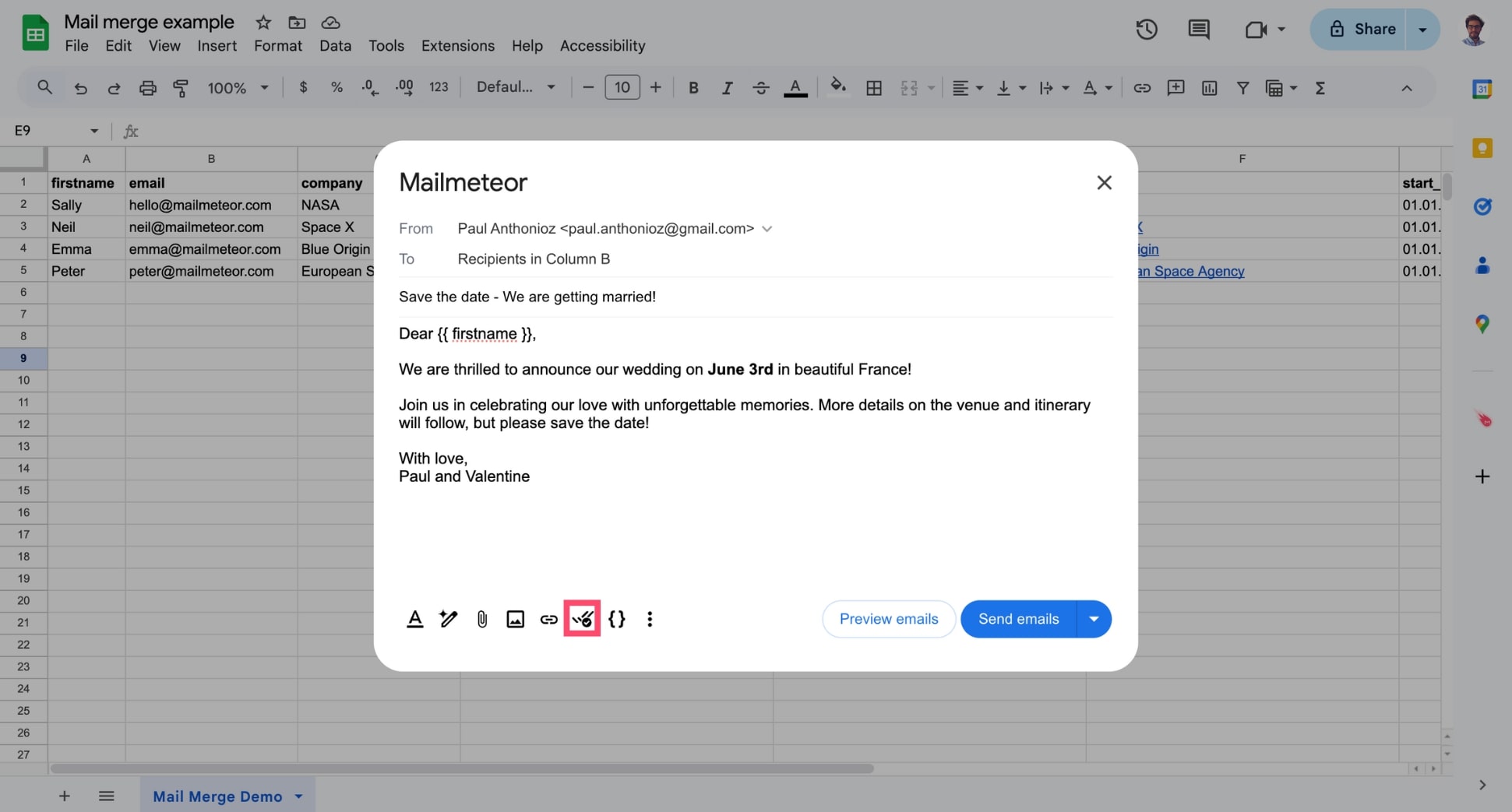
- Open Mailmeteor in Google Sheets to connect your list and prepare the merge..
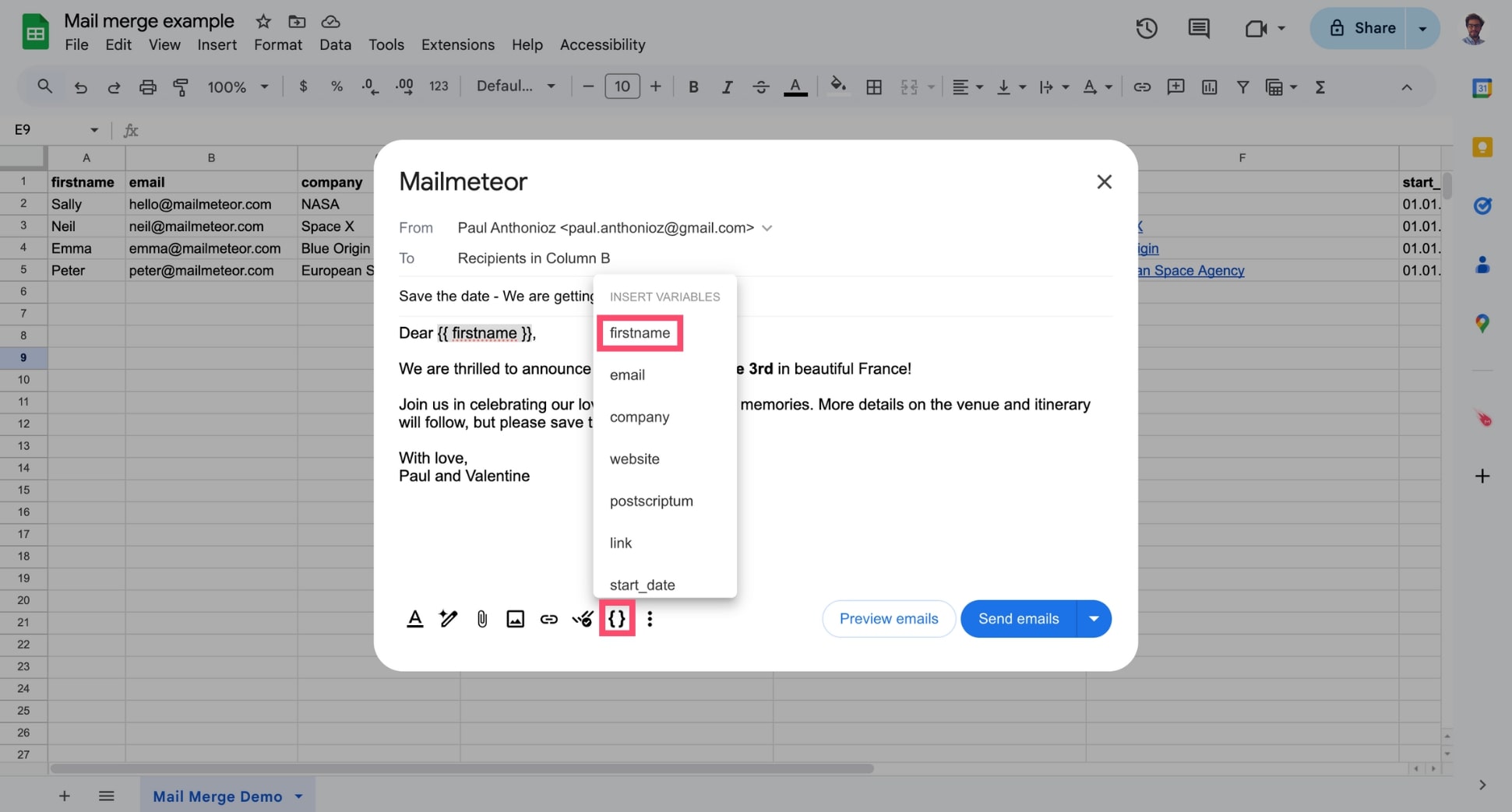
- Write or paste your save the date email, then insert variables like or where personalization should appear.
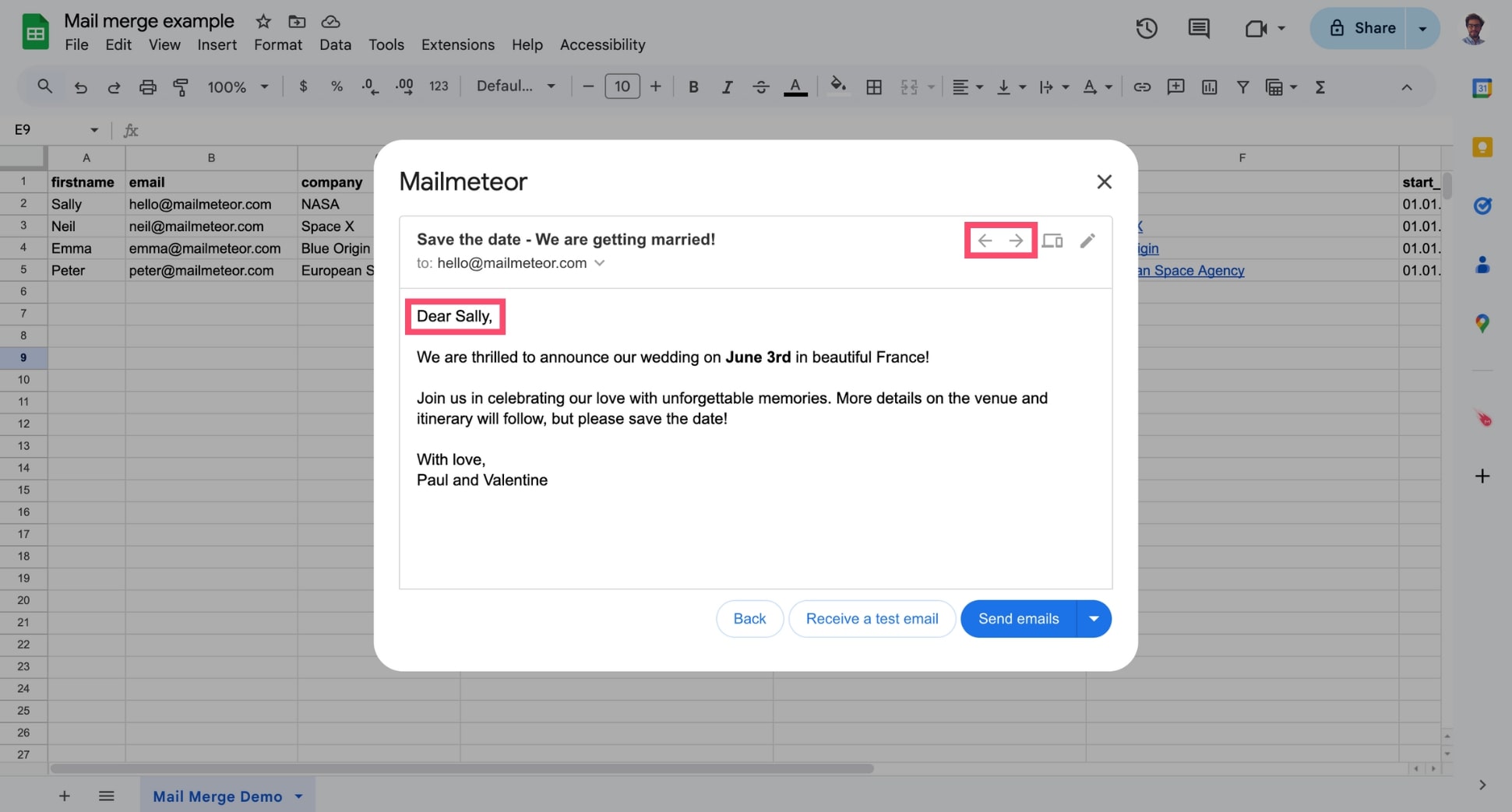
- Preview your emails to make sure every variable is pulling the right information. You can use the Left and Right arrows to preview each message.
- Click Send emails.
And voilà. Each recipient will now receive a personalized version of your save the date. This approach makes your message more human, boosts attendance, and eliminates the risk of copy-paste errors.
3. Schedule Smart Reminders to Keep Your Event Top of Mind
Even with a save the date email, people get busy — calendars fill up, inboxes pile up, and your message can slip out of sight. Sending one or two well-timed reminders dramatically increases the chances that guests will actually show up.
Here’s how to automate your save-the-date follow-ups:
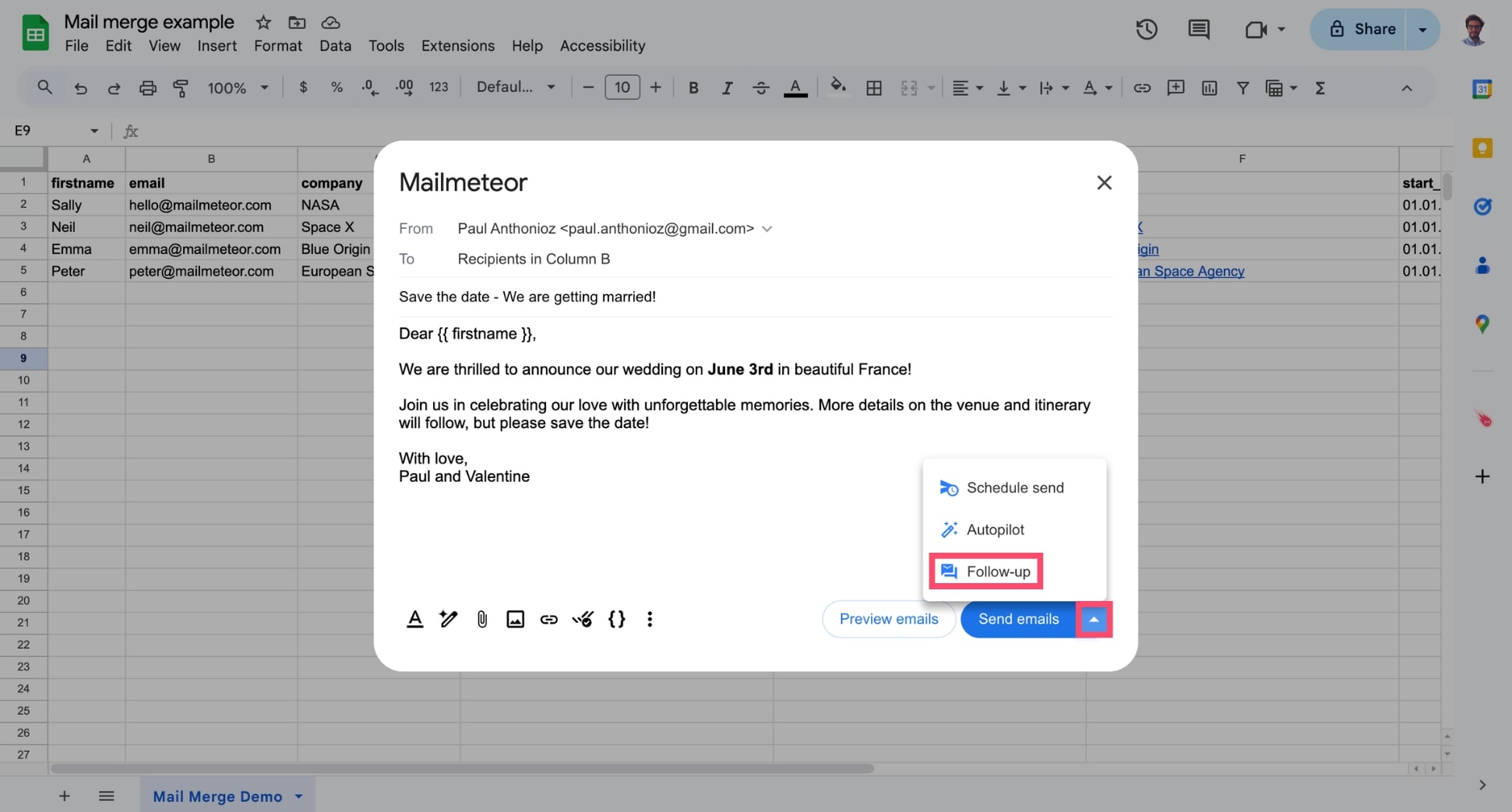
- In Mailmeteor, before sending your follow-up, click the arrow next to Send emails and select Follow-up.
- Write your reminder message and add variables like to personalize it.
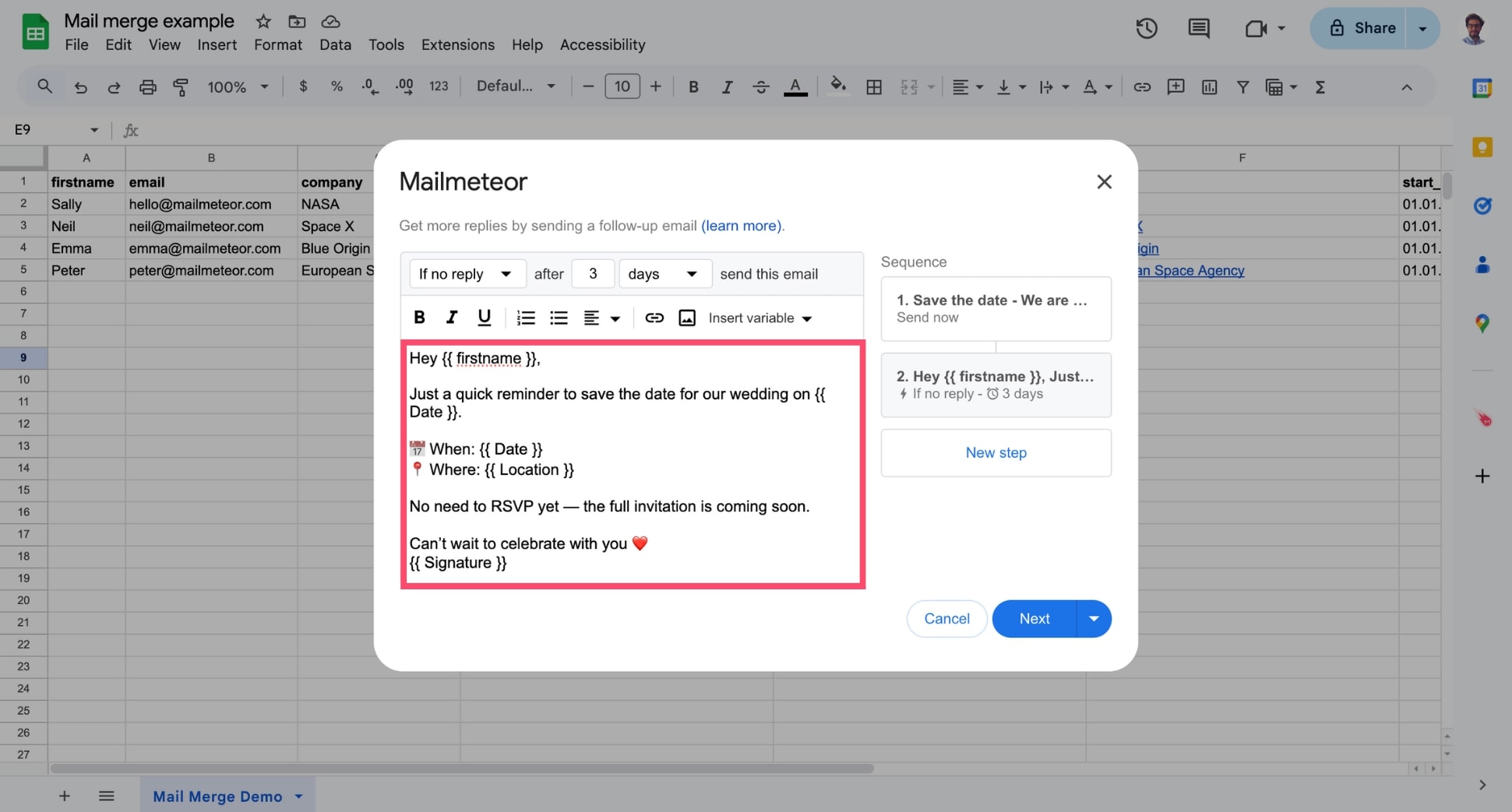
- Choose when the reminder should be sent. For example: Send if no opens after 3 days.
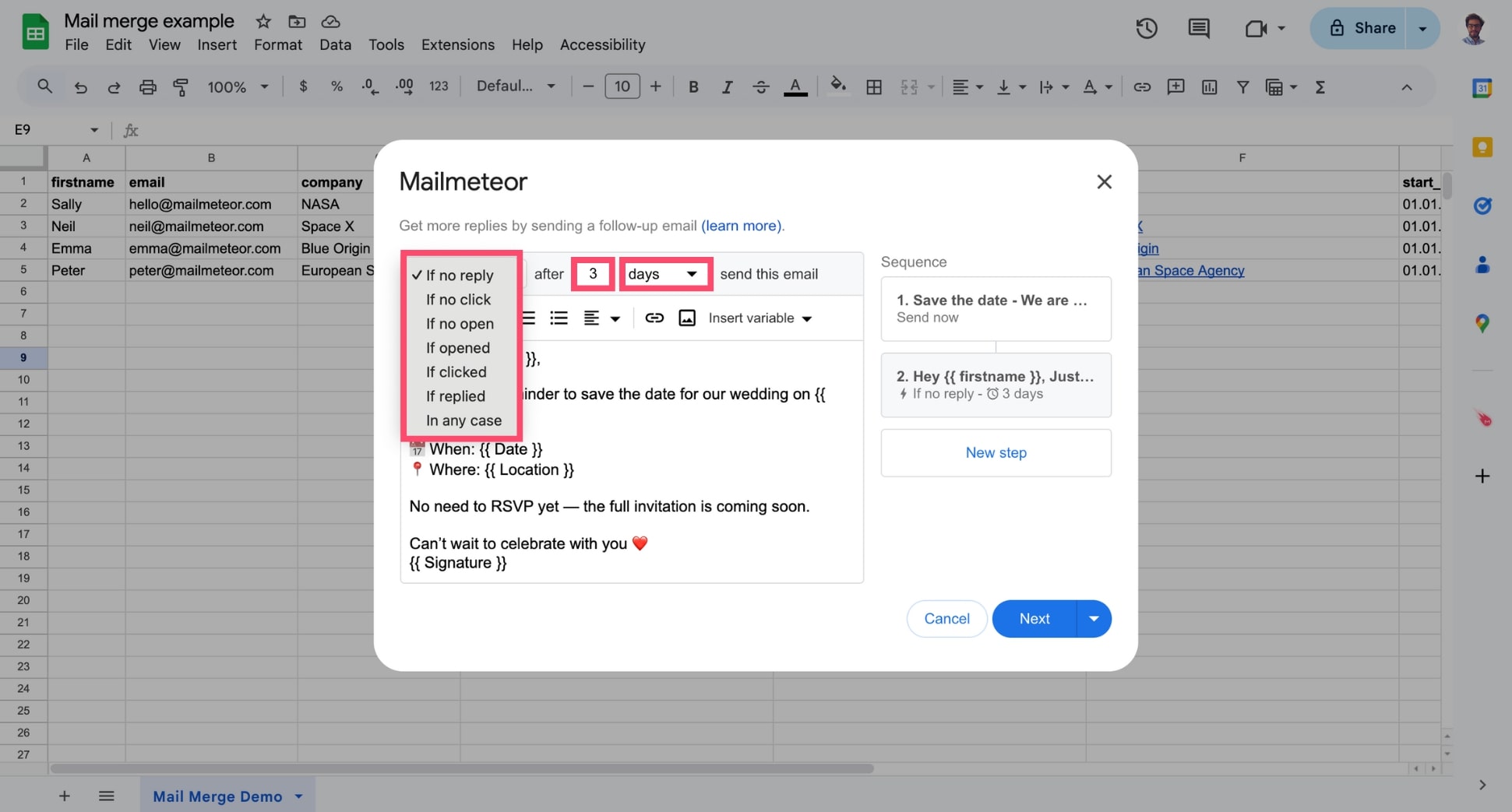
- Click Next, then Send with follow-ups.
And voilà. Mailmeteor will automatically send your reminder based on the trigger you selected. For example: only to guests who haven’t opened the email, haven’t clicked, or haven’t replied. Zero manual chasing, maximum turnout.
4. Track Opens and Clicks to Forecast Attendance
Once your save the dates are sent, the next question is simple: Who’s actually seeing them? Tracking opens and clicks gives you an early signal of attendance and helps you identify who may need a reminder.
With Mailmeteor’s built-in email tracking, you can monitor engagement directly from Gmail or Google Sheets — no extra dashboard or tool required. Simply make sure the Email tracking feature is enabled.
FAQs
Is it okay to send save the date by email?
Yes. Save the date emails are widely accepted for both business and personal events. They’re fast, convenient, and easy for recipients to add to their calendars. Even for formal occasions like weddings or graduation ceremonies, email is perfectly fine — as long as you follow up with a proper invitation later.
What should a save the date email say?
Keep it simple. A save the date email should include only the essentials. The goal is just to help guests block the day — not to provide the full agenda.
Make sure to mention:
- The date
- The event name or purpose
- The location (city or venue, if known)
- A short line letting recipients know that full details will follow
How far in advance should you send a save the date email?
It depends on the type of event:
- Business events: 2–3 months in advance
- Webinars: 2–4 weeks in advance
- Product launches: 4–8 weeks in advance
- Weddings: 6–12 months in advance (especially for destination weddings)
- Personal parties: 4–8 weeks in advance
When in doubt, send earlier. The whole point is to avoid scheduling conflicts.
How to ask guests to RSVP on a save the date?
You generally shouldn’t ask for an RSVP in a save the date — that comes later with the official invitation. If you must gauge interest early (e.g., limited seating, travel logistics), keep it optional and low-pressure: “If you already know you can make it, feel free to let us know — otherwise, no worries. Formal invitation to follow.” This keeps the save the date lightweight while still giving you useful signals.
What’s the difference between a save the date email and an invitation email?
A save the date is an early heads-up that tells people when the event will happen so they can mark their calendars. An invitation includes additional details, like agenda, logistics, dress code, RSVP link, and directions. Think of the save the date as “block this day,” and the invitation as “here’s everything you need to join us.”
Should you send a reminder after a save the date?
Yes — a reminder can significantly increase attendance, especially for business events and webinars.
Here’s what an effective sequence looks like:
- Save the date → early heads-up
- Formal invitation → full details
- Reminder → 1 week before the event
For weddings or personal events, one reminder (the formal invitation) is usually enough.


