Your welcome email is likely the single most powerful message you’ll ever send. With open rates nearly four times higher than regular newsletters, it’s your one shot to set expectations, build trust fast, and turn a brand-new subscriber into someone who’s genuinely excited to hear from you.
But what does a great welcome email actually look like? Instead of giving you generic templates, this guide breaks down real welcome email examples from brands, SaaS products, and newsletters. You’ll see the exact structures, tone, and tactics they use — and learn how to apply the same ideas in your own emails.
By the end, you’ll know how to write a welcome email that feels personal, performs well, and leaves a memorable first impression — and how to automate a simple welcome sequence that works on its own.
Here’s what we’ll cover:
- What is a Welcome Email?
- Why Welcome Emails Matter
- X Welcome Email Examples That Boost Engagement From Day One
- How to Write a Welcome Email People Actually Want to Read
- How to Create an Automated Welcome Email Sequence
Sounds good? Then let’s dive in.
What is a Welcome Email?
A welcome email is the first message you send to someone right after they sign up, subscribe, or become a customer. Its goal is to greet them, set expectations, and start the relationship on the right foot.
It’s usually sent automatically and often includes:
- a warm thank-you
- a quick intro to who you are
- what they can expect next
- a simple call-to-action (like reading a guide, replying, or completing their profile)
Why Welcome Emails Matter
Welcome emails aren’t just a polite hello — they’re one of the most powerful messages you can send. They consistently outperform every other type of email and set the foundation for long-term engagement.
Here’s why they matter:
- They get opened more than any other email: Welcome emails average around 50% open rates, which is 4× higher than typical marketing emails.
- They drive significantly more clicks: With an average 14.4% CTR, welcome emails dramatically outperform standard promotional emails, which often struggle to reach 2–3%.
- They reach subscribers when engagement is highest: The first 48 hours after signup are when new contacts are most attentive. A welcome email lets you capitalize on that natural window of interest.
- They boost long-term engagement: Subscribers who receive a welcome email show 33% higher engagement with future emails and brand interactions.
- They match user expectations: 74% of people expect a welcome email immediately after joining a list — meeting that expectation builds trust from day one.
- They help keep your list clean: A welcome email confirms who genuinely wants to hear from you. Non-engaged contacts can be filtered out early, keeping your list healthier and more responsive.
- They guide new contacts toward the next step: Whether you want someone to reply, read a guide, watch a video, or complete their profile, the welcome email is the ideal moment to nudge them forward.
7 Welcome Email Examples That Boost Engagement From Day One
Welcome emails don’t need to be complicated to work — they just need the right structure. Below, you’ll find 7 real welcome email examples from well-known brands. Each one includes a quick breakdown of what works and how you can apply the same ideas to create high-converting onboarding emails.
1. Lush
 (Source: ReallyGoodEmails)
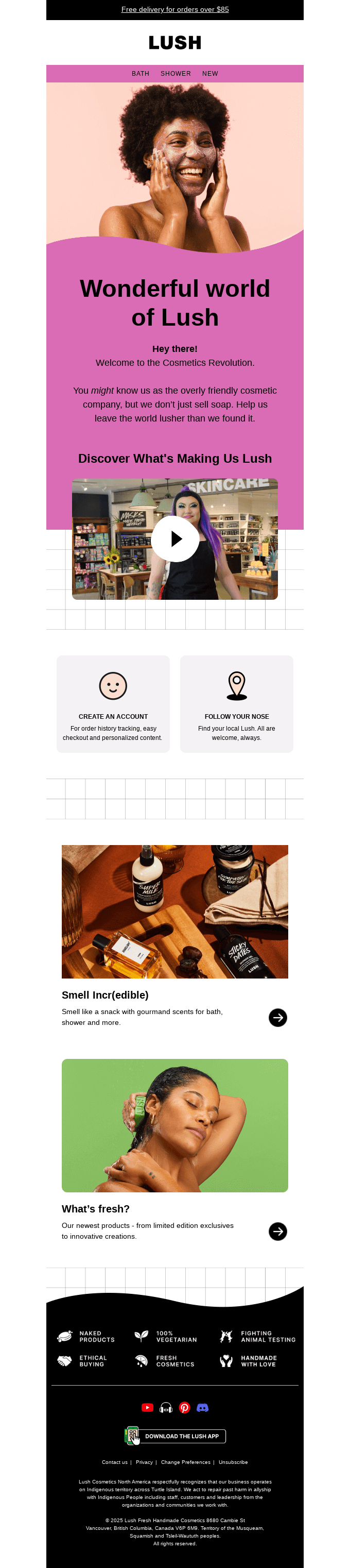
Lush’s welcome email is a great example of how strong branding and clear next steps can create an instant connection with new subscribers.
What this email does well
- Leads with bold visuals: The bright colors and playful hero image immediately communicate Lush’s personality — fun, friendly, and sensory-driven.
- Shows a clear brand voice: Welcome to the Cosmetics Revolution feels on-brand. The copy is short, warm, and consistent with their store experience.
- Gives simple next steps: CTAs like Create an Account and Find Your Local Lush make it easy for new subscribers to take action without feeling pushed.
- Introduces products naturally: Sections like Smell Incr(edible) and What’s fresh? highlight new items with strong visuals and minimal text.
- Reinforces brand values: The footer showcases what Lush stands for: handmade cosmetics, ethical buying, no animal testing. This builds trust right away.
Takeaway for your own welcome email
Use your first message to show personality, offer 1–2 simple next steps, and highlight what makes your brand unique — without overwhelming the reader.
2. Apple
 (Source: ReallyGoodEmails)
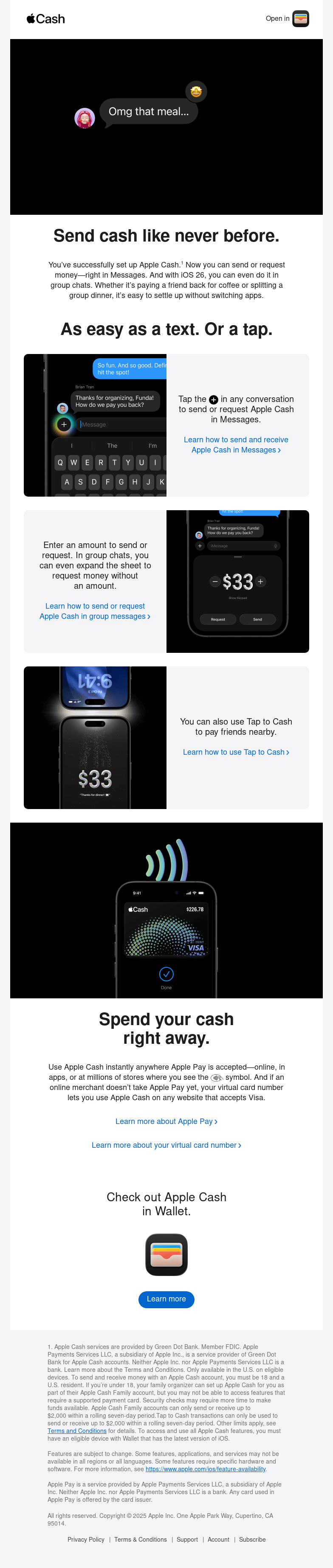
Apple’s welcome email for Apple Cash is clean, simple, and focused on getting the user to take action. It explains the product in seconds, uses strong visuals, and gives readers clear instructions on what to do next.
What this email does well
- Shows the product in action instantly: The opening iMessage-style animation immediately demonstrates the main use case. No long explanations needed.
- Explains key features visually: Instead of paragraphs of text, Apple uses product screenshots to show how to send or request money. This reduces friction for new users.
- Highlights ease of use: Phrases like As easy as a text. Or a tap. reinforce how simple Apple Cash is — lowering the psychological barrier to trying it.
- Gives clear next steps: The email links directly to Learn how to send and receive Apple Cash, Tap to Cash, and Learn more about Apple Pay, guiding the reader through a logical onboarding path.
- Strong brand consistency: Clean layout, minimal text, white space, and crisp product images — unmistakably Apple. This builds authority, loyalty and brand recognition.
Takeaway for your own welcome email
Show your product in action as early as possible. Use visuals, keep instructions simple, and guide new users through one or two high-value onboarding steps — not a full tutorial.
3. Polaroid
 (Source: ReallyGoodEmails)
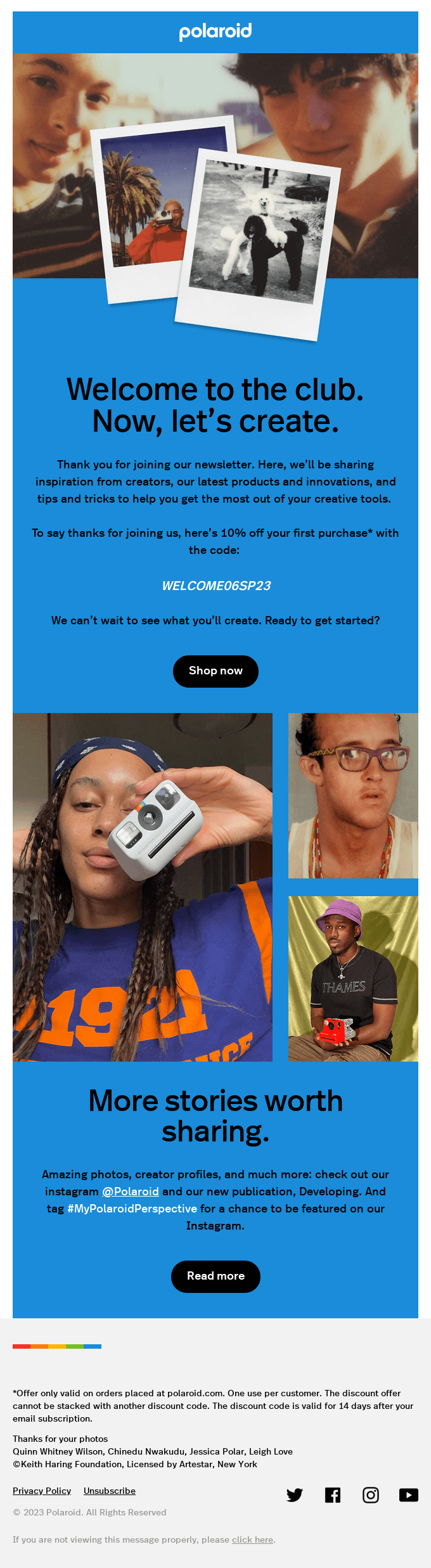
Polaroid’s welcome email is a great example of how to blend brand nostalgia, creator culture, and a clear incentive to get new subscribers excited right away.
What this email does well
- Leads with strong visual identity: The instant-camera photos and bold blue background immediately signal the Polaroid brand.
- Sets expectations clearly: The copy promises creative inspiration, product updates, and tips for getting more out of Polaroid gear.
- Offers an incentive: A 10% discount code gives new subscribers a reason to browse and buy right away.
- Spotlights the community: User photos and creator imagery reinforce that Polaroid is a community as much as a product.
- Encourages engagement:Invitations to follow @Polaroid or tag #MyPolaroidPerspective help grow their ecosystem across channels.
Takeaway for your own welcome email
If your brand has a strong identity or active community, bring it forward. Combine a clear incentive with visual storytelling, and make it easy for new subscribers to take their next step — whether that’s shopping, following, or creating.
4. Claude
 (Source: ReallyGoodEmails)
Claude’s welcome email focuses on clarity and ease of use, helping new users understand what the AI can do for them from the very first screen.
What this email does well
- Shows the product in action: The hero image demonstrates a real use case, making Claude’s value instantly clear.
- Positions Claude as a partner: Phrases like your intelligent collaborator and imagine having a thought partner build emotional connection and trust.
- Highlights concrete use cases: Writing emails, planning meals, tailoring a résumé — the examples are simple, relatable, and help new users imagine using Claude in their daily workflow.
- Creates a low-friction first step: The recurring CTA, Start your first chat, keeps the focus on getting users to try Claude right away.
- Previews what’s coming next: Mentioning upcoming tips prepares users for further onboarding emails and keeps them engaged in the long run.
Takeaway for your own welcome email
Show a real use case right away, describe your product in human terms, and offer simple, relatable examples. Keep the next step obvious and easy — one clear CTA is often enough.
5. Untamed
 (Source: ReallyGoodEmails)
Untamed’s welcome email leans heavily on storytelling and founder authenticity to build trust with new subscribers from the very first scroll.
What this email does well
- Opens with a personal founder story: Ben’s message explains why Untamed exists, making the brand feel human and mission-driven instead of salesy.
- Uses emotion and credibility: The story about his cat’s health journey positions the product as a solution born from real experience — not marketing.
- Makes the offer impossible to miss: The £8 trial box is highlighted multiple times with clear visuals and a direct CTA, making it easy for subscribers to act.
- Strong product visuals: Close-ups of the food and the packaging create trust and help buyers imagine what they’ll receive.
- Clear value proposition: Icons showing benefits (no commitment, best value, free shipping, 5-star reviews) quickly answer common objections.
Takeaway for your own welcome email
If your brand has a founder story or emotional origin, lead with it. Personal narratives build credibility fast. Pair that with one strong, low-friction offer and clear benefits to turn new subscribers into first-time customers.
6. Miro
 (Source: ReallyGoodEmails)
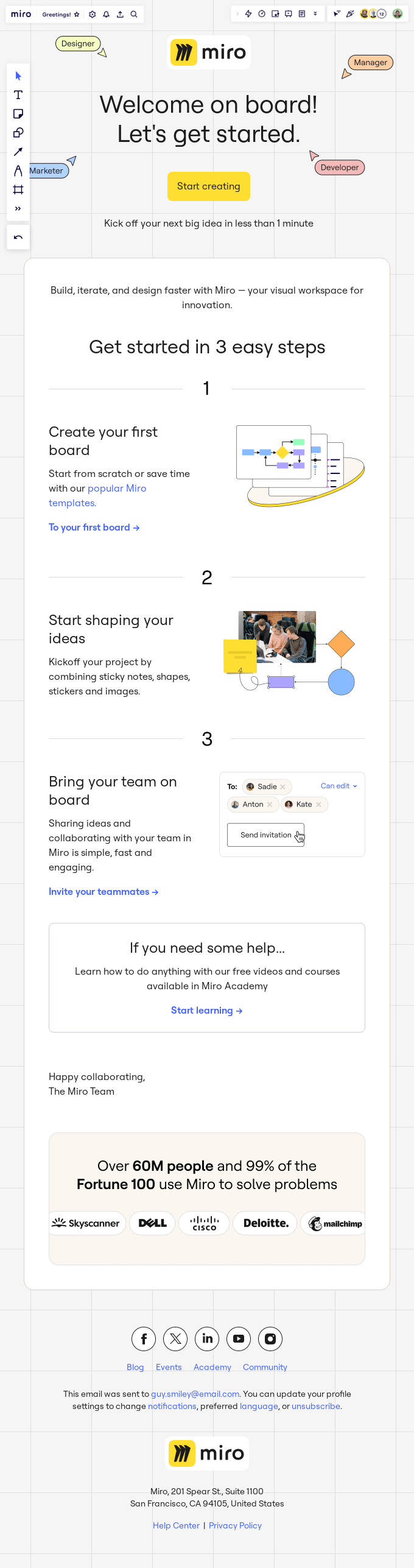
Miro’s welcome email focuses on fast activation. Every section is designed to get new users building their first board as quickly as possible.
What this email does well
- Action-focused opening: Welcome on board! Let’s get started. paired with a bright Start creating button guides users toward their first interaction.
- Simple 3-step onboarding: Breaking setup into three small steps (create a board, shape your ideas, invite your team) reduces friction and makes the process feel easy.
- Strong visual guidance: Screenshots and illustrations show exactly what users should do inside Miro, making the instructions intuitive even without reading every word.
- Social proof that builds trust: Mentioning Over 60M people and 99% of the Fortune 100 creates instant credibility, especially for business users.
- Helpful learning resources: The link to Miro Academy gives new users a clear path if they need deeper tutorials or guided help.
Takeaway for your own welcome email
If your product requires onboarding, simplify the first steps as much as possible. Use visuals, break tasks into small actions, and add social proof to reassure new users they’re in good company.
7. Copyblogger
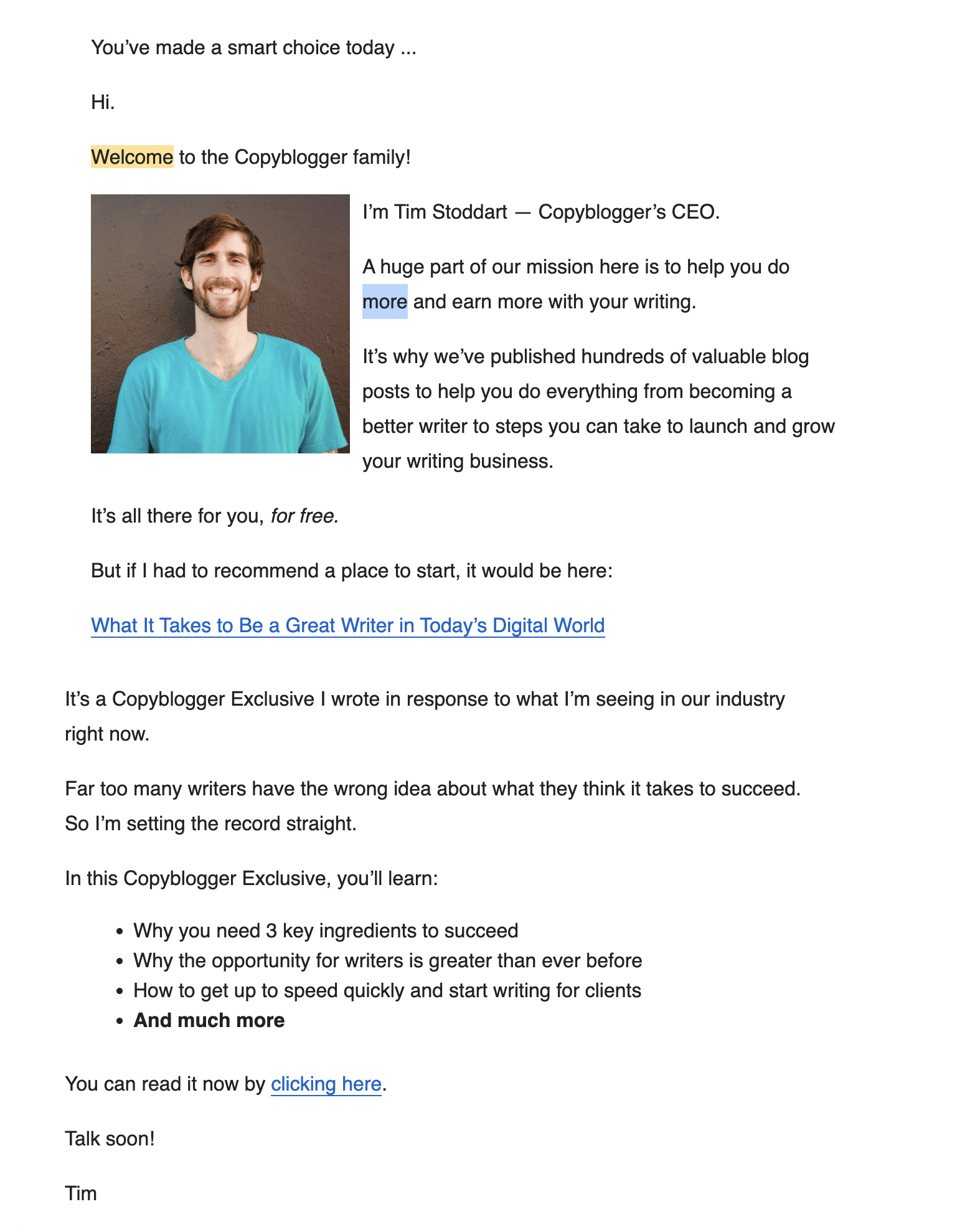
Copyblogger’s welcome email takes a personal, text-first approach that builds trust quickly and sets clear expectations for new readers.
What this email does well
- Opens with a warm, conversational tone: The simple Hi. and Welcome to the Copyblogger family! make the message feel human and approachable.
- Uses founder-led storytelling: Introducing Tim Stoddart with a photo and personal message creates immediate credibility and connection.
- Explains the mission clearly: The email highlights Copyblogger’s goal — helping readers become better, more successful writers — in just a few lines.
- Offers a clear starting point: Linking to one recommended article reduces overwhelm and guides new subscribers to their first win.
- Provides value before asking for anything: The promise of free resources and a Copyblogger Exclusive makes the reader feel like they’re getting something worthwhile right away.
- Teases what’s coming next: Bullet points preview future lessons and insights, setting expectations for the rest of the welcome sequence.
Takeaway for your own welcome email
A text-based welcome email can be just as powerful as a designed one. Lead with a personal introduction, explain your mission in simple terms, and direct new readers to one clear, high-value resource to keep them engaged.
How to Write a Welcome Email People Actually Want to Read
Most welcome emails are opened… but quickly forgotten. If you want yours to stand out — and actually lead to replies, clicks, or conversions — you need a simple structure that respects your reader’s time.
Start with a warm, personal greeting
Open your email the way you’d start a real conversation. Keep it simple, friendly, and human. A short line like Hey [Name], glad you’re here instantly signals that your emails won’t feel robotic or corporate. Avoid long intros — one genuine sentence is enough to make people feel welcomed and more likely to keep reading.
Set expectations clearly
Right after your greeting, tell subscribers what they’ll receive and how often. This removes uncertainty and builds trust. A single sentence like I’ll send you one short tip every Tuesday helps readers understand the value of staying on your list and reduces the chances of early unsubscribes.
Explain your value in one or two lines
Subscribers want to know what they’ll gain from being on your list. Spell it out quickly: what problems you help solve, what benefits they’ll get, or what outcomes they can expect. One clear sentence — I’ll help you write better emails in less time — is enough to reassure readers that joining was worth it.
Give a quick win
Offer something useful right away — a tip, guide, template, or resource your new subscriber can use immediately. This builds momentum and shows you deliver value from the very first email. Keep it simple. One clear link or one practical tip is often more effective than a long list of options.
Add credibility or social proof
A single line of credibility can make your reader trust you faster. Mention a key metric, a short credential, or a notable result — just enough to show you’re worth listening to. Keep it brief and natural, like Trusted by 40,000+ marketers or I’ve spent 10 years helping people improve their email strategy.
Offer one simple next step
Your welcome email should point to a single, clear action — not a menu. Whether it’s reading a guide, replying to a question, or starting a setup flow, choose the one step that delivers the most value early on. One focused CTA keeps readers from feeling overwhelmed and increases the likelihood they’ll actually take action.
Keep it scannable and short
Most people skim welcome emails, so make yours easy to digest. Use short paragraphs, clear spacing, and simple language. Aim for a message someone can grasp in ten seconds — the essential value, what to expect next, and one action to take. The cleaner the structure, the higher your engagement.
How to Create an Automated Welcome Email Sequence
Once your welcome email is in place, the next step is to turn it into a simple automated sequence. This helps you keep the momentum going and onboard new subscribers without doing anything manually.
Start with the goal of your welcome sequence
Decide what the sequence should achieve. Do you want new subscribers to explore your product, read a key resource, make a first purchase, or simply get to know you better? Your goal will shape the tone, length, and content of your entire sequence. Pick one primary outcome and build everything else around it.
Decide how many emails to include
Most welcome sequences work best with 2 to 5 emails. That’s enough to introduce yourself, deliver value, and guide subscribers toward a next step without overwhelming them. Shorter sequences fit newsletters or creators. Longer ones work well for SaaS onboarding or ecommerce.
Map out your sequence content
Give each email in your sequence a clear purpose. Start with a warm welcome, then follow up with something useful, and gradually guide subscribers toward a meaningful action. A simple structure works well:
- Email 1: Welcome + expectations
- Email 2: A quick win (your best guide, tip, or resource)
- Email 3: Your story or social proof
- Email 4: Deeper value or product benefits
This progression helps new subscribers understand who you are, why you’re worth listening to, and what they should do next. New customers are encouraged to take action — without feeling pressured.
Automate your welcome email sequence with Mailmeteor
Once your sequence is ready, Mailmeteor makes it easy to send everything automatically from Google Sheets. You can trigger emails when someone submits a form, when a row is updated in your spreadsheet, or on a schedule you choose. For multi-step onboarding, Mailmeteor also supports follow-ups and drip sequences.
FAQs
What should a welcome email say?
A welcome email should thank the recipient for joining, briefly introduce who you are, and explain what they can expect next. Keep it friendly and clear. You can also offer a quick resource, link, or tip to help them get started. The goal is to make a great first impression and guide them toward a simple next step.
When should you send a welcome email?
You should send a welcome email immediately after someone signs up, subscribes, or becomes a customer. The first few minutes are when engagement is highest, so automating your welcome email ensures it reaches people at the perfect moment. Sending it within the first hour dramatically increases opens and replies.
How long should a welcome email be?
A welcome email should be short—usually between 3 and 6 short paragraphs. Focus on the essentials: a warm greeting, a quick intro, what the person can expect, and a simple call to action. Long onboarding sequences belong in later emails. The welcome email exists to reassure, orient, and encourage a first step.
Should a welcome email be formal or friendly?
Most welcome emails perform better when they sound friendly and conversational. However, the tone should match your brand and your audience. A law firm might choose a more formal voice, while a newsletter or SaaS product can keep it warm and personal. Whatever tone you choose, clarity and sincerity matter most.
What is a good welcome email subject line?
A good welcome email subject line is clear, warm, and easy to recognize. Examples include “Welcome aboard!”, “Glad to have you here”, or “You’re in!”. Shorter subject lines tend to boost open rates. Adding a personal element — like a first name — can also help, as long as it still feels natural.
How many emails should a welcome series include?
Most welcome series include between 2 and 5 emails. The first message greets the subscriber, while the following emails can offer resources, explain benefits, or highlight key features. The ideal length depends on your goals, but every message should deliver value and avoid overwhelming the new contact.


