Spam Checker
The Spam Checker is a free tool that helps you analyze your email content for words and phrases that might trigger spam filters. It highlights terms that are often seen as spammy so you can adjust your message before sending it.
This tool is useful for anyone who writes emails for outreach, sales, recruiting, or marketing and wants to increase the chance their message lands in the inbox rather than a spam folder.
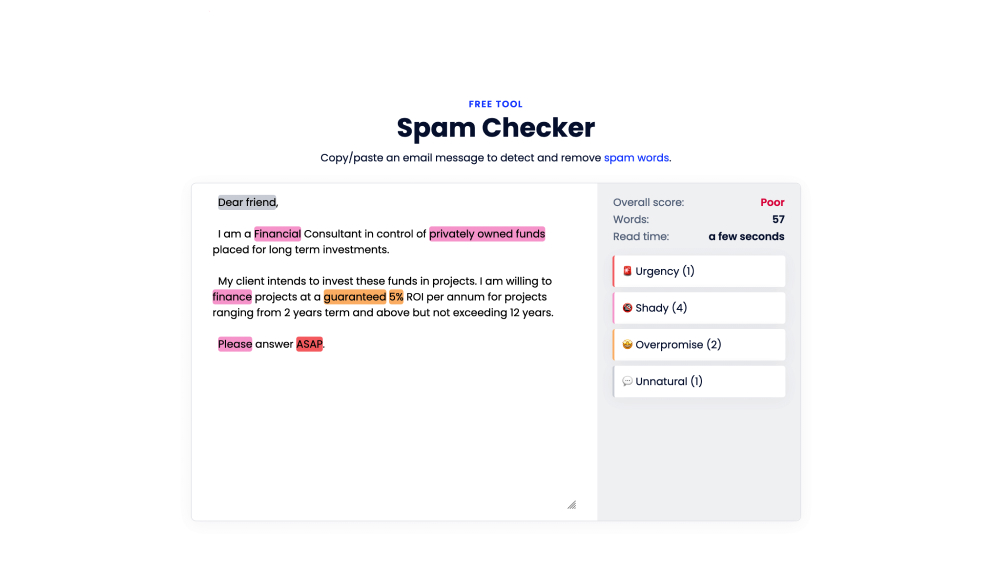
What is the Spam Checker?
Spam Checker scans the text of your email and identifies words or phrases that are commonly associated with spam filters. It uses a curated list of spam trigger words — such as overpromising language, urgency signals, or unnatural expressions — and highlights them so you can revise your content.
By avoiding or rephrasing these flagged terms, you can make your email sound more natural and less likely to be caught by spam filters.
How the Spam Checker works
To use the Spam Checker, you paste your email content into the tool. It analyzes the text for possible spam trigger words and gives you feedback to help make your email more deliverable.
-
Open the Spam Checker tool in your browser.
-
Paste your email content into the input field. This can include your subject line and body text.
-
Click “Check for spam”. The tool scans your email for words and phrases that could be seen as spammy by email providers.
You’ll see a list of potential issues in your content, so you can edit your email to improve its chances of reaching the inbox.
When should you use the Spam Checker?
Use the Spam Checker if you:
- Want to reduce the risk of emails being marked as spam
- Are preparing an outreach or promotional message
- Want help spotting unnatural, overpromising, or shady language
- Want quick feedback on your email before sending
Is the Spam Checker free?
Yes. The Spam Checker is free to use and doesn’t require a Mailmeteor account. No account or credit card is required. To ensure fair use, the tool may use CAPTCHA protection.
Tips for best results
- Paste both your subject line and body text for a more complete analysis
- Focus on replacing flagged terms with more natural language
- Keep sentences clear and concise, avoiding too many salesy phrases
- Try different versions of your message and compare results
Frequently asked questions
Do I need a Mailmeteor account to use this tool?
No. You can use the Spam Checker without signing up.
What kinds of issues does the Spam Checker detect?
The tool highlights words or phrases that may appear spammy or trigger filters, such as urgency, exaggerated claims, or unnatural language.
Does the Spam Checker guarantee deliverability?
No. It helps identify potential spam flags in your content, but deliverability also depends on other factors such as sender reputation, authentication (SPF, DKIM), and sending behavior.
What should I do if many spam words are flagged?
Consider revising the flagged terms to more natural or neutral alternatives. Rethinking sentence structure and tone can help make your email read less like spam.