Email Reputation Checker
Your email reputation score tells you how likely your emails are to reach the inbox instead of getting caught by a spam filter. This page walks through what the score looks at, how to read it, and what to do if yours is lower than you’d like.
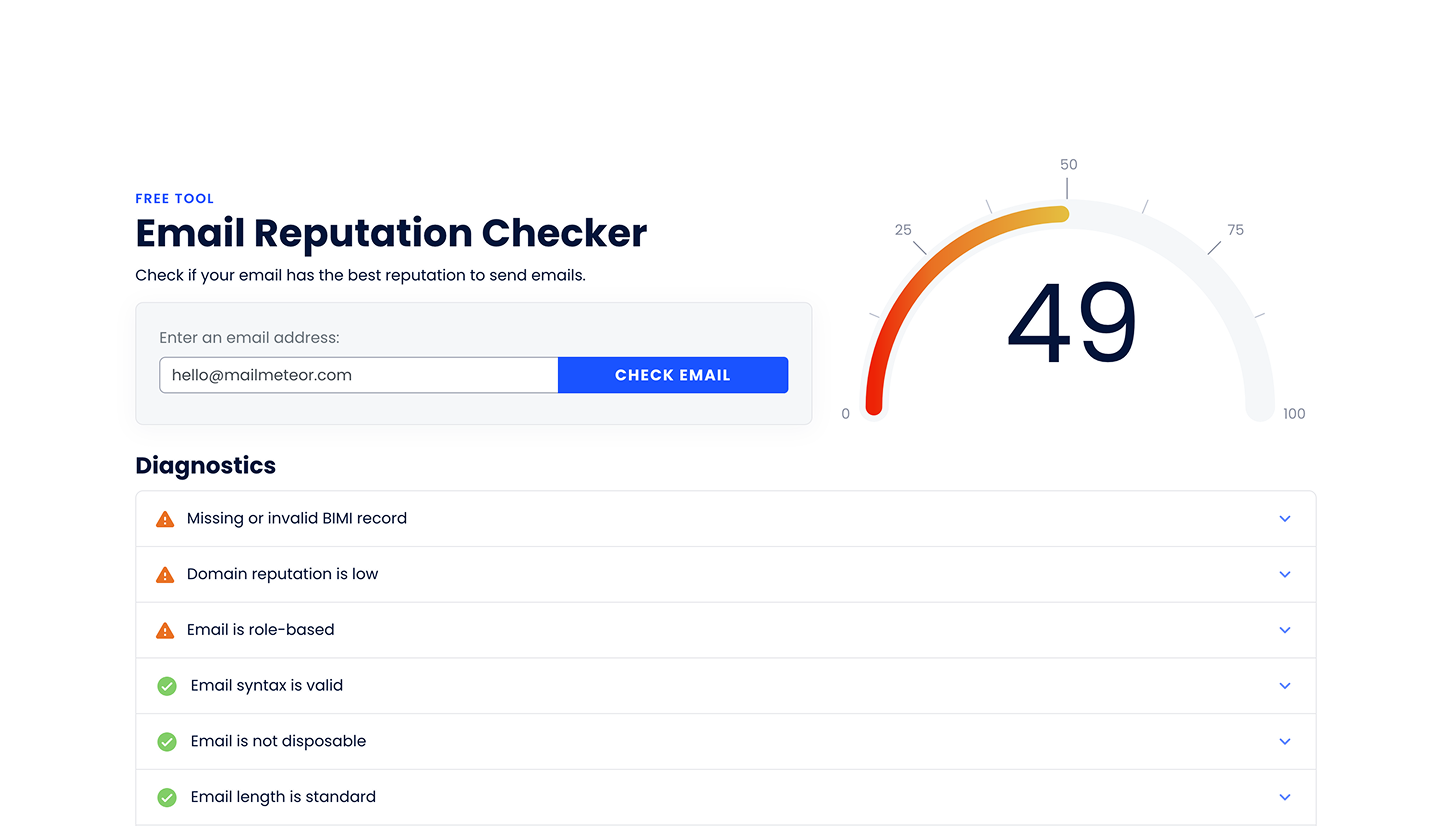
What is the Email Reputation Checker?
The Email Reputation Checker looks at an email address and gives it a score from 0 to 100. The higher the score, the more trustworthy that address and its domain look to the services that receive your emails, like Gmail, Outlook, and Yahoo. It’s the same score that powers the Deliverability Hub in your Dashboard and the below-50 threshold we use to recommend email warm-up — one algorithm, wherever you see the number.
Understanding your score
The scale is logarithmic, not linear. The gap between 90 and 91 is much bigger than the gap between 40 and 41 — each additional point gets harder to earn than the last. A score of 100 is a limit you approach, not one you’re expected to reach.
| Score | What it means |
|---|---|
| 75–100 | Excellent. Your setup is in good shape. |
| 50–75 | Good, but there’s room to improve. Worth reviewing the suggestions below. |
| Below 50 | Weak. This is likely hurting your delivery, and should be addressed before you send a campaign. |
Two things follow from the logarithmic scale:
- Reaching 50 is a real milestone, not “halfway there.” It means your fundamentals are in place. There’s still work ahead, but you’re out of the range where deliverability actively suffers.
- Don’t expect a straight line to 100. Each point costs more the closer you get, while its effect on real deliverability keeps shrinking. Once you’re solidly above 75, your time is usually better spent on your contact list and your content than on the last few points.
If you’re below 50, consider running an email warm-up before you launch a campaign.
What we check
We look at three things:
Your email setup. We confirm that your domain exists, is properly configured to send and receive mail, and that nothing in its basic configuration would get your messages rejected outright. This is the foundation — if it’s broken, little else matters.
Quality and risk signals. We look for the patterns spam filters react to and flag anything about your address or domain that looks risky. This part evaluates the sending address and domain, not the content of any message you write — if you want your subject lines and copy checked too, use our Spam Checker.
Security and authentication. We check whether your domain uses SPF, DKIM and DMARC, the three standard ways of proving that an email really came from you. You don’t need to understand how each one works. What matters is that mailbox providers increasingly expect all three, and addresses without them get filtered, or rejected, far more often. If anything is missing or misconfigured, your report tells you exactly which one.
We also check your domain against known blocklists. Landing on one is serious enough that we flag it directly, rather than just lowering your score.
How to read your report
Results are colour-coded, so you can see at a glance what’s fine and what isn’t. Start with anything marked red — that’s what’s costing you the most.
Your score belongs to your domain, not to a single mailbox. A problem on the domain affects everyone sending from it, and fixing it helps every address on your team at once.
Improving a low score
Work through these roughly in order — the first few usually move the number the most.
- Fix any authentication issue flagged in your report. SPF, DKIM and DMARC problems are the most common cause of a low score, and usually the fastest to fix. If you don’t manage your own DNS, forward the report to whoever does.
- Clean your contact list. Invalid addresses bounce, and bounces hurt your reputation fast. Run your list through the Email Checker before you send.
- Send steadily rather than in bursts. A sudden spike in volume looks suspicious, especially from a new address. Ramp up gradually instead.
- Watch your content, too. It won’t move this particular score, since we only check the address and domain here, but misleading subject lines and heavily promotional wording still get you flagged by real spam filters. Our Spam Checker catches most of it before you hit send.
- Send to people who want to hear from you. This won’t move your score either, since engagement isn’t something we measure — but it’s what mailbox providers watch most closely. Low engagement quietly hurts your real-world delivery even when your score looks fine.
If you’re starting from a low score, expect your first few fixes to move the number a lot. That’s the logarithmic scale at work: early problems are the cheapest to fix, and the most expensive to leave in place.
Frequently asked questions
Do I need a Mailmeteor account to use this tool?
No. The Email Reputation Checker is free and doesn’t require an account or a credit card.
Why did my score change?
If nothing on your side has changed, checking the same address again returns the same score. When it does move, it’s likely for one of these reasons:
- Your configuration changed, or broke
- Your domain got added to a blocklist
- Other factors have influenced the score
Deliverability isn’t static, and neither is our algorithm. Mailbox providers change what they expect from senders, authentication standards evolve, and new abuse patterns show up. We update our scoring to keep up, so your score can shift even when you haven’t touched your setup.
Is this the same score as the one in my Dashboard?
Yes. The Deliverability Hub and email warm-up both rely on the same scoring algorithm as this free tool. Wherever you see your score, it means the same thing.
Does a high score guarantee my emails will reach the inbox?
No. It means your technical setup won’t work against you, which is necessary but not sufficient. Your contact list, your content, and how recipients engage with your emails all matter just as much.
What should I do if my domain is on a blocklist?
Identify why you were flagged, usually spam complaints or sending to a bad list, then follow that blocklist’s delisting process. Most have a self-service removal form.
How often should I check?
Check before you launch a significant campaign, after any change to your domain or DNS settings, and periodically if you send regularly. Your reputation isn’t fixed — it moves with how you send.
Next steps
- How is your email reputation computed? for the full breakdown behind this score
- Check your Deliverability Hub for a per-sender view inside your Dashboard
- Clean your contact list before your next campaign
- Set up email warm-up if your score is below 50
- The Ultimate Guide to Email Reputation